

Comparisons Best time tracking apps for Mac: 12 compared
Nov 13, 2026 · 10 min read



Best time tracking apps for Mac: 12 compared
The best time tracking apps for Mac in November 2026: Timing, Rize, Toggl, RescueTime, Timemator and more compared on privacy, tracking style and fit.
What is the best automatic time tracker for Mac in 2026?
The best automatic time tracker for a Mac is Timing if you want a native Mac-only app that keeps data on your Mac, and TimeUno, an automatic time tracker for Mac and Windows, if you also want AI coding agent hours recorded. Timemator suits a one-time purchase, and Toggl Track or Clockify suit a plain start-stop timer.
We make TimeUno, so this guide also says where it is the wrong pick.
Last reviewed: November 2026. We read each vendor's pricing and help pages on 10 November 2026 and link them in the sources.
How do you choose a Mac time tracker in four questions?
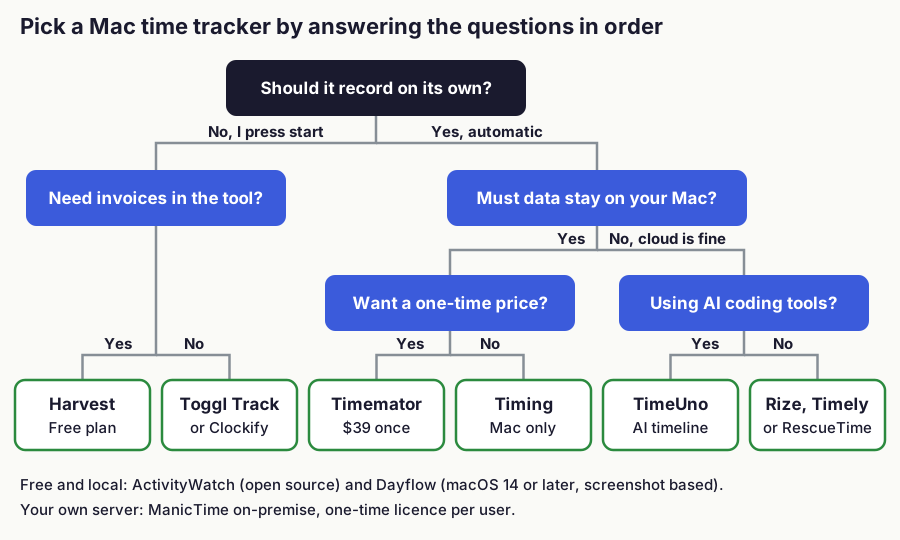
Four questions narrow twelve apps to two or three. Most people can decide after the first two.
- Automatic or manual? A manual timer is cheap and accurate if you remember to press start. An automatic tracker records the app and window you use, and you sort the day afterwards.
- Where should your data live? Timing, Timemator, Dayflow and ActivityWatch can keep everything on your Mac. Cloud apps sync to a vendor server, which helps if you want to see your day on a second computer.
- Subscription or one-time? Timemator is sold as a one-time purchase and ManicTime sells a one-time on-premise licence. Most others bill monthly or yearly.
- Do you invoice from the same tool? Harvest includes invoicing, and Rize adds it on Pro. TimeUno exports CSV and PDF, and you invoice elsewhere.
A fifth question is newer: do you work with AI coding tools? Time spent waiting on an agent in Claude Code or Cursor looks like email or idle time to a classic tracker. The worked example near the end shows the difference.
!Flowchart: choose manual or automatic first, then invoicing, data location, price model and AI coding tools to reach a shortlist of Mac time trackers
Figure 1: Decision order for a Mac time tracker. Based on vendor pricing and help pages read on 10 November 2026.
How do the best Mac time trackers compare in one table?
Twelve apps fit in one table: how each tracks, where its pricing lives, where the data lives and who it suits. Prices are on each vendor's page, so check them before you buy.
| App | Tracking | Pricing | Data | Best for |
|---|---|---|---|---|
| Timing | Automatic, Mac only | See Timing's pricing page | Your Mac, optional sync | Mac freelancers who want rules and reports |
| Rize | Automatic | See Rize pricing | Cloud | Focus insights and AI categorization |
| Timely | Automatic (Memory) | See Timely pricing | Cloud | Small teams planning hours |
| Toggl Track | Manual timer | Free up to 3 users; Starter $9/user/mo yearly | Cloud | Teams that want a simple timer |
| Clockify | Manual timer | See Clockify pricing | Cloud | Tight budgets, many users |
| RescueTime | Automatic | See RescueTime pricing | Cloud | Personal productivity scores |
| ManicTime | Automatic | See ManicTime pricing | Cloud or your own server | Control over where data lives |
| Harvest | Manual timer | See Harvest pricing | Cloud | Time plus invoices |
| Timemator | Automatic rules plus manual | See Timemator | Your Mac, iCloud sync | One-time price, iPhone companion |
| Dayflow | Automatic, screenshot based | See Dayflow pricing | Local, or your own AI key | Open source, Mac only |
| ActivityWatch | Automatic | Free and open source | Your device | Tinkerers who want local control |
| TimeUno | Automatic, two timelines | $9.99/mo ($8.33 yearly) | Cloud | Developers using AI tools |
Tracking style and data location split the field more than price does.
Which automatic time tracker fits a Mac best?
Timing fits a Mac-only freelancer best, Rize suits focus coaching, and TimeUno suits people who also run AI coding agents. Automatic trackers record the app and window in front, so you sort the day instead of starting timers.
Timing
Timing is a native Mac app, and its site says it is not a slow web or Electron app. Data stays on your Mac unless you turn on sync. Plans differ by the number of Macs and by features such as report rounding and ClickUp, Linear and Clio sync, so read the plan list on Timing's pricing page before you buy. See TimeUno vs Timing for the head-to-head.
Rize
Rize records apps and websites on macOS and Windows and adds AI categorization and focus insights. Higher plans add clients, projects, invoicing, client reports and MCP server access. See Rize pricing.
The mobile app is listed for Enterprise only. See TimeUno vs Rize.
Timely
Timely's Memory app for Mac needs macOS 14.0 or later, plus Accessibility access and System Events permission. It sits in the menu bar and records no screenshots and no mouse tracking. Firefox is not supported on Mac.
Check Timely's pricing page for plans and what each includes.
RescueTime
RescueTime records activity automatically with idle detection, focus sessions and goals, and Solo+ adds more features (pricing). It targets personal productivity more than client billing, so see RescueTime alternatives if you bill hours.
ManicTime
ManicTime Cloud includes the Mac client (pricing). The on-premise option is a one-time licence per user with a self-hosted server, as covered in ManicTime alternatives.
TimeUno
TimeUno is a desktop app for macOS and Windows. It records the app in front, the window title, idle time and a count of input seconds, never what you type. It takes no screenshots. It can read on-screen text, and the owner or an admin can switch that off. Data is stored on TimeUno's servers.
On a Mac it needs the Screen Recording permission. A second timeline records AI coding sessions. A headless Linux agent covers servers you reach over SSH. How automatic time tracking works explains what any such tracker can see.
Where TimeUno is the wrong pick: there is no free plan (a 14-day trial starts with a card), no mobile app, no Linux desktop app, no invoicing and no Jira or accounting integration. Export is CSV and PDF only. Chrome, Firefox and Edge extensions are live.
Which manual timers work well on a Mac?
Toggl Track, Clockify and Harvest all work on a Mac, and the choice comes down to budget and invoicing. A manual timer is only as complete as your habit of pressing start.
Toggl Track
Toggl Track has a macOS desktop app and a free plan for up to 3 users. Starter is $9 per user a month and Premium $16 on yearly billing.
Clockify
Clockify lists a free plan with tracking, mobile and desktop apps and idle detection. See Clockify's pricing page for the free plan limits, prices and which features each plan adds.
Harvest
Harvest has invoicing, expense tracking and Mac and iOS apps. Its plans have seat, project and usage terms, so read the Harvest pricing page.
Are there one-time purchases and local-only Mac apps?
Timemator is the Mac-native one-time purchase, and Dayflow and ActivityWatch are the free local options. All three trade cloud features for control of your data.
Timemator is a one-time purchase and needs macOS 10.15 or newer. It works offline and keeps data on the device. A separate iOS app covers iPhone, iPad and Apple Watch with iCloud sync, including auto-tracking rules.
Dayflow is open source under the MIT licence, needs macOS 14 or later and is Mac only, with a Windows waitlist. It takes screenshots at low frequency, uses AI to build a timeline and needs Screen & System Audio Recording permission. Local mode keeps screenshots on your device; a bring-your-own key sends selected ones to your AI provider, and its paid plan sends them to Dayflow servers.
ActivityWatch is open source and stores data locally on Windows, macOS, Linux and Android, with Chrome and Firefox extensions. Sync between devices is still in progress, according to the project site. More options are in open source time trackers.
Which Macs and permissions do these apps need?
Check the minimum macOS version before you buy, because it ranges from 10.15 to 14. Timemator needs 10.15, and Timely Memory and Dayflow need 14. Timing, Rize and TimeUno publish their own requirements, so check them for older Macs.
Permissions differ too. Timely asks for Accessibility and System Events, Dayflow for Screen & System Audio Recording, and TimeUno for Screen Recording during setup. Timely Memory does not support Firefox on Mac, while TimeUno has a Firefox extension, as well as Chrome and Edge extensions.
Which Mac time tracker should you pick?
- Native Mac app with data on your Mac and rules: Timing.
- One-time price with an iPhone companion: Timemator.
- Open source: ActivityWatch, or Dayflow on macOS 14 or later.
- A timer for many users on a budget: Clockify.
- Invoices from the same tool: Harvest, or Rize Pro.
- Personal productivity scores: RescueTime or Rize.
- A self-hosted server: ManicTime on-premise.
- Mac and Windows, with AI coding agents tracked: TimeUno.
How does one day look in two kinds of tracker?
Take an illustrative day: 6 hours at the keyboard, 4 in the editor and 2 reading email while a coding agent runs a refactor. A classic tracker logs the agent hours as email or idle. A tracker with an AI timeline logs the same 6 hours of attention and 2 hours of agent runs in parallel.
!Bar chart of an illustrative six hour day: a classic tracker shows editor and email, a two timeline tracker adds a separate agent run timeline
Figure 3: Illustrative example with made-up numbers, not measured data.
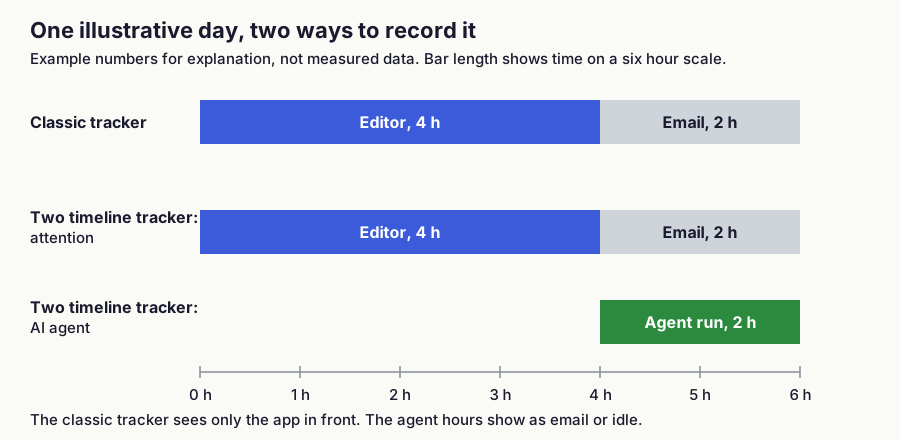
This matters only if agents do real work while you do something else. Without agents, a classic tracker records your day fine.
Where can you try a Mac time tracker?
Pick the app that matches your first two answers and run its trial. If you are on a Mac and work with AI coding tools, try TimeUno on your Mac. On Windows too, see time tracking apps for Windows.
FAQ
What is the best time tracking app for Mac?
It depends on how you work. Timing is the native automatic option for Mac only, Timemator is the one-time purchase, Clockify is the budget timer, and TimeUno suits people tracking AI coding tools on Mac and Windows.
Is there a free time tracker for Mac?
Yes. Toggl Track has a free plan for up to 3 users, and ActivityWatch is free and open source. Clockify, Harvest and Dayflow list free options on their pricing pages. TimeUno has no free plan, only a 14-day trial, and more are listed in free time tracking apps.
Can a Mac time tracker work without screenshots?
Yes. Timely Memory states it records no screenshots, and TimeUno takes none. Dayflow depends on screenshots by design, so choose another app if that is a concern.
What is the best time tracker for freelancers on Mac?
For a freelancer who bills by the hour, Timing is the native Mac pick, Harvest bundles invoicing, and TimeUno suits freelancers who want automatic tracking and invoice elsewhere. See time tracking software for freelancers for the full comparison.
Do these Mac time trackers also run on Windows?
Rize, Timely, ActivityWatch and TimeUno run on both. Timing, Timemator and Dayflow are Mac only, and Dayflow has a Windows waitlist.
Sources and checks
Prices and features read on 10 November 2026. Vendors change plans often, so confirm on the vendor page before you buy.
- Timing: pricing
- Rize: pricing
- Timely: pricing and Memory for Mac handbook
- Toggl Track: pricing and macOS desktop app
- Clockify: pricing
- RescueTime: pricing
- ManicTime: pricing
- Harvest: pricing
- Timemator: product page
- Dayflow: pricing and GitHub
- ActivityWatch: project site