

Comparisons Time Tracking Software for Freelancers: 6 Tools Compared
Nov 15, 2026 · 8 min read
Time Tracking Software for Freelancers: 6 Tools Compared
Time tracking software for freelancers compared by billing model: invoicing, automatic tracking and plan checks. Harvest, Toggl, Clockify, Paymo, TimeUno.
Time tracking software for freelancers: the quick answer
The best time tracking software for freelancers depends on what happens after the hours are logged. Harvest and Paymo track time and invoice in one place. Clockify and Toggl Track fit if you invoice elsewhere. TimeUno, an automatic time tracker for Mac and Windows with no built-in invoicing, suits you if you would rather not start timers.
TimeUno is an automatic time tracker for macOS and Windows, and this comparison comes from its team. Where another tool is the better pick, we say so. Facts are as of November 2026 and come from each vendor's own pages. For competitor prices, follow the pricing links.
Last reviewed: November 2026
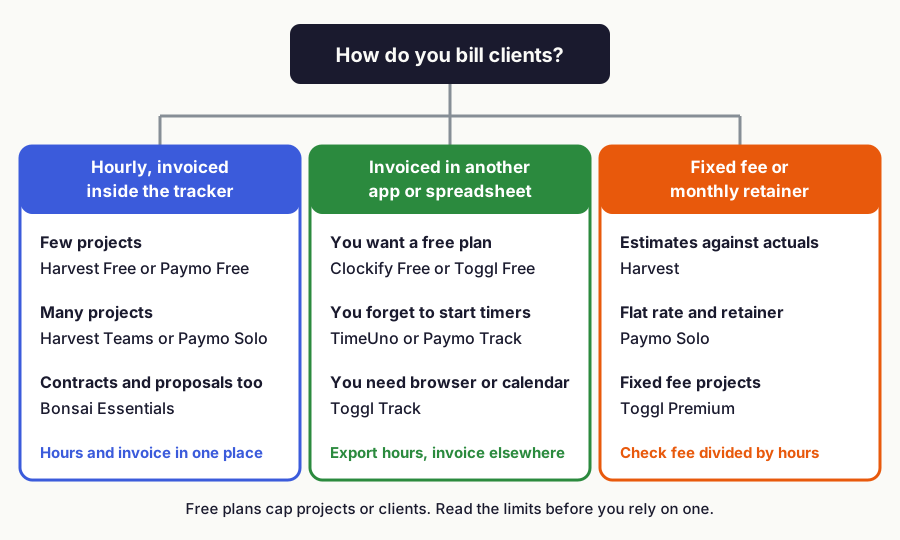
!Decision chart: pick freelancer time tracking software by how you bill, with Harvest, Paymo and Bonsai for invoiced hours, Clockify, Toggl and TimeUno for hours invoiced elsewhere, and Harvest, Paymo Solo and Toggl Premium for fixed fees
Figure 1: Start from how you bill, then check the plan limits on each vendor's pricing page, November 2026.
Time tracking software for freelancers at a glance
Six tools cover most freelance setups. The table shows what each one is best for and where it falls short.
| Tool | Best for | Platforms | Pricing | Main limit |
|---|---|---|---|---|
| Harvest | Tracking plus invoicing | Web, desktop, mobile | See Harvest pricing | Check project limits on your plan |
| Toggl Track | Manual and calendar-based tracking | Web, desktop, mobile, browser extensions | Free up to 3 users. Starter: $9 per user/mo billed yearly | Billable rates need a paid plan |
| Clockify | Timers with invoicing on higher plans | Web, desktop, mobile | See Clockify pricing | Invoicing is on higher plans |
| Paymo | Solo freelancers who invoice from the tracker | Web, desktop, mobile | See Paymo pricing | Check client and project limits on your plan |
| Bonsai | Contracts, proposals and invoices together | iOS, Android | See Bonsai pricing | Invoices need a higher plan |
| TimeUno | Automatic tracking | macOS, Windows | $9.99/mo, or $8.33/mo billed yearly. 14-day trial | No free tier, no invoicing, no mobile app |
Sources: Harvest, Toggl, Clockify, Paymo and Bonsai.
What is the best time tracking app for freelancers who invoice clients?
Harvest, Paymo and Bonsai all create invoices from tracked time, and Clockify adds invoicing on a higher plan.
Harvest combines time tracking, invoicing and expense tracking. Projects can be time and materials or fixed fee, with project estimates. Read the plan details on the Harvest pricing page before you grow.
If Harvest stops fitting, our Harvest alternatives comparison covers what to pick next.
Paymo creates invoices from tracked time, and its Solo plan adds flat rate and retainer projects. See Paymo pricing for client and project limits.
Bonsai puts invoices and payments on its Essentials plan, together with proposals, contracts and a client portal. Choose it if you want the paperwork around the work in one tool. Time tracking is a small part of it. Check seat minimums on any plan before you sign up as a solo freelancer.
Is there a free time tracking app for freelancers?
Toggl Track is free for up to 3 users. Harvest, Clockify and Paymo list free options on their sites, and each has a different catch, so read their pricing pages.
Toggl's free plan offers manual and real-time timers and calendar integrations.
TimeUno has no free tier. If free is a hard requirement, our list of free time tracking apps for freelancers has more options.
Which time tracking tool for freelancers tracks hours automatically?
TimeUno and Paymo Track both record desktop app use without a timer, and Clockify offers an auto tracker too. Paymo Track runs on Mac, Windows and Linux and records time in desktop apps, then asks you to match those entries to tasks and projects at the end of the day. Clockify's auto tracker records the apps and websites you use in a desktop app and keeps the recordings on your computer.
TimeUno shows your tracked day as a timeline, and TimeUno remembers each correction the next time. You export the result to CSV or PDF.
TimeUno has no invoicing, no accounting integrations and no mobile app, and it has no Linux desktop app. You take the hours into whatever you invoice from. It costs $9.99 a month, or $8.33 a month billed yearly, with a 14-day trial on the TimeUno pricing page. Our guide to automatic time tracking explains how this style of tracking works, and automatic timesheet software shows what you hand to a client.
Which tool helps you stay inside a client budget?
Match the tool to the billing model. Hourly work needs accurate hours and a rate. Fixed fee work needs an estimate to compare against, and retainers need a flat monthly amount that you still check against the hours spent.
Harvest is the most direct fit for estimates. Toggl adds billable rates on Starter and fixed fee projects on Premium, which costs $16 per user a month billed yearly. Paymo's Solo plan adds flat rate and retainer projects.
Track hours on fixed fee jobs too. A fixed fee divided by the hours you tracked is your real hourly rate. Quote $3,000 for a job you expected to take 50 hours at $60, and if it takes 60 hours you earned $50 an hour (illustrative numbers).
Read our Toggl alternatives comparison for options beyond it. Hours only become money once they have a rate, and our freelance hourly billing guide shows how to set one.
Is a paid time tracker worth it for a solo freelancer?
It pays for itself when it recovers a few minutes of billable time a month. Divide the monthly price by your hourly rate and multiply by 60 to get the break-even minutes.
At an example rate of $60 an hour, one dollar of monthly price equals one minute of billable time. TimeUno Individual at $9.99 a month breaks even at 10 minutes, and Toggl Starter at $9 a month billed yearly breaks even at 9 minutes. Missing 20 minutes a day across 20 working days is 400 minutes, or about $400 at that rate (illustrative, not a measured average).
The cheapest plan is not automatically the right one. A tool that sends the invoice saves you a step, and a tool that records your day removes the forgetting.
When is TimeUno not the right pick?
TimeUno is the wrong choice if you want one app that tracks and invoices, if you need a free plan, or if you work from a phone or Linux machine. It does not create invoices, connect to accounting tools or offer a free tier, and it has no mobile app. Automatic tracking also sees only what happens on your computer, so work away from it is not part of the picture.
In those cases Harvest, Paymo or Clockify are better picks, and our Mac time tracking apps and automatic time trackers lists cover more options. TimeUno fits when your problem is forgotten hours and you already have an invoicing tool.
What should you look for in time tracking software for freelancers?
Start with how you bill, then decide how much effort you want tracking to take. A short rule of thumb for each case:
- You invoice from the tracker: Harvest or Paymo, or Bonsai if you also want contracts.
- You invoice elsewhere and want it free: Clockify or Toggl Track.
- You forget to start timers: TimeUno, Paymo Track or Clockify's auto tracker.
- You bill fixed fees against a budget: Harvest estimates, Paymo Solo or Toggl Premium.
Check the limits on any free plan, the seat minimums, and whether the plan with invoicing is the one you are comparing. The guide to freelance hourly billing covers the workflow behind these choices.
FAQ
Do freelancers need time tracking software?
If you bill by the hour, yes, because the tracked hours are what you invoice. On fixed-price work it still shows whether your price covered the time you spent.
How much does time tracking software for freelancers cost?
Prices change, so check each vendor's pricing page: Harvest, Clockify, Paymo and Bonsai. Toggl Track Starter is $9 per user a month billed yearly, and TimeUno Individual is $9.99 a month or $8.33 billed yearly.
Is there a time tracker that works without starting a timer?
Yes. TimeUno tracks automatically on macOS and Windows, Paymo Track records desktop app use on Mac, Windows and Linux, and Clockify offers an auto tracker in its desktop app.
What is the best time tracker for freelancers on a Mac?
TimeUno is an automatic time tracker for Mac and Windows with no invoicing, so it suits freelancers who invoice elsewhere. Harvest and Paymo suit Mac freelancers who want tracking and invoices in one tool. See the Mac time tracker roundup.
Does TimeUno invoice clients?
No. TimeUno exports CSV and PDF, so you pass the hours to the tool you invoice from.