

Blog Productivity Freelance hourly billing: rate, rounding, invoices
Productivity · Nov 14, 2026
Freelance hourly billing: rate, rounding, invoices
How to bill hourly as a freelancer: set a rate from real billable hours, choose a rounding rule, write clear timesheet lines and pick hourly or fixed.
How does freelance hourly billing work?
Freelance hourly billing means you record the time you spend on a client's work, multiply the hours by an agreed rate and send the total with a timesheet that shows where the hours went. Four things decide whether it pays: the rate, the rounding rule, the quality of your records and how you treat time you cannot bill.
Each gets illustrative numbers below, followed by a comparison of hourly, fixed fee and retainer. For definitions first, see our page on billable hours. Last reviewed: November 2026. This is not tax or legal advice.
How do you set an hourly rate that covers your real year?
Divide the income you need for the year by the hours you can realistically bill, not by 2,080. Most freelancers bill well under a full-time week, because admin, sales, email and unpaid revisions fill the rest. Your rate has to pay for those hours too.
| Step | Value |
|---|---|
| Take-home pay you want | $60,000 |
| Business costs (software, equipment, insurance) | $9,000 |
| Income to cover | $69,000 |
| Weeks worked (52 minus 6 for holidays, sick days, gaps) | 46 |
| Billable hours per week (of a 40-hour week) | 25 |
| Billable hours per year | 1,150 |
| Rate floor | $60 |
The numbers are illustrative, not a benchmark. Taxes depend on where you live, so add a set-aside for your country or ask an accountant. In the United States, self-employed people pay a 15.3 percent self-employment tax (12.4 percent Social Security and 2.9 percent Medicare) on top of income tax, as of November 2026, according to the IRS.
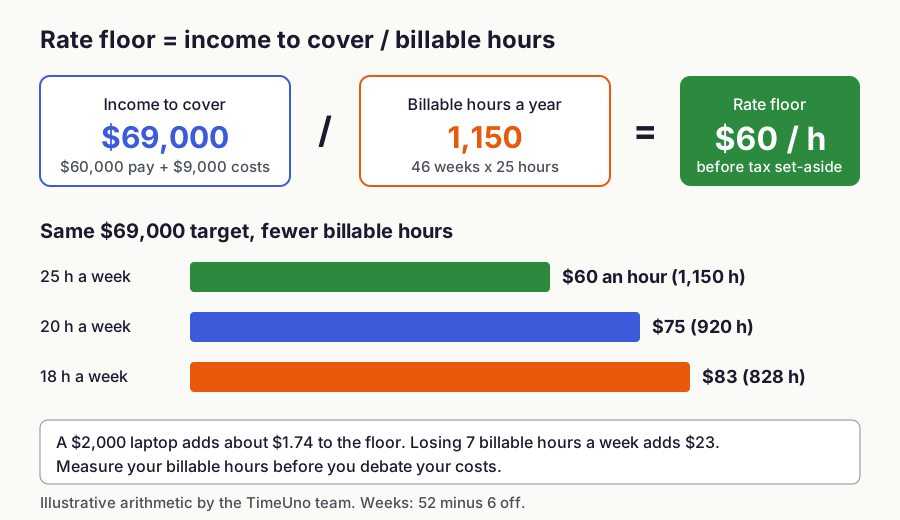
Figure 1: Rate floor = income to cover / billable hours. Illustrative arithmetic by the TimeUno team.
The denominator matters more than the costs. A $2,000 laptop adds about $1.74 to the floor. Billing 18 hours a week instead of 25 raises it from $60 to about $83. Measure your real billable hours for a month before you quote.
Treat the result as a floor, not a price. Specialist or urgent work can be priced above it, and so can work that saves the client real money. How far above is a judgment call.
Which rounding rule should you use for billable time?
Pick one rounding rule, write it into your contract and apply it to every client. Six minutes (a tenth of an hour) is easy to defend and close to the truth. Fifteen minutes is common when work is full of small interruptions, and no rounding is the most transparent.
TimeUno is an automatic time tracker for macOS and Windows that records the app in front, the window title and idle time. Owners and admins choose none, 6, 15 or 30 minutes, and whether to round to the nearest increment or always up. The rule applies to each timesheet line, not to the sheet total. The example assumes "up" and treats each task as its own line.
| Task | Actual | 6 min | 15 min | 30 min |
|---|---|---|---|---|
| Client call | 7 min | 12 min | 15 min | 30 min |
| Fix a layout bug | 22 min | 24 min | 30 min | 30 min |
| Write the handover note | 38 min | 42 min | 45 min | 60 min |
| Answer client email | 11 min | 12 min | 15 min | 30 min |
| Total | 78 min | 90 min | 105 min | 150 min |
| At $60 an hour | $78 | $90 | $105 | $150 |
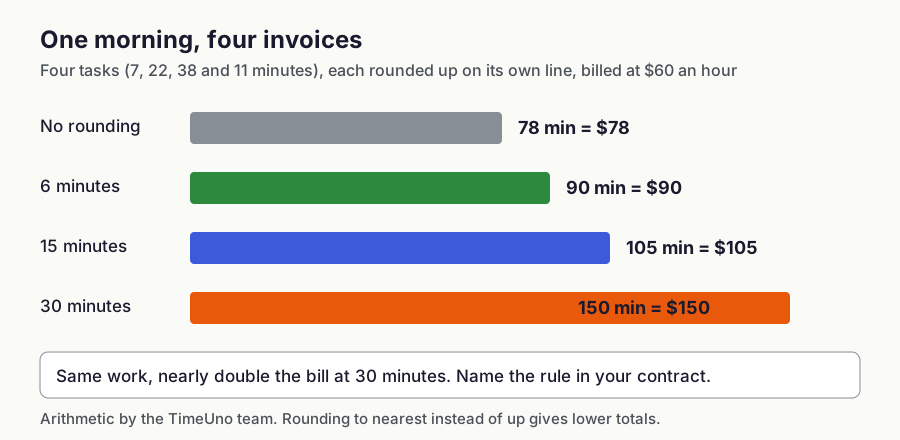
Figure 2: One morning of four tasks at $60 an hour under each rounding rule. Illustrative arithmetic by the TimeUno team.
The same work becomes $78 or $150 depending on the rule, and many short tasks widen the gap. With "nearest" instead of "up", a short line can round down. Check how your own tool applies the rule.
A fair way to choose:
- Use no rounding or 6 minutes if you want the invoice to match the clock.
- Use 15 minutes if you tell the client up front.
- Use 30 minutes only as a stated minimum charge, such as a call-out fee.
- Never change the rule mid-project without telling the client.
Put it in the contract in one sentence: "Time is billed in 15-minute increments, rounded up."
Should you charge hourly, per project or on retainer?
Charge hourly when scope is unclear, per project when scope is clear and the client needs one budget, and on retainer when the same work repeats every month. Hybrids work too: a fixed fee for the defined core, hourly for anything outside it.
| Model | Best when | Main risk | What to put in writing |
|---|---|---|---|
| Hourly | Scope is unclear or changes | Client fears an open-ended bill | Written estimate, billing cadence |
| Fixed fee | Scope is clear, client needs one budget | You absorb overruns and revisions | Scope, revision rounds, change-order rate |
| Retainer | Same work every month | Unused hours, creeping extras | Hours per month, rollover rule |
| Hybrid | Core is defined, extras are not | More to explain | Which items are fixed, hourly rate for the rest |
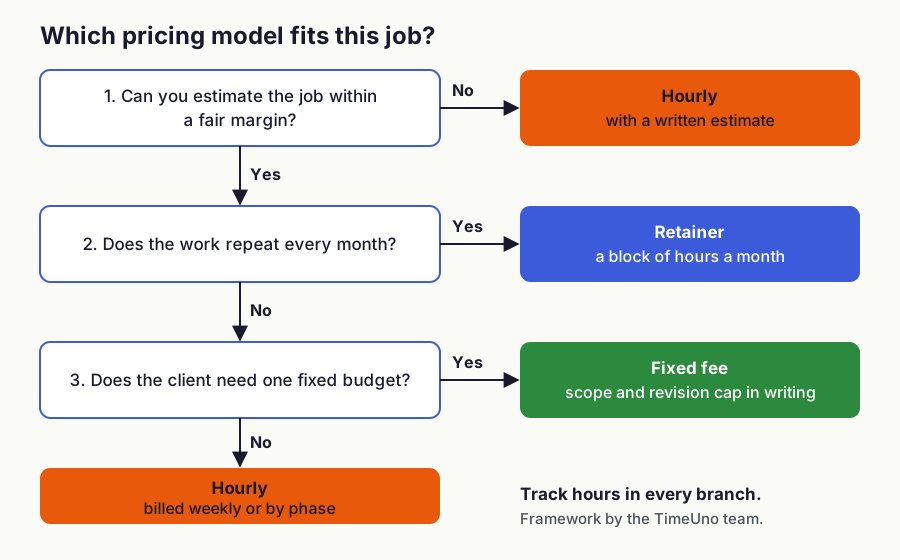
Figure 3: A pricing-model decision path. Framework by the TimeUno team.
Track hours in every model. On fixed-fee work the invoice does not change, but the hours show what the job really paid. Say you quote $3,000 and log 38 hours: that is about $79 an hour. At 70 hours it is about $43, and you know to cap revisions or price the next job higher.
If a client pushes back on price, cut scope before you cut the rate. A smaller first phase keeps your hourly value intact and lets both sides keep going.
How do you track billable time without forgetting it?
Choose a method that records time before you can forget it. Manual timers fail in a predictable way: you start work, get pulled into something else and never press start. Rebuilding the week on Friday from memory usually loses time and is hard to defend if a client questions a line.
- Manual timer. Exact when you remember, no safety net when you do not.
- Daily log or spreadsheet. Cheap, but it depends on memory. Our timesheet template helps, and spreadsheet versus app compares the trade-offs.
- Automatic tracking. An app records the app and window in front of you and groups time by project. You review and correct instead of building from scratch. See automatic time tracking.
TimeUno is the third kind. It saves no screenshots and never records what you type. It has no mobile app, so work done only on a phone will not appear. You open the week, check project totals and fix a wrong assignment once, and the correction is remembered as a rule.
What should a timesheet line say?
A good timesheet line gives the date, the task and the time, in words the client would use. The client approves the invoice by reading these lines, so vague lines lead to questions and slow payment.
| Line | |
|---|---|
| Weak | 12 Nov: Development, 6.0 h |
| Strong | 12 Nov: Fix checkout error on mobile Safari, add regression test, deploy to staging, 2.5 h |
| Strong | 12 Nov: Weekly call and sprint notes, 0.5 h |
The strong lines split a day into blocks that match deliverables, so the client can see what each hour bought. Add your name, the client, the period, the agreed rate and rounding rule, total hours and amount, and currency.
TimeUno builds timesheets from tracked project time for a chosen client, for this week, last week or this month. You edit any line, can have descriptions written for you to review, and export CSV or PDF. The PDF carries your company name, address, tax ID and logo. Clients can approve a timesheet through a shareable link with an optional PIN and expiry date.
TimeUno does not create invoices and has no accounting integration. You take the CSV or PDF into the invoicing tool you already use.
How do you handle non-billable time?
Track non-billable time, but keep it out of the invoice. Proposals, admin, learning and unpaid fixes are real work. If you never record them, your effective rate looks better than it is, and you cannot tell when a client costs more than they pay.
Add a billable ratio to your monthly review: billable hours divided by all tracked hours. The example assumed 25 of 40 hours, or 62.5 percent. If your real ratio is 45 percent, the rate formula needs a higher floor or fewer non-billable tasks.
In TimeUno each project has a billing type: hourly, fixed fee (with an optional budget) or non-billable. Owners and admins set currency, default rate and rounding under Settings, and rates can be set per client and per project.
What payment terms and billing routine work best?
Invoice weekly or at the end of each project phase, and put payment terms, the rounding rule and revision limits in the contract before work starts. Waiting a month turns a ten-minute review into an hour of guesswork. Ask a lawyer about enforceable terms where you work.
The weekly routine takes about 15 minutes:
- Review tracked time by client and project.
- Fix wrong assignments and merge short fragments.
- Rewrite vague lines into deliverable-based descriptions.
- Mark anything non-billable.
- Export the timesheet as CSV or PDF.
- Create the invoice in your invoicing tool with the exact timesheet total.
- Send both, so the client can check each line.
To raise your rate, give existing clients written notice and apply the new rate to new work. Your records help here: a timesheet history shows what you actually deliver per hour.
Is TimeUno the right tool for this?
It suits you if you work on a Mac or Windows computer, forget to start timers and want timesheets built from time you already tracked. It is the wrong choice if you need a free plan, a mobile app, Excel export or built-in invoicing.
The Individual plan costs $9.99 a month ($8.33 a month billed yearly), with a 14-day trial and no free tier, as of November 2026. See pricing. If a free timer is enough, a manual timer plus the timesheet template works. To compare options, see automatic trackers or time trackers for freelancers. You can also start with time tracking for freelancers.
## FAQ
### How do you calculate a freelance hourly rate?
Divide the income you need for the year, including business costs and a tax set-aside, by the hours you can realistically bill. In this guide's example, $69,000 divided by 1,150 billable hours gives a floor of $60 an hour.
How many billable hours can a freelancer expect per week?
It varies by work and by client mix, so measure your own. The example uses 25 of 40 hours, and tracking a month of real work shows whether that is too high or too low.
Which rounding rule is best for freelance billable time?
No rounding or 6-minute rounding is best if you want the invoice to match the clock. Rounding up to 15 minutes suits work with many small interruptions if you tell the client up front, and 30 minutes should only be a stated minimum charge.
Should I charge hourly or per project?
Charge hourly when scope is unclear and per project when scope is clear and the client needs one budget. Either way, track hours so you know what the job really paid.
Should freelancers track hours on fixed-fee projects?
Yes. The invoice does not change, but the data shows what the job paid per hour, which makes the next quote better.
Can TimeUno create invoices for freelancers?
No, TimeUno does not create invoices and has no accounting integration. It builds timesheets from tracked project time that you export as CSV or PDF and take into your invoicing tool.
Sources
- US self-employment tax rate (as of November 2026): IRS, Self-employment tax
- TimeUno plans and prices: pricing
- The rate formula and all example figures in this post are illustrative arithmetic by the TimeUno team, not survey data.