

Blog Productivity Time tracker spreadsheet: when it works and when it breaks
Productivity · Nov 15, 2026
Time tracker spreadsheet: when it works and when it breaks
A time tracker spreadsheet works for light use. Copy checked Excel and Sheets formulas for overnight shifts and rounding, and see where a sheet breaks.
Quick answer: is a time tracker spreadsheet enough?
A time tracker spreadsheet is enough when you log a few hours a week, bill one or two clients and don't mind typing entries in. It stops working when you forget to log, need rounded totals or track many projects across the day.
A hybrid setup often fits best: let an automatic tracker record the time, then import its CSV into the sheet for the totals and charts you already have. Every formula below is checked against Microsoft's or Google's documentation, and the pages are linked.
Last reviewed: November 2026.
When is a time tracking spreadsheet enough?
A spreadsheet is enough when entries are few and the rules are simple. One client, one hourly rate and a handful of sessions per week fit on a single tab. You also own the file, can add any column, and nothing renews on a card.
What decides it is where the times come from, not file size. A sheet is only as accurate as the memory behind it, so three questions settle most cases.
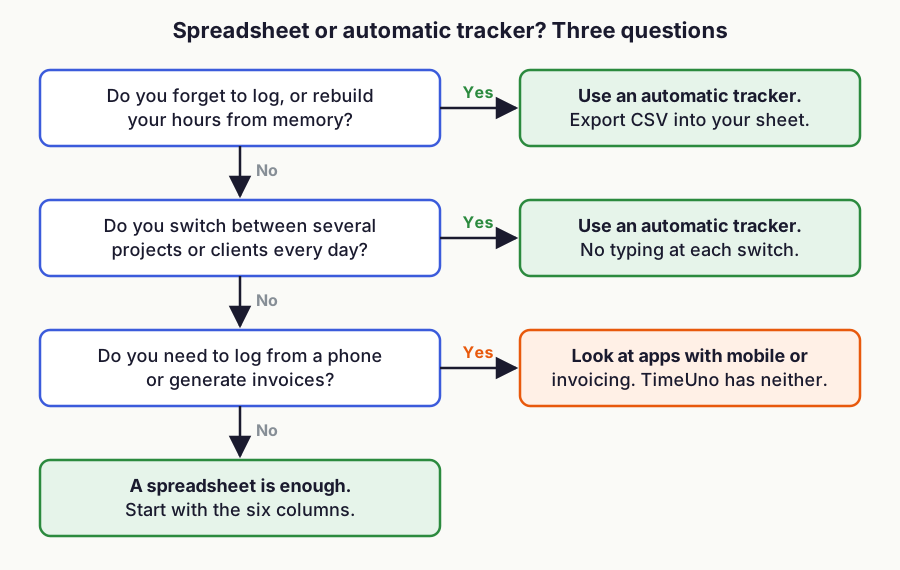
Figure 1: A three-question rule for choosing between a spreadsheet and an automatic tracker. Original TimeUno framework, November 2026.
If you only need a printable sheet, start with the free timesheet template. It gives you the columns without building them yourself.
What is the best layout for a timesheet spreadsheet template?
Keep it to one row per work block and six columns. More columns mean more typing, and typing is where a manual sheet fails.
| Column | Header | Example |
|---|---|---|
| A | Date | 2026-12-08 |
| B | Start | 09:00 |
| C | End | 12:30 |
| D | Hours | 3.5 |
| E | Project | Website redesign |
| F | Notes | Homepage copy |
Format B and C as time, D as a number with two decimals. Put a total at the bottom with =SUM(D2:D200), so new rows are counted as you add them.
How do I calculate hours between two times in Excel or Google Sheets?
Subtract the start from the end and multiply by 24. With the start in B2 and the end in C2, the formula is =(C2-B2)*24.
Excel and Google Sheets store a time as a fraction of a day, which is why you multiply by 24 to get hours. Without it, 3.5 hours shows up as 0.1458. Microsoft's guide to adding and subtracting time uses the same subtraction.
For a shift that crosses midnight, the end time is smaller than the start and the result goes negative. Use =MOD(C2-B2,1)*24 instead. Microsoft's MOD documentation says the result has the same sign as the divisor, so a negative difference wraps into a single day and 22:00 to 02:00 returns 4. Google Sheets has the same MOD function.
MOD covers spans under 24 hours. For longer spans, put the date and time in each cell and use plain subtraction; Microsoft's example returns 31.5 hours that way.
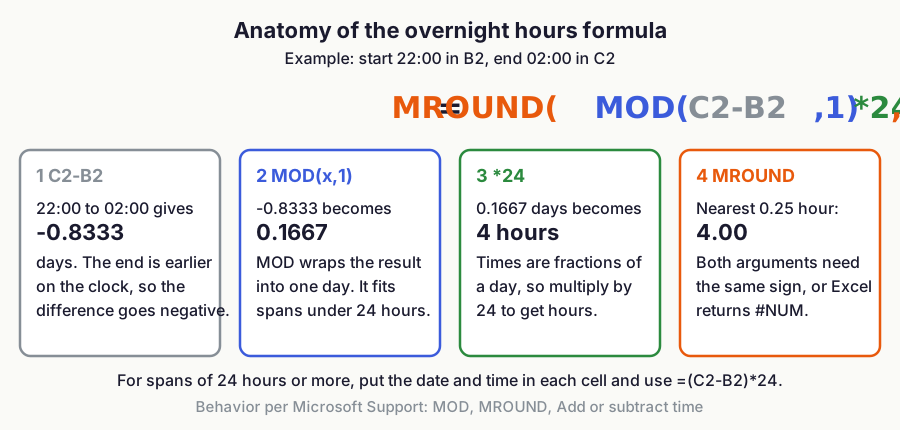
Figure 2: How the overnight formula turns 22:00 to 02:00 into 4 hours. Behavior per Microsoft Support (MOD, MROUND, Add or subtract time).
To subtract an unpaid break kept in column G, in minutes, use =MOD(C2-B2,1)*24-G2/60.
How do I round time in a time tracking spreadsheet?
Wrap the hours formula in MROUND. To round to the nearest quarter hour, use =MROUND(MOD(C2-B2,1)*24,0.25). Use 0.5 for half hours.
Two documented details can bite. First, MROUND needs both arguments to have the same sign; Excel returns a #NUM error otherwise, so a bare end-minus-start formula fails on overnight rows. Google's MROUND page states the same sign rule.
Second, Microsoft notes that with a decimal multiple, a value exactly halfway can round either way: MROUND(6.05,0.1) returns 6.0 but MROUND(7.05,0.1) returns 7.1. Six-minute blocks (0.1 hour) hit these ties. Round to whole minutes first with =MROUND(ROUND(MOD(C2-B2,1)*1440,0),6)/60; Google's MOD page also suggests ROUND when floating-point arithmetic gives an approximate result.
Decide the rounding rule before the first entry. If you round each row, the total can differ from rounding the sum, and a client who adds up the rows will notice.
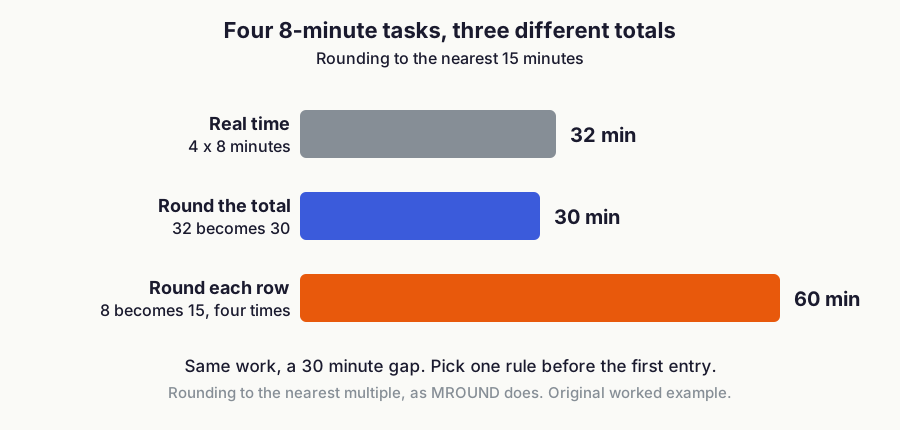
Figure 3: Four 8-minute tasks rounded to the nearest 15 minutes, per row versus on the total. Original worked example.
The timesheet calculator does the same arithmetic without a sheet. TimeUno's Settings offer rounding to 6, 15 or 30 minutes, applied to the timesheets it builds.
Why does my time total reset after 24 hours?
Because the default time format wraps at 24 hours. Microsoft's example adds 12:45 and 15:30 and shows 4:15; applying the custom format [h]:mm;@ shows the real 28:15.
In Google Sheets, custom number formats take the same elapsed-hours token. The Sheets format reference describes [h] as the number of elapsed hours in a duration. Microsoft also notes that Excel for the web cannot apply custom number formats, so there, sum the decimal hours from column D instead.
Which formulas should I copy? (checked November 2026)
| Task | Formula | Source |
|---|---|---|
| Hours, same day | =(C2-B2)*24 | Microsoft: add or subtract time |
| Hours, overnight under 24 h | =MOD(C2-B2,1)*24 | Microsoft: MOD, Google: MOD |
| Round to a quarter hour | =MROUND(MOD(C2-B2,1)*24,0.25) | Microsoft: MROUND, Google: MROUND |
| Round to 6 minutes, tie-safe | =MROUND(ROUND(MOD(C2-B2,1)*1440,0),6)/60 | MROUND and MOD pages above |
| Total of time cells over 24 h | =SUM(B2:B8) with format [h]:mm;@ | Microsoft, Google Sheets formats |
Where does a time tracking spreadsheet break?
It breaks in four places, and the formulas are not one of them.
- Forgotten entries. A manual sheet records what you remember. By Friday, the Tuesday afternoon is a guess.
- Total errors. A total formatted as time resets at 24 hours unless you use
[h]:mm. A range that stops one row early drops the last entries without any warning. - Mixed formats. One row typed as 9.30 and another as 9:30 breaks the subtraction. Text that looks like a time is still text.
- Scale. Ten projects and several clients mean filters, pivot tables and a separate tab per month. The sheet turns into a small project.
Most of these come from relying on memory, so stop typing the times yourself.
Can I track time automatically and still use a spreadsheet?
Yes. Record the time automatically, export it as CSV and open it in Excel or Google Sheets.
TimeUno is an automatic time tracker for macOS and Windows. It builds automatic timesheets from the project time it already recorded and exports them as CSV or PDF. It has no Excel export, so the CSV is the route into a sheet. If you want the background first, read how automatic time tracking works.
The steps are short:
- Track as usual. There is no timer to start.
- Build a timesheet for this week, last week or this month.
- Export it as CSV.
- In Excel, use Data, then From Text/CSV. In Google Sheets, use File, then Import.
- Check that the imported times are numbers or times, not text, then point your existing total, rounding and chart formulas at the rows.
That keeps your own formulas and layout. A wrong block fixed on the timeline becomes a rule, so the same correction is not repeated next week.
Is a time tracker spreadsheet free, and what does an app cost?
A spreadsheet costs nothing if you already have Excel or use Google Sheets. The time you spend building it and fixing it is the real cost.
As of November 2026, TimeUno has no free tier. It starts with a 14-day trial, then pricing is:
| Plan | Monthly | Billed yearly |
|---|---|---|
| Individual | $9.99 | $8.33 per month |
| Team | $12.99 per seat | $10.83 per seat per month |
See pricing for the current plans. TimeUno also has no mobile app, no invoicing and no accounting integrations, so if you work mostly on a phone or need generated invoices, a spreadsheet or another tool may fit better. The best time tracking apps comparison and the list of free time tracking apps show the alternatives.
Spreadsheet or app for freelancers?
Freelancers with one or two clients can start with a spreadsheet. Once you juggle several clients, or forget to log time, an automatic tracker is usually worth paying for, because it catches the hours you would forget.
You can use both: the app records, the sheet reports. Our guide to time tracking for freelancers covers what to bill and how to keep records. For habits that keep any log honest, see how to track your work hours.
FAQ
What is the simplest time tracker spreadsheet?
Three columns are enough: date, start and end, plus an hours column with =(C2-B2)*24. Add a project column once you have more than one client.
How do I track time in Excel for overnight shifts?
Use =MOD(C2-B2,1)*24 for hours. It returns the right result when the end time is after midnight and the start is before it, for spans under 24 hours.
Is there a Google Sheets time tracker?
You can build one with the same layout and formulas, since Google Sheets has MOD and MROUND and uses the same time arithmetic as Excel. Format the hours column as a number, or apply the custom format [h]:mm for time totals above 24 hours.
Is Excel or Google Sheets better for a time tracker?
Neither wins on formulas, because everything in this guide works in both. Choose by where the file lives and who edits it. Excel for the web cannot apply custom number formats, so keep decimal hours there.
Can I import automatic time tracking into a spreadsheet?
Yes, if the tracker exports CSV. TimeUno exports timesheets as CSV, which Excel and Google Sheets both open.
Why is my time total wrong in Excel?
The usual causes are a total formatted as plain time, which resets after 24 hours, a SUM range that is too short, or entries stored as text. Apply the [h]:mm format and check that each cell is aligned like a number.