

Blog Productivity Time tracker for work hours: how to track yours
Productivity · Nov 15, 2026
Time tracker for work hours: how to track yours
Track your work hours in five steps: decide what counts, pick a method, calculate hours worked, round neutrally and review weekly. Worked examples inside.
How do I track my work hours?
Write down when you start and stop each day, subtract unpaid breaks, and add the days into a weekly total. A paper log, a spreadsheet, a timer app or an automatic time tracker for work hours all do this job, as long as you keep using the same one.
This guide covers what counts as work time, how to pick a method, how to calculate hours worked (including overnight shifts), when to round, and a 10-minute weekly review. Legal notes link to primary sources and are dated November 2026.
Last reviewed: November 2026.
Step 1: Decide what counts as work time
Before you log anything, write one rule that says which minutes count and which do not. The usual arguments are about short breaks, lunch at your desk and travel. Here is what the official sources say, as of November 2026:
- Short rest breaks. In the US, rest periods of about 5 to 20 minutes are customarily paid and must be counted as hours worked (29 CFR 785.18).
- Meal breaks. A bona fide meal period, where you are completely relieved of duty, is not work time. Eating at your desk while you work is working time (29 CFR 785.19).
- UK. Workers get one uninterrupted 20-minute rest break if they work more than 6 hours a day, and it does not have to be paid (GOV.UK, rest breaks at work).
- Commuting and client travel. Commuting to a fixed workplace is usually unpaid and travel between client sites often counts, but your contract or client agreement decides.
These rules cover employees. If you bill clients, agree the rule with them instead, then put it in one line at the top of your log, for example: "Unpaid: lunch of 30 minutes or more. Counted: client travel."
Step 2: Pick a method you will still use on a bad day
Pick the method that costs you the least effort per day, because a perfect system you skip is worse than a rough one you keep.
| Method | Best for | Daily effort | Main limit |
|---|---|---|---|
| Paper log | One job, fixed hours | Write start and stop | No totals, easy to lose |
| Spreadsheet | Hours per day or week | Type start, stop and break | You build the sums |
| Timer app | Several projects | Press start and stop | You must remember to press |
| Automatic tracker | Computer work | Review a timeline | Only sees the computer |
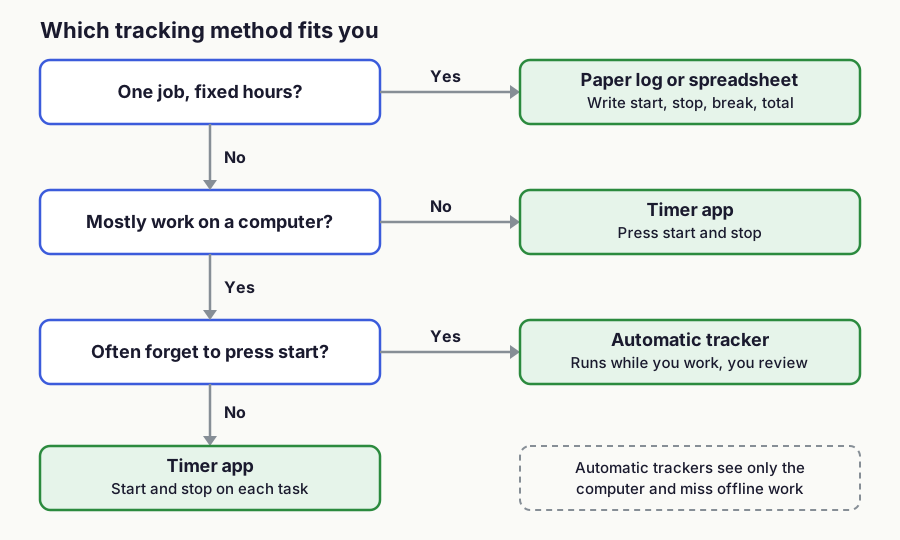
Three questions decide it.
!Decision flowchart: fixed hours at one job point to a paper log or spreadsheet, work away from a computer points to a timer app, and computer work where you forget to press start points to an automatic tracker
Figure 1: Choosing a tracking method in three questions. Decision rules by the TimeUno team.
TimeUno is an automatic time tracker for macOS and Windows. It runs while you work and builds a timeline you can correct, and each correction becomes a rule for next time.
There is no mobile app, no Linux version and no free tier, only a 14-day trial, so it suits people who do most of their work on a Mac or Windows computer. See automatic timesheets for how that works.
To compare other options, start with the best time tracking apps, the time clock app guide or spreadsheet vs app. For a no-cost start, use the timesheet template.
How do I calculate hours worked?
Convert the start and end times to minutes after midnight, subtract, take off unpaid breaks, then divide by 60. Working in minutes avoids the most common mistake, which is writing 7 hours 45 minutes as 7.45.
- Convert both times to minutes after midnight: 9:00 is 540 and 17:30 is 1,050.
- Subtract start from end: 1,050 minus 540 is 510 minutes.
- Subtract the unpaid break: 510 minus 45 is 465 minutes.
- Divide by 60: 465 divided by 60 is 7.75 hours.
!Bar from 9:00 to 17:30 split into 195 minutes, a 45 minute break and 270 minutes, giving 465 minutes or 7.75 hours, with a warning that 7.45 hours is not 7 hours 45 minutes
Figure 2: The same day as a bar, plus the minutes-to-decimal table. Arithmetic by the TimeUno team.
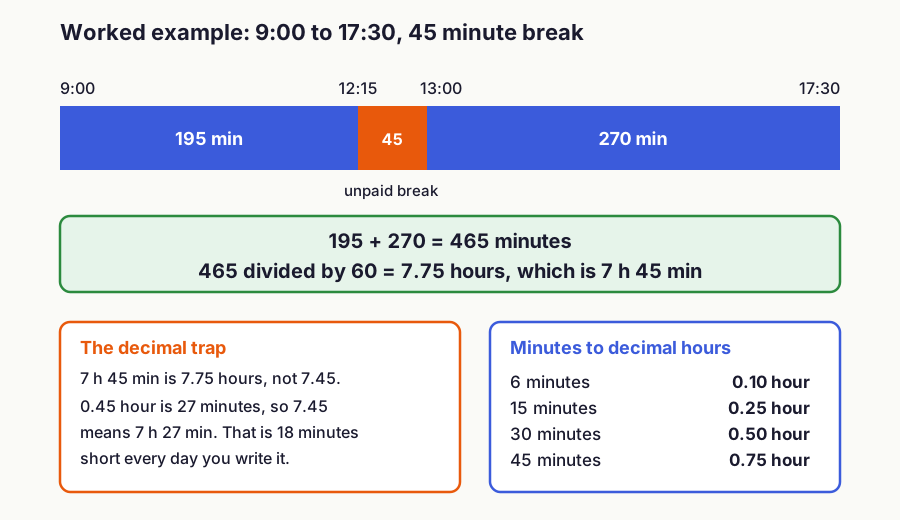
Minutes convert to decimals in fixed steps: 6 minutes is 0.1 hour, 15 is 0.25, 30 is 0.5 and 45 is 0.75. A figure like 7.45 means 7 hours 27 minutes, so writing it for 7 hours 45 minutes shortchanges you by 18 minutes a day.
Overnight shift. If the end time is earlier than the start time, add 1,440 minutes (24 hours) to the end. A 22:00 to 06:30 shift is 390 plus 1,440 minus 1,320, which is 510 minutes or 8.5 hours. On the night the clocks change, a 22:00 to 06:00 shift lasts 7 or 9 hours, not 8, so log the real times.
Split shift. Add each block in minutes, not in hours. 9:00 to 12:15 is 195 minutes and 13:00 to 17:30 is 270, so the day is 465 minutes. The gap between the blocks is the break, which means you never subtract it twice.
In a spreadsheet. In Excel, =(B2-A2)24 returns decimal hours for a same-day shift, and =MOD(B2-A2,1)24 also handles a shift that crosses midnight. Format the result cell as a number, not as a time.
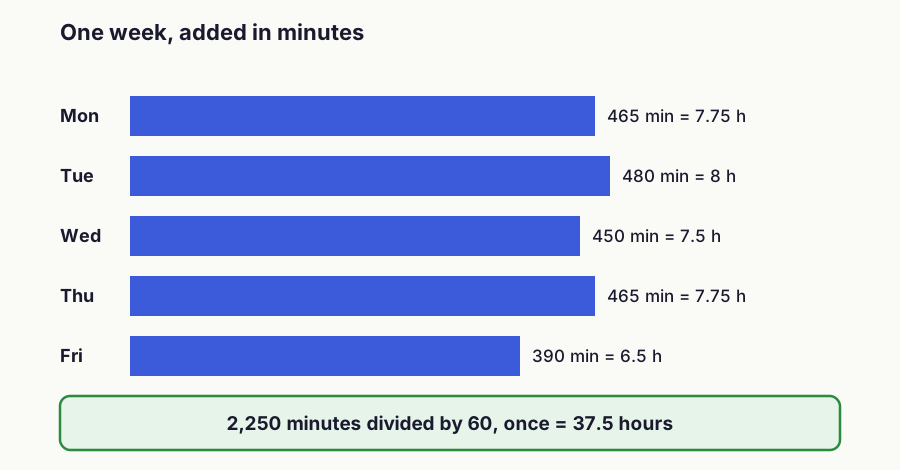
For the week, add the days as minutes and convert once at the end. Monday to Friday at 465, 480, 450, 465 and 390 minutes is 2,250 minutes, or 37.5 hours. Rounding each day to two decimals first can drift: five shifts of 7 hours 52 minutes add up to 39.35 hours that way and 39.33 hours exactly.
!Horizontal bars for Monday to Friday showing 465, 480, 450, 465 and 390 minutes that add up to 2,250 minutes, which is 37.5 hours
Figure 3: A work week added in minutes and converted once. Arithmetic by the TimeUno team.
The timesheet calculator does the same sums from start, end and break.
Overtime depends on where you work. In the US, the Department of Labor says the FLSA applies per workweek, a fixed period of 168 hours, that covered non-exempt employees get 1.5 times their regular rate above 40 hours, and that averaging hours across weeks is not permitted (Fact Sheet #23, as of November 2026). Other countries use daily limits or averages, so check your local rule.
Step 3: Log at the end of each block
Each entry needs the date, start, end, break and total. Add a project or client column if you work for more than one. Log when a block of work ends, not on Friday, because a week rebuilt from memory drifts toward round numbers.
With an automatic tracker, the timeline is the log. Check it at the end of the day, fix the gaps, and let the corrections turn into rules.
Step 4: Round only with a neutral rule
Round only if your employer or client asks, and use the same rule every time. Common steps are 6 minutes (a tenth of an hour), 15 minutes and 30 minutes.
In the US, 29 CFR 785.48(b) accepts rounding to the nearest 5 minutes, tenth or quarter of an hour, provided it does not, over time, leave employees unpaid for time they worked (as of November 2026). The rule assumes the rounding averages out, so a habit that always rounds the same way is the risky kind.
In TimeUno, owners and admins set rounding to 6, 15 or 30 minutes in Settings, and exports are CSV or PDF. Write the rule at the top of the log either way.
Step 5: Review once a week
Spend 10 minutes at the end of the week. Ask yourself four things:
- Does the total match what you expected?
- Which tasks took longer than planned?
- Are there days with no entry, or breaks you forgot to subtract?
- Does any entry need a note while you still remember the context?
Fix gaps now, because they only get harder to rebuild. To act on what the review shows, read time management that works.
How many hours should I log?
The hours you actually worked, no more and no less. How many you owe comes from your contract, client agreement or local law, not from the tracker. A day logged at 6 hours when you expected 8 is useful information, so do not pad it.
## FAQ
### What is the best way to track my work hours?
The one you will use every day. Paper or a spreadsheet suits fixed hours at one job, a timer app suits several projects, and an automatic tracker suits computer work where you forget to press start.
What if I forgot to start the timer?
Rebuild the block the same day from your calendar, sent messages and file timestamps, and mark the entry as estimated. Then fix the next one on time. An automatic tracker such as TimeUno records a timeline you can correct instead.
Can I track my work hours for free?
Yes, with paper or the timesheet template, and many timer apps have free plans (see the best free time tracking apps). TimeUno has no free tier, only a 14-day trial. After that, Individual is $9.99 per month or $8.33 per month billed yearly, as of November 2026 (pricing).
How do I convert minutes to decimal hours?
Divide the minutes by 60. 15 minutes is 0.25 hour, 30 is 0.5 and 45 is 0.75, so 7 hours 45 minutes is 7.75 hours.
How do I calculate hours worked on an overnight shift?
Add 1,440 minutes to the end time, then subtract the start and the break. A 22:00 to 06:30 shift with no break is 510 minutes, which is 8.5 hours.
Does my own work hours log count as proof?
A personal log helps you check your pay, but it is not your employer's official record. In the US, employers must keep hours records for non-exempt employees, and any timekeeping method is acceptable if it is complete and accurate (Fact Sheet #21, as of November 2026). TimeUno is not a certified time clock, and rules differ by country.