

Automatic timesheets Timesheets built from the time you already tracked.
TimeUno records the time you spend at your computer, files it under your projects and turns it into a timesheet for this week, last week or this month. You check the lines, mark it ready and download it as CSV.
Start your 14-day free trial 14-day trial, then $14.99 a month
What a timesheet app should do for you
A timesheet app records your hours, adds them up per day and project, and gives you a sheet to send to a client or manager. Most apps do the first part with a timer you start and stop. TimeUno skips the timer: it records the time you spend at your computer and files it under your projects for you.
That changes what you do at the end of the week. You no longer rebuild Tuesday from memory. You open the timesheet, read it, fix what is off and send it.
How automatic timesheets work
TimeUno fills in a timesheet from the project time it already tracked. You pick the period and the project, and it writes one line per day.
- Install the desktop app on your Mac, Windows or Linux computer and work as usual.
- TimeUno reads the project from your editor (package.json, Cargo.toml, go.mod, pyproject.toml or the folder name), or uses projects you add by hand with keywords.
- Open Timesheets and click Create timesheet. Choose This week, Last week or This month, the project and an optional client name.
- Edit the line descriptions, untick lines you don’t bill, click Mark ready and Download CSV.
Timer app or automatic: which is better?
A timer app is better when you need to log time away from a computer or from a phone. Automatic tracking is better when your work happens on a computer and you forget to start the timer. Pick by where your hours happen.
| Timer timesheet app | TimeUno | |
|---|---|---|
| How time gets in | You start and stop a timer, or type hours | Recorded as you work at your computer |
| Forgotten timers | Lost or wrong hours | Nothing to forget |
| Mobile clock-in | Usually yes | No mobile app |
| Time from AI tools | Not tracked | Claude Code, Cursor and others tracked next to yours |
| Export | Varies | CSV |
The simple timesheet app for computer work
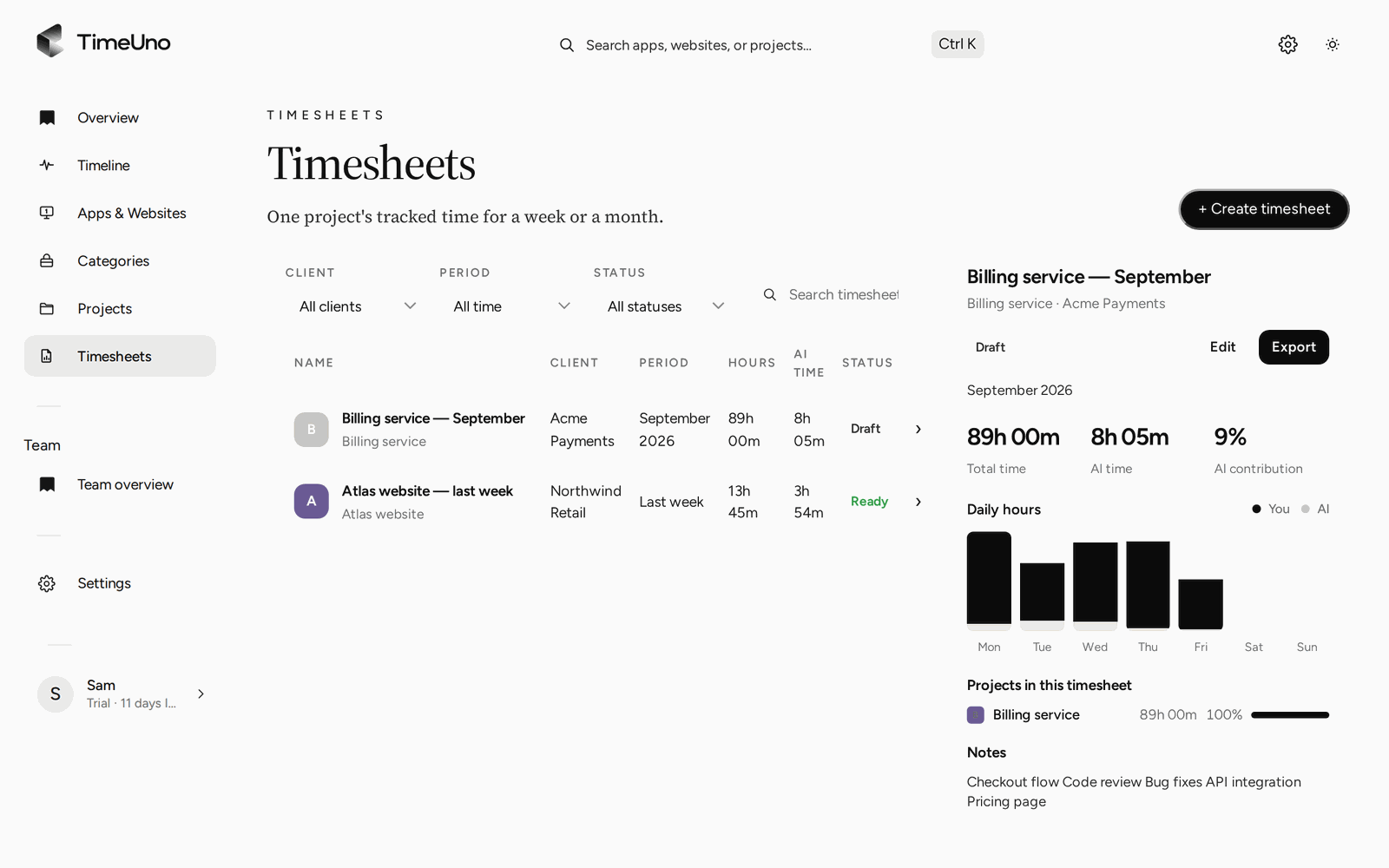
TimeUno skips the timer, the clock-in screen and the sign-in forms other timesheet apps use. The timesheet list shows your sheets by client, period and status (Draft or Ready), and a preview with total time, AI time and hours per day.
Corrections stay simple too. If an hour landed under the wrong project, move it on the Timeline. Choose From now on and TimeUno files that app or site the same way next time.
Your time and your AI’s time, per project
If you work with AI tools, the timesheet shows that as well. TimeUno tracks Claude Code, Cursor, Codex CLI and other tools while they work, even in a background terminal. Each timesheet shows AI time and AI contribution next to your own hours, so you see what the work took.
Rather keep a spreadsheet?
If you only need to log a few hours a week, a spreadsheet is enough. Our timesheet templates add up hours and breaks in Excel or Google Sheets, and the timesheet calculator works out a week of pay in your browser.
Updated 13 October 2026
Questions people ask
Is there a free timesheet app?
TimeUno is not free: it has a 14-day trial, then costs $14.99 a month, or $10.49 a month billed yearly. If you want something free, our Excel timesheet templates and timesheet calculator cost nothing.
Can I export a timesheet to Excel or PDF?
TimeUno exports timesheets as CSV. Excel, Google Sheets and Numbers open CSV files, and you can save to PDF from there. There is no direct PDF or Excel export.
Is there a mobile timesheet app?
No. TimeUno runs on macOS, Windows and Linux, with a browser extension. It tracks computer work, so it suits office, remote and freelance work, not field or shift work.
Can I edit an automatic timesheet?
Yes. Change any line's description, untick Include to leave a line out, and the total follows. Mark ready locks the timesheet once it is final.
Does it work for a team?
Each person builds their own timesheets. On the Team plan, owners and admins also see worked time, productivity score and AI usage per person, never anyone's apps, sites or screenshots.