

Time tracking for agencies Team hours and AI time, filed per client.
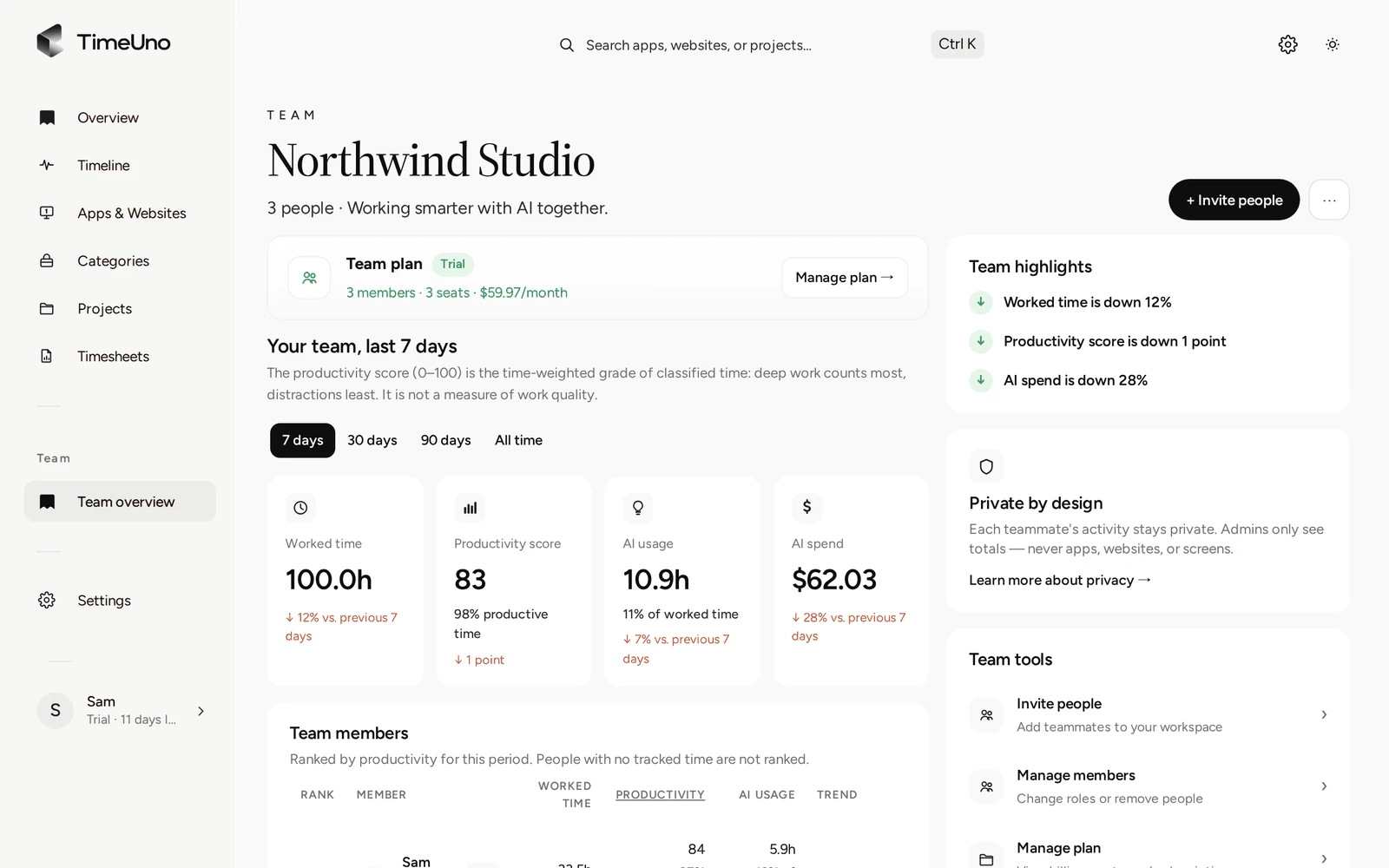
TimeUno records what each person on your team works on and files it under the right client's project, with no timer to start. Admins see hours, AI usage and a productivity score per person, and AI time and spend per client project; they never see anyone's apps, sites or screenshots. At the end of the week, export a timesheet per client as CSV and invoice from there.
Start a team trial 14-day trial, then $19.99 per seat a month
Why agencies need time tracking per client
An agency’s week is split across several clients and several people, and both axes have to line up. A spreadsheet timesheet asks everyone to remember what they did and attach it to the right client, after the fact. People forget a call, round a number down, or file an hour under the wrong account. The totals look fine and are still wrong.
TimeUno removes the manual step. It records computer work as it happens and files it under a client project on its own, so the record exists before anyone has to recall it.
How TimeUno files team time under each client
Each client is a project in TimeUno, shared by whoever works on it. Time is filed under that project from what the person is doing, not from a timer they remembered to start.
- Add one project per client, with a few keywords that show up in window titles or URLs, such as the client’s name or their product’s name.
- Invite your team. Each person installs the desktop app on their own computer, and the browser extension if they want browser time included.
- The first time TimeUno sees a new editor project, it asks the person whether to track it. Code work for a client files under that client the same way.
- Once a week, check Review unassigned time and move anything stray to the right client.
What agency admins see, and what they don’t
Owners and admins see four numbers for each person on the Team overview, for the last 7, 30 or 90 days, plus AI time and spend for each client’s project on the Projects page.
| Admins see | Admins never see |
|---|---|
| Worked time, per person | Apps and websites |
| Productivity score (0 to 100), per person | Window titles |
| AI usage per person, AI time and spend per client project | Screenshots or on-screen text |
| Trend against the previous period | Anyone’s detailed day |
Each person keeps their own timeline, categories and corrections private. What goes to a client is a count of hours, not a transcript of the day.
Billing AI agent time to clients
Agencies that use Claude Code, Cursor or other AI tools on client work face a real question: whose time was it? TimeUno tracks AI agent sessions next to each person’s own time, filed under the same client project. A client’s weekly total shows hours worked by people and hours worked by AI agents, so you can decide case by case what to put on the invoice and what not to.
From team hours to a client invoice
TimeUno does not send invoices. It builds the timesheet; your invoicing tool does the rest.
- Open Timesheets and click + Create timesheet.
- Choose This week, Last week or This month, the project and the client name.
- TimeUno fills in a line per day from the time you tracked on that project. Edit the descriptions, untick any line you won’t bill, and click Mark ready.
- Click Download CSV and use the hours in Stripe, QuickBooks, FreshBooks or whatever you invoice with.
Where TimeUno is the wrong fit
TimeUno tracks work done on a computer. It has no mobile app, no GPS, no clock-in kiosk, no shift scheduling and no payroll export. If your team logs hours on-site or on the road, note those separately; if you need a record of working hours to meet a legal duty, check what your local rules require, as TimeUno is not a certified time recording system. This is not legal advice.
Updated 18 October 2026
Questions people ask
Can I track time across my whole team, per client?
Yes. Each client is a project. TimeUno records each person's computer time on its own and files it under the right client, from the code project open in an editor or from keywords you add by hand, such as the client's name.
Can I see what my team is doing on a client's work?
No. Admins see worked time, a productivity score, AI usage and the trend per person, plus AI time and spend per client project on the Projects page. Each person's apps, sites, window titles and screenshots stay visible only to them.
Can I bill clients for AI agent time?
You can see it either way. TimeUno tracks AI tools such as Claude Code and Cursor next to your team's own time, split per client project, visible on the admin dashboard. The exported timesheet lists each person's own hours only, so you decide what AI time to add to the invoice.
How much does an agency plan cost?
The Team plan is $19.99 per seat a month, or $13.99 per seat a month billed yearly. Each member is one seat. It starts with a 14-day trial; there is no free plan.
Can I export a timesheet per client to invoice?
Yes. Build a timesheet for any client's project, review the hours and click Download CSV. TimeUno doesn't send invoices: use the CSV in Stripe, QuickBooks, FreshBooks or whatever you invoice with.
Can I add freelancers or contractors alongside staff?
Yes. Anyone invited to the team gets a seat and installs the desktop app on their own computer. Their time files under the clients they work on, the same as a staff member's.