

Comparisons Time tracker for Windows: 7 apps compared for 2026
Nov 15, 2026 · 7 min read
Time tracker for Windows: 7 apps compared for 2026
Time tracker for Windows: 7 apps compared by automatic vs manual tracking, Windows support and where each one falls short, as of November 2026.
What is the best time tracker for Windows?
The best time tracker for Windows depends on one choice: do you press a timer yourself, or let the app record your day? TimeUno is an automatic time tracker for Windows and Mac, and so are ManicTime and ActivityWatch. Clockify, Toggl Track and TimeCamp are the usual picks for timers with team features.
TimeUno is our product, so read our picks with that in mind. Facts are as of November 2026 and come from each vendor's own pages, listed under Sources at the end. For any competitor's price, follow its pricing link.
Last reviewed: November 2026
| Tool | Best for | Records automatically? | Pricing | Main limit |
|---|---|---|---|---|
| TimeUno | Automatic tracking you correct later | Yes | $8.33/mo billed yearly ($9.99 monthly), 14-day trial | No free tier, no mobile app, no invoicing |
| ManicTime | Local timeline, optional cloud sync | Yes | See ManicTime pricing | Cloud screenshots and AI tagging need higher plans |
| ActivityWatch | Open source, local data | Yes | Free, open source | You set it up and build reports yourself |
| RescueTime | Focus goals and distraction reports | Yes | See RescueTime pricing | Built around focus, not client billing |
| Toggl Track | Manual timers, clear reports | Suggestions only (Timeline) | Starter $9/user/mo billed yearly | Free up to 3 users, timers come first |
| Clockify | Timers for teams | Suggestions only (auto tracker) | See Clockify pricing | Auto tracker entries are added by hand |
| TimeCamp | Teams that want timers and invoicing | Yes, from Premium | See TimeCamp pricing | App and site tracking starts on Premium |
How do I choose a time tracker for Windows?
Start with how you work. If you forget to press start, choose an automatic tracker such as TimeUno, ManicTime or ActivityWatch. If you already bill by project and like starting timers, Toggl Track, Clockify or TimeCamp are simpler, and if a team needs invoices or approvals, check which plan includes them before you commit.
!Two column guide matching Windows time trackers to needs: press-a-timer tools on the left, automatic tools on the right
Figure 1: Which Windows time tracker fits you, by need. Plan features as of November 2026 from each vendor's pricing and help pages.
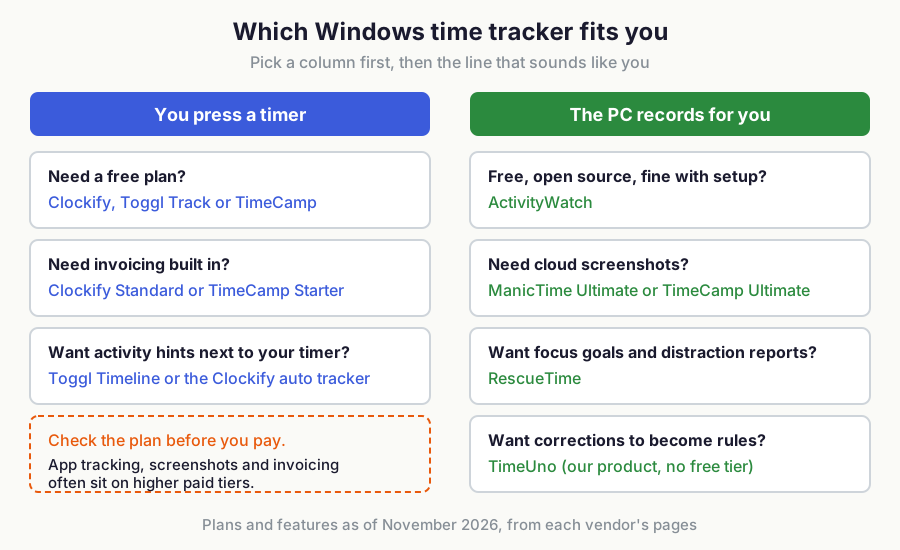
Two Windows details can decide it. RescueTime needs no browser plugin on Windows, whereas ActivityWatch's window watcher reads page URLs in Chrome-based browsers and its separate aw-watcher-web extension covers Chrome, Edge and Firefox. TimeUno also has Chrome, Edge and Firefox extensions.
Which time tracker for Windows works automatically?
TimeUno, ManicTime, ActivityWatch, RescueTime and TimeCamp (from Premium) record apps and sites on Windows without a timer. Clockify's auto tracker and Toggl Track's Timeline record too, but they only suggest activity: you convert it into time entries by hand.
TimeUno's pitch is what happens after recording: you fix the timeline once and the fix becomes a rule, so the same app or site is filed correctly next time. For the longer argument, read how automatic time tracking works.
What each Windows time tracker does well, and where it falls short
TimeUno
TimeUno records your Windows and Mac activity automatically and shows it as a timeline you correct. TimeUno remembers a correction the next time, and you export to CSV or PDF. There is also an MCP server at https://app.timeuno.io/mcp for asking an AI assistant about your tracked time.
It is not the right fit if you need invoicing, accounting integrations, Jira sync, a mobile app, a Linux desktop app or a free tier. It never takes screenshots and is not employee monitoring software. See plans and the 14-day trial: Individual is $9.99 per month or $8.33 billed yearly, and Team is $12.99 per seat per month or $10.83 billed yearly.
ManicTime
ManicTime has a Windows timeline of apps, websites and documents, and its Cloud plans add apps for Mac, Linux, Android and iOS. Its Ultimate plan adds cloud screenshots, and Ultimate AI adds AI tagging and chat with your activity history. See ManicTime pricing for current plan costs.
It beats TimeUno on platform reach and on self-hosting: an on-premise license with a self-hosted ManicTime Server is a one-time payment per user. If you are leaving it, see ManicTime alternatives.
ActivityWatch
ActivityWatch is free and open source. Its tray app starts a server on your PC, the web interface runs at localhost:5600, and the default watchers log your active window and flag you away after 3 minutes without mouse or keyboard input. The project describes storing data on your own machine. Release builds support Windows 10 or later (x64).
It costs nothing and keeps data on your machine. What it does not give you, going by its getting-started docs, is invoicing or client-ready timesheets, so expect to export and build reports yourself. More free options are in our open source time tracker comparison.
RescueTime
RescueTime supports Windows 10 and 11 and is built around focus: automatic tracking, idle detection, Focus Sessions and goals. Its Solo+ plan adds Timesheets. See RescueTime pricing for current plans and trial terms.
Choose it if you want fewer distractions more than billable hours. It also has iOS and Android apps, which TimeUno does not. See TimeUno vs RescueTime.
Toggl Track
Toggl Track is a timer app first. Its Windows desktop app needs Windows 10 or higher, and the Timeline feature records websites and programs you use for more than 10 seconds, shown as blocks in the calendar that you turn into entries by hand. Timeline data is private to your account, so even workspace admins cannot see it, and it stops recording when the computer sleeps.
As of November 2026, Starter is $9 per user per month billed yearly, and the free plan covers up to 3 users (Toggl pricing). Toggl has iOS and Android apps and calendar integrations. See TimeUno vs Toggl Track.
Clockify
Clockify is a timer-first tracker with an auto tracker for suggestions. Its paid Standard plan adds invoicing, time off, approvals and rounding, and free-plan limits change, so check Clockify pricing.
The auto tracker is a desktop app for Windows, Linux and Mac that records programs, window titles and site URLs, keeps them on your computer and shows them only to you. It does not fill your timesheet. See TimeUno vs Clockify.
TimeCamp
TimeCamp offers a timer, manual entries and keyword-based auto tracking. Its Premium plan adds app and website tracking with window titles, and Ultimate adds screenshots and approvals. See TimeCamp pricing for plan costs and any free plan.
Its desktop app installs on Windows, macOS and Linux, but the help pages do not name Windows versions. It does not record mouse or keyboard counts or screen recordings.
Is there a free time tracker for Windows?
Yes. ActivityWatch is free and open source, and Toggl Track is free for up to 3 users. Clockify and TimeCamp may offer free plans, so check their pricing pages. TimeUno has no free tier, only a 14-day trial.
For a wider list of free options, see free time tracking apps compared.
Do Windows time trackers take screenshots?
Only some do, and usually on higher plans. TimeCamp offers optional screenshots on Ultimate and ManicTime adds cloud screenshots on its Ultimate plans. TimeUno takes no screenshots and is not employee monitoring software.
Toggl's Timeline and Clockify's auto tracker keep activity visible only to you. If you only want to see where your own screen time goes, our screen time tracker article explains the approach.
FAQ
Does a time tracker for Windows run in the background?
Yes, the automatic ones do. ActivityWatch's tray app starts the server and watchers and has a Start at login option. Toggl's Timeline only records while the desktop app is running with Record activity switched on.
Does it work on Windows 10 and 11?
As of November 2026, ActivityWatch lists Windows 10 or later, Toggl lists Windows 10 or higher and RescueTime lists Windows 10 and 11. The ManicTime, Clockify, TimeCamp and TimeUno pages we read do not state a Windows version, so check the vendor's download page.
Which Windows time tracker is best for freelancers?
Pick by how you bill. Clockify Standard and TimeCamp Starter include invoicing, while TimeUno has none, so you export CSV or PDF to your billing tool and keep the automatic timeline as the source of truth.
Can I ask an AI about my tracked time on Windows?
TimeUno has an MCP server at https://app.timeuno.io/mcp, so MCP-capable assistants can query your tracked time. ManicTime's Ultimate AI plan offers chat with your activity history inside its own app.
Sources
Checked in November 2026: ManicTime pricing, Clockify pricing and auto tracker help, TimeCamp pricing and desktop app help, Toggl pricing and Timeline help, RescueTime pricing and OS support, ActivityWatch docs.