

Comparisons Open source time tracker: 5 picks for 2026
Nov 14, 2026 · 13 min read
Open source time tracker: 5 picks for 2026
Open source time tracker picks for 2026: ActivityWatch, Kimai, Solidtime, TimeTagger and Traggo compared by license, release dates and self-hosting effort.
What is the best open source time tracker?
The best open source time tracker is ActivityWatch if you want automatic tracking on your own computer, and Kimai or Solidtime if a team bills clients. TimeTagger and Traggo suit small manual setups. TimeUno is not open source: it is a paid automatic tracker for Mac and Windows.
As of November 2026 the other tools on this list shipped a release within the last 100 days, while TimeTagger and Traggo have gone longer. An open source time tracker gives you the code, the right to run it yourself and your data on hardware you choose. The price is upkeep: updates, backups and the occasional broken upgrade are yours. This guide compares each project by license, release freshness and the work it takes to run.
Last reviewed: November 2026. Repository figures were read from the GitHub API on 10 November 2026, so check them again before you commit.
What counts as an open source time tracker here?
An open source time tracker publishes its source under a license that lets you run and modify it. Two differences matter more than the logo on the website: whether the tool records time by itself or waits for you to press start, and whether you have to run a server.
We kept projects that meet four tests:
- A release or commit in the last 12 months.
- A real license file, not "source available".
- A documented way to self-host, or no server needed.
- Time tracking as the main job, not a side feature of a project manager.
Which five open source time trackers stand out?
Release dates are the latest GitHub release as of 10 November 2026. "Effort" is our judgment from the install docs, not a measured figure.
| Tool | License | Latest release | Tracks | Self-host effort | Teams |
|---|---|---|---|---|---|
| ActivityWatch | MPL-2.0 | v0.14.2 (10 Nov 2026) | Automatic: apps, windows, browser tabs | None, runs locally | No |
| Kimai | AGPL-3.0 | 2.71.0 (25 Oct 2026) | Manual timers and entries | Medium: PHP and a database | Yes |
| Solidtime | AGPL-3.0 | v0.22.1 (21 Oct 2026) | Manual timers and entries | Medium: Docker, Postgres, SMTP, reverse proxy | Yes |
| TimeTagger | GPL-3.0 | v26.1.3 (2 Feb 2026) | Manual, timeline style | Low: pip install or Docker | Multiple logins, aimed at individuals |
| Traggo | GPL-3.0 | v0.8.3 (1 Mar 2026) | Manual, tag based | Low: Docker image | Basic user management |
How fresh is each project?
A release is not proof of quality, but a project with no release in nine months is a project you may end up patching yourself. Figure 1 counts the days since each latest release.
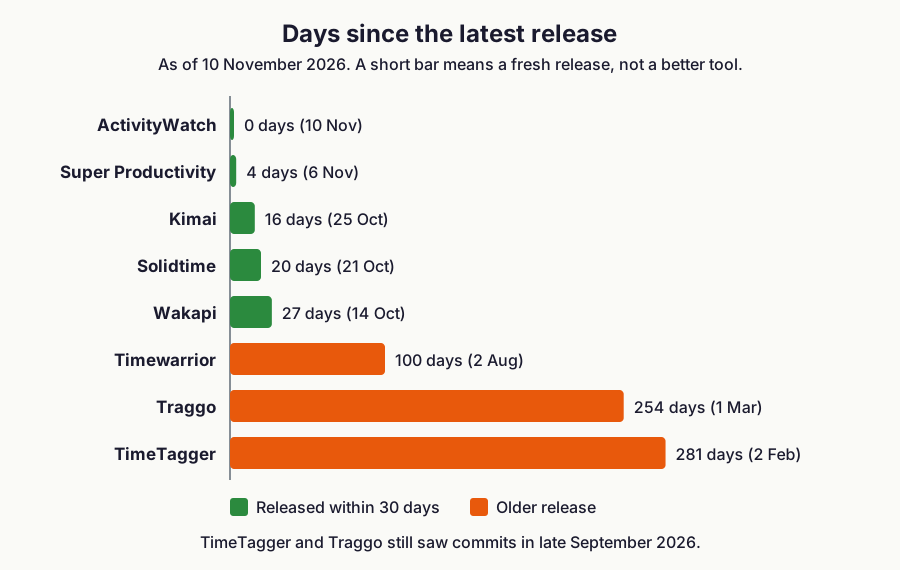
Figure 1: days between each project's latest GitHub release and 10 November 2026. Source: GitHub releases and commit history of each repository, read 10 November 2026.
TimeTagger and Traggo have the oldest releases, but both still received commits in late September 2026. That looks slow, not abandoned. If you plan to depend on either one, watch the repository for a few weeks first.
What does each license mean when you run it yourself?
For internal use, every license in this list lets you install the tool and use it. The differences appear when you modify the code. This is general information from the license texts and FAQs, not legal advice.
| License | Tools | Running it unchanged | If you modify it |
|---|---|---|---|
| MPL-2.0 | ActivityWatch | Nothing required | Obligations start when you distribute outside your organization, and apply to the changed files |
| GPL-3.0 | TimeTagger, Traggo | Nothing required | Private or internal use needs no release. Releasing it to the public means sharing your source under the GPL |
| AGPL-3.0 | Kimai, Solidtime | Permitted without conditions | Users who reach your modified version over a network, including your own staff, must be offered its source |
| MIT | Super Productivity, Timewarrior, Wakapi | Permissive | Permissive, keep the copyright notice |
The AGPL row is the easiest to misread. If you only install Kimai or Solidtime as released, nothing changes. If you patch it and let colleagues use the patched version in a browser, section 13 of the AGPL applies. Sources for the other rows are the GNU GPL FAQ and the MPL 2.0 FAQ.
Is ActivityWatch the best automatic open source tracker?
ActivityWatch records the app in front of you, the window title and, with a browser extension for Chrome, Firefox or Edge, the tab you are on. Events go into a local SQLite database, so there is nothing to host. The project is on v0.14.2 under MPL-2.0 and has about 19,600 GitHub stars.
You do not start timers. You open the web UI on localhost, read your day as a timeline and write rules that sort apps into categories. It runs on Windows, macOS, Linux and Android, and exposes a REST API plus watchers you can write yourself. For the general idea, see how automatic time tracking works.
Two limits are worth knowing. The project's own FAQ calls its data an estimate, and the default idle timeout is 3 minutes, so a long meeting away from the keyboard looks like nothing happened. It also gives you raw activity, not a timesheet: no clients, no rates, no invoice.
Pick it if you want to see where your day went, nothing should be uploaded, and you are happy to build your own reports.
Is Kimai good for teams that bill by the hour?
Kimai is a PHP application with customers, projects and activities, timesheets per user, teams, hourly rates and budgets. Its README also lists invoicing, data export, an API, two-factor login, LDAP and SAML. It is licensed AGPL-3.0, and the latest release is 2.71.0 from 25 October 2026. The README says releases come every couple of weeks.
Self-hosting needs PHP 8.2 or newer, MariaDB 10.6 or MySQL 8.4, a web server and its own subdomain, because a subdirectory install is not supported. Official Docker images exist. A hosted cloud version is sold at kimai.cloud, and the plugin marketplace mixes free and paid plugins, so read the plugin list before you assume an extra is included.
Entries are manual: start a timer or add a block of time.
Pick it if you need multi-user timesheets, rates and invoices from one tool, and you already run PHP or Docker services.
Is Solidtime a Toggl-style tracker you can host?
Solidtime looks like the commercial trackers many people know: a timer, projects, tasks, clients, billable rates, organizations, roles and permissions, plus CSV import from Toggl, Clockify and Timeentry. It is on v0.22.1 from 21 October 2026 under AGPL-3.0, with about 9,100 stars. The repository was created in January 2024.
The Docker guide asks for more than the others: a Postgres database, an SMTP server for email, and a reverse proxy such as Traefik or Nginx. Migrations run after every update, or automatically if you set AUTO_DB_MIGRATE. Registration is off by default. The desktop client and browser extensions need OAuth clients that you create on the command line.
It is below version 1.0, so features and the data model can still change. Read the release notes before each upgrade.
Pick it if you want the Toggl layout on your own server and someone on the team is comfortable with Docker.
Is TimeTagger good for solo manual tracking?
TimeTagger shows your day as an interactive timeline. You start a timer or drag out a block, tag it, and review totals by tag. It is a small Python application under GPL-3.0, with SQLite storage, pip or Docker installation and PDF and CSV reports. The latest release is v26.1.3 from 2 February 2026.
The README targets individuals and freelancers. Several logins are possible through environment variables or the command line, but there are no rate cards or approval flows. The author also sells a hosted version: according to timetagger.app, as of November 2026 the Basic plan is 3 euros a month on yearly billing and 1 euro more billed monthly, with a 14-day trial and a lifetime option.
Pick it if you work alone, want fast manual entry and want the least to maintain. Freelancers who bill by the hour can also read our freelance hourly billing guide.
Is Traggo a good tag-based tracker?
The Traggo README puts it plainly: there are no tasks, only tagged time spans. You might add a project tag and a type tag with values like email, programming or meeting, then build dashboards that add up time by tag. It has list and calendar views, several themes and simple user management. The code is Go, licensed GPL-3.0, with a Docker image on Docker Hub. The latest release is v0.8.3 from 1 March 2026.
Traggo is self-hosted only, and it is pre-1.0. There is no billing layer, so use it for insight rather than invoices.
Pick it if you think in tags and want a small server you can forget about.
Which other open source tools are worth knowing?
These solve a narrower problem than the five above.
- Super Productivity (MIT, v20.0.0 on 6 November 2026) calls itself a to-do list, time tracker and daily planner for focused personal work, private and offline-first. Choose it when tasks, not clients, are the unit.
- Timewarrior (MIT, v1.10.0 on 2 August 2026) is a command line tracker with stopwatch features, calendar-based backfill and reports. Choose it if you live in a terminal.
- Wakapi (MIT, 2.18.2 on 14 October 2026) is a self-hosted backend compatible with WakaTime editor plugins, and Hackatime is another WakaTime-compatible tracker from Hack Club. Both count coding time inside editors, not the rest of your day.
We left out two older projects. Anuko Time Tracker's repository last saw a commit in December 2023, and Tockler's latest release is from April 2025.
How do you choose an open source time tracker?
Match your situation to a row. If two rows fit, take the one with less to maintain.
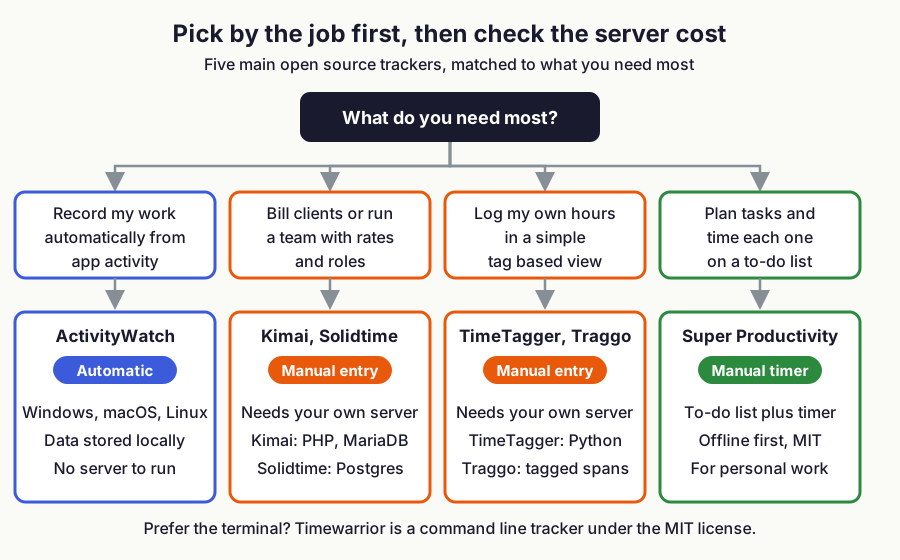
Figure 2: which open source tracker fits which job, and whether it needs your own server. Source: each project's README and documentation, November 2026.
| Your situation | Pick | Why |
|---|---|---|
| Solo developer, no timers, nothing uploaded | ActivityWatch | Automatic, local, no server |
| Small agency billing clients by the hour | Kimai | Customers, rates, teams, invoicing |
| Team that wants a Toggl-style app on its own server | Solidtime | Familiar layout, frequent releases |
| Solo, manual entry, minimal upkeep | TimeTagger | pip or Docker, timeline editing |
| You prefer tags to a project tree | Traggo | Tag dashboards, simple setup |
| Tasks drive your day | Super Productivity | Time attached to each task |
ActivityWatch is the only automatic tracker in the main five, so it is the open source answer to RescueTime. Kimai and Solidtime are the only ones built for teams, and they are the open source answers to Toggl Track. If you track by hand anyway, a spreadsheet may be enough, and time tracking spreadsheet vs app covers that trade.
How do you test a tracker in one afternoon?
Install your top two and run the same short routine on both. It exposes the problems a feature list hides.
- Log the same five entries, across two clients, in each tool.
- Edit one entry and delete another. Check the totals change.
- Export a report to CSV and open it in a spreadsheet. Check the time zone and the rounding.
- Restore a backup onto a clean install. If you cannot, you do not have a backup.
- Update to the newest release and note how long it takes.
- Decide who backs up the database, who applies updates and whether the app sits behind HTTPS. Each answer is a recurring task.
When does a hosted app fit better?
TimeUno is an automatic time tracker for macOS and Windows. It is closed source, so it is not a ranked pick here, but it suits people who want automatic tracking without running anything. It is a cloud service.
The trade-offs:
- Cost: there is no free tier. After a 14-day trial, Individual is $9.99 a month ($8.33 a month billed yearly). See pricing.
- No source code: you cannot audit or fork it.
- Platforms: macOS and Windows only, with no mobile app and no Linux desktop app. A headless Linux agent exists for servers.
- Your data is on our servers, not yours.
In return you skip upgrades and backups. TimeUno turns tracked time into timesheets that export as CSV or PDF, and it has no invoicing. It also has an MCP server, covered in asking Claude about your time. If you like ActivityWatch but want a hosted timeline, see our ActivityWatch alternative guide. For more hosted and free options see free time tracking apps and automatic time trackers compared. If your reason for open source is control over your data, ActivityWatch is the better fit.
FAQ
What is the best open source time tracker?
The best open source time tracker depends on how you work. ActivityWatch suits automatic tracking on your own machine, Kimai and Solidtime suit teams that bill clients, and TimeTagger and Traggo suit small manual setups.
Is there an open source time tracker that tracks automatically?
Yes, ActivityWatch is the only automatic one among the five main picks. It records apps, window titles and browser tabs, and stores its data on your computer in SQLite.
What is the best open source time tracker for Linux?
ActivityWatch is the best open source time tracker for Linux if you want automatic tracking, because it runs on Linux without a server. Timewarrior suits the command line, and Kimai, Solidtime, TimeTagger and Traggo run on a Linux server. TimeUno has no Linux desktop app. See open source and Linux time trackers.
How do Kimai and ActivityWatch compare with commercial trackers?
Kimai records time you enter, bills clients and needs a PHP server, while ActivityWatch records automatically, stays on your machine and produces no timesheet. Commercial trackers such as TimeUno, Toggl Track or RescueTime host the data for you and cost a subscription, as of November 2026.
Can I use AGPL time tracking software at work without publishing code?
Yes, if you run it unmodified. The AGPL asks you to offer source to network users only when you modify the program, and a modified internal install still counts. Ask a lawyer before you ship patches.
Sources and checks
- ActivityWatch repository and releases: https://github.com/ActivityWatch/activitywatch
- ActivityWatch FAQ: https://docs.activitywatch.net/en/latest/faq.html
- Kimai repository and releases: https://github.com/kimai/kimai
- Solidtime repository and releases: https://github.com/solidtime-io/solidtime
- Solidtime Docker self-hosting guide: https://docs.solidtime.io/self-hosting/guides/docker
- TimeTagger repository and releases: https://github.com/almarklein/timetagger
- TimeTagger pricing: https://timetagger.app/pricing
- Traggo repository and releases: https://github.com/traggo/server
- Super Productivity repository: https://github.com/super-productivity/super-productivity
- Timewarrior repository: https://github.com/GothenburgBitFactory/timewarrior
- Wakapi repository: https://github.com/muety/wakapi
- Hackatime repository: https://github.com/hackclub/hackatime
- GNU AGPL 3.0: https://www.gnu.org/licenses/agpl-3.0.html
- GNU GPL FAQ: https://www.gnu.org/licenses/gpl-faq.html
- MPL 2.0 FAQ: https://www.mozilla.org/en-US/MPL/2.0/FAQ/
- Release data read from the GitHub API on 10 November 2026.