

Blog AI & Tools Time tracking MCP server: ask Claude about your time
AI & Tools · Nov 13, 2026
Time tracking MCP server: ask Claude about your time
A time tracking MCP server lets Claude, ChatGPT or Cursor answer from your real hours. Setup steps per app, what a call sends, and which trackers have one.
What is a time tracking MCP server?
A time tracking MCP server lets an AI assistant such as Claude, ChatGPT or Cursor read your tracked time and answer from it instead of guessing. MCP (Model Context Protocol) is an open standard for connecting AI apps to outside tools, and the server exposes a few named tools that the assistant calls when your question needs data.
Last reviewed: November 2026.
TimeUno is an automatic time tracker for macOS and Windows that records the app in front, your window titles and your AI tool sessions. It runs a remote MCP server at https://app.timeuno.io/mcp. You connect your AI app once, sign in, and ask about your day in plain language.
Why use MCP instead of a CSV export or an API call?
A CSV export is a snapshot you have to download, upload and re-explain every time. A REST API needs code and a key. An MCP server sits between the two: the assistant discovers the tools itself, calls them live and asks you for consent first.
MCP suits short, repeated questions such as "where did Tuesday go?". For a report you hand to a client, a CSV or PDF export from the app is still the better artifact.
What can you ask your tracked time?
You can ask anything the tools return: totals for a day, week or month, a timeline of activity runs, the current activity, and time per project. The assistant picks the tool, reads the result and writes the answer. The data comes from time TimeUno already tracked, not from a new capture.
Questions that map to the read tools:
- "How much of today was productive?" (
get_summaryfor one day) - "What did I work on this week?" (
get_summaryfor a week, with top apps, sites and projects) - "Walk me through yesterday as a list." (
get_timeline: app or site, window title, category, verdict, project) - "What am I doing right now, and is tracking paused?" (
get_current_activity) - "Which project took more time than last week?" (
get_projects, which includes the week before) - "How much of this week was AI tool time versus my own?" (the summary reports AI and idle time)
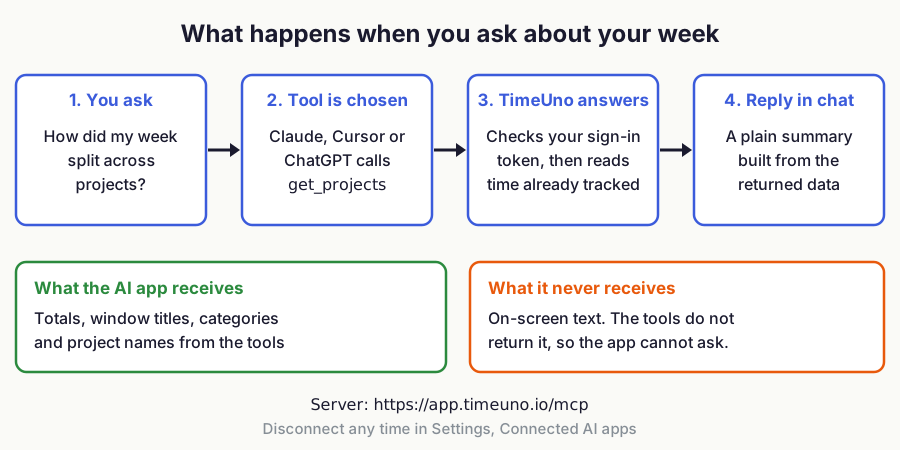
Figure 1: What happens when you ask about your week. Source: TimeUno MCP documentation, November 2026.
Four tools are read only. Four more can act for you, and only if you allow them: pause_tracking, resume_tracking, add_note and set_productivity_rule. Team owners and admins get one extra read tool, get_team_summary, which returns each member's time, productivity score, productive share and AI time, and never apps, sites or screens.
How do you set up the TimeUno MCP server?
You add https://app.timeuno.io/mcp as a remote server in your AI app, then sign in with OAuth in the browser. You need a TimeUno account with an active trial or plan. Every plan starts with a 14-day trial, with a card added at the start.
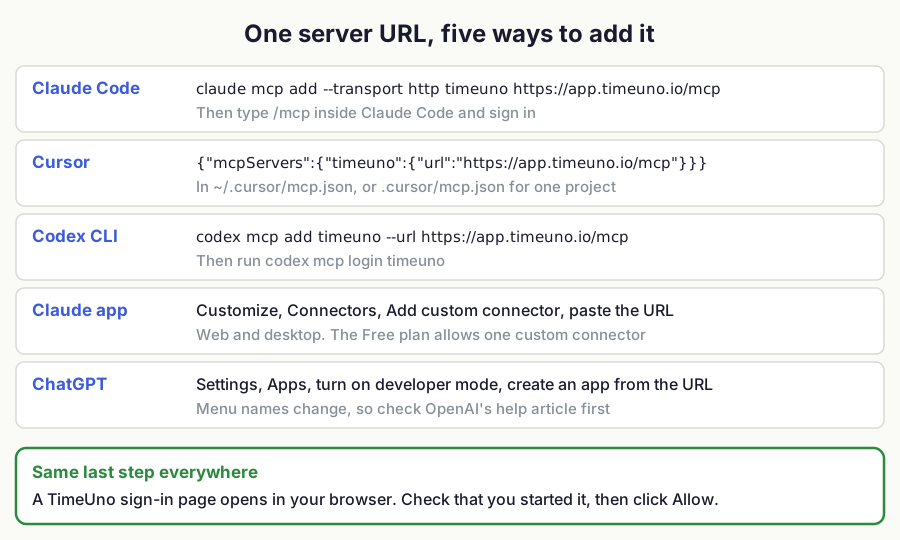
Figure 2: One server URL, five ways to add it. Sources: the Claude Code, Cursor, Codex and Claude documentation listed below.
Claude Code
Run this in a terminal, then type /mcp inside Claude Code and follow the sign-in prompt:
claude mcp add --transport http timeuno https://app.timeuno.io/mcpCheck it with claude mcp list. By default Claude Code keeps the server private to you in the current project. Add --scope user to make it available in every project. Anthropic's Claude Code MCP documentation lists the scopes and a claude mcp remove command.
Cursor
Add a remote server to ~/.cursor/mcp.json for all projects, or to .cursor/mcp.json inside one project. Cursor supports Streamable HTTP and OAuth, so the URL is enough:
{
  "mcpServers": {
    "timeuno": {
      "url": "https://app.timeuno.io/mcp"
    }
  }
}
See the Cursor MCP documentation.
Codex CLI
codex mcp add timeuno --url https://app.timeuno.io/mcp
codex mcp login timeuno
The Codex CLI, IDE extension and ChatGPT desktop app share one configuration in ~/.codex/config.toml. OpenAI describes it in its Codex MCP documentation.
Claude (claude.ai and the desktop app)
Custom connectors are available on Free (limited to one), Pro, Max, Ultra, Team and Enterprise plans, as of November 2026. On an individual plan, go to Customize, then Connectors, click the plus button, and choose Add custom connector. Name it TimeUno, paste the server URL, click Continue, review the authentication settings and click Add.
Then switch it on per conversation with the plus button at the lower left, under Connectors. On Team or Enterprise, an Owner adds it once under Organization settings, then Connectors, and each member clicks Connect under Customize, then Connectors. Claude connects from Anthropic's cloud, so the server must be reachable from the internet, which the TimeUno URL is. Anthropic's steps are in its custom connectors guide.
ChatGPT
ChatGPT needs developer mode to add a custom MCP server. In the web app, open Settings, then Apps, turn on developer mode under Advanced settings, then create an app, paste the server URL and choose OAuth. On Business and Enterprise workspaces an admin may need to allow it first.
OpenAI changes these menu names often, so check its developer mode help article if a label differs.
Any other MCP client
Pick the option for a remote server over Streamable HTTP, paste https://app.timeuno.io/mcp, and choose OAuth if asked. If a client only supports local stdio servers, it cannot use this server directly. The TimeUno MCP setup guide and the MCP page have the current details.
What if it does not connect?
Most failures have one of three causes: a typo or trailing character in the URL, a client that only supports local servers, or a TimeUno trial or plan that is not active. Remove the server and add it again after fixing the cause, since some clients only run the sign-in flow when a server is first added.
What does an MCP call send?
A call carries your OAuth token and its arguments, such as a date or a note's text. TimeUno answers from time it already tracked. The AI app only gets what the tool returns: totals, timeline entries, project names and the current activity.
On-screen text never goes to the AI app, because no tool returns it. A call does not record a keystroke or capture anything new. Whatever a tool returns does enter the assistant's conversation, so it falls under that provider's own terms, and you should read those before you connect, as you would for any connector.
To disconnect, open Settings, then Connected AI apps, in the TimeUno dashboard and click Disconnect. Access ends at once. If your plan ends, the tools stop answering until a plan is active again.
Is it safe to allow an app to read your time?
It is safe when you start the connection yourself. The sign-in page shows the app's name and the permissions it asks for. Check those, then click Allow.
If a TimeUno Allow page opens and you did not just add the server in an AI app, click Deny. Someone else may be trying to link their app to your account. If an app asks to act for you and you only want it to read, click Deny.
Anthropic also warns to trust a server before connecting it and to watch for prompt injection, where text inside a tool result tries to steer the assistant. Keep tool approvals switched on, and read what the assistant is about to do before you accept a write.
Which time trackers have an MCP server?
Eight of the nine below do. The table lists what each vendor's own site says as of November 2026. Setup and limits differ, so check the linked source before you pick.
| Tracker | MCP server for AI assistants | Notes | Source |
|---|---|---|---|
| TimeUno | Yes, remote server | OAuth sign-in. Read tools plus pause, note and rule tools. No free tier. | timeuno.io/mcp |
| Toggl | Yes | Logs time, manages tasks, runs reports. Says it is on all plans, including the free one. Creates, updates and deletes need a confirmation step. | toggl.com/ai/mcp |
| Clockify | Yes, API key | Time entries and reports, limited to projects you can already access. Its help page carries a "Coming soon" label as of this check. | Clockify Help |
| Harvest | Yes | Start and stop timers, log hours and review time through an AI assistant, per its help center article. Check the article for plan limits. | Harvest Help Center |
| Timing (Mac) | Yes, two servers | Built into the Mac app and also a web server. Needs a Timing Connect plan. Mac app server is in beta. | timingapp.com/help/mcp |
| Rize | Yes, remote server | Hosted at https://mcp.rize.io/mcp, OAuth sign-in. Covers time entries, projects and clients. | Rize MCP guide |
| Dayflow (Mac) | Yes, local | Set up from Settings, MCP / CLI. Mac only. Reads local data, with an Allow edits switch. | dayflow.so/integrations |
| WakaTime | Not found | No MCP page on wakatime.com (home, features and developers pages checked). | wakatime.com/developers |
| RescueTime | Yes, remote server | Mostly read access to activity, time totals and project time. Starting or stopping focus sessions and categorizing activities need extra permissions. MCP API keys are read-only. OAuth sign-in. | RescueTime MCP guide |
The main split is manual versus automatic. Manual trackers such as Toggl, Clockify and Harvest mostly let the assistant log and edit entries, so you still have to remember to tell it what you did. Automatic trackers such as TimeUno, RescueTime and Rize mostly let it read what was already recorded.
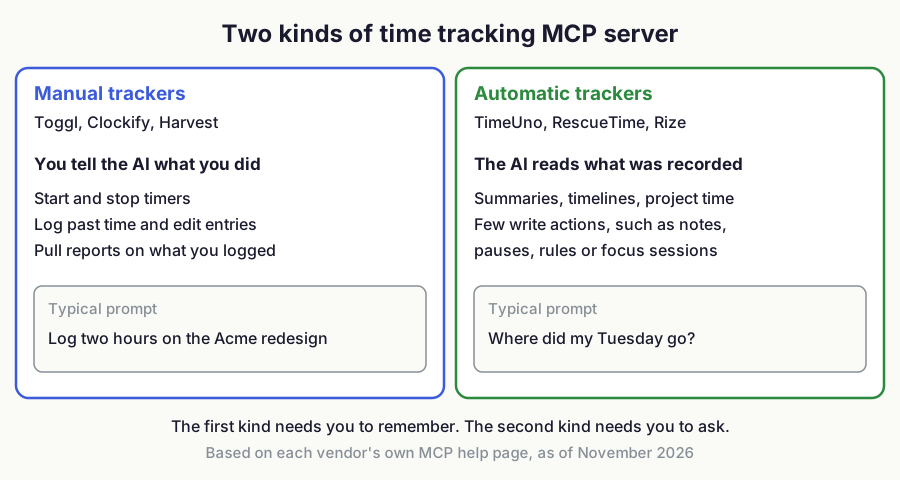
Figure 3: Two kinds of time tracking MCP server. Sources: each vendor's MCP page in the table above, as of November 2026.
TimeUno is automatic and covers macOS and Windows. It records your AI tool sessions (Claude Code, Cursor, Codex CLI and others) next to your own app time, so you can ask about both in one place. It has no mobile app and no free tier, and it will not log time for you from a chat the way a manual tracker can. For side-by-side detail, see TimeUno versus Rize, TimeUno versus RescueTime and the best automatic time trackers.
What should you ask first?
Start with read only questions and one real week of data. A fresh install has little to answer from, so give it a few days of tracking first.
- Ask for a summary of last week, then compare it with your own memory.
- Ask for yesterday's timeline and check that the project names are right.
- Ask which project moved most against the week before.
- Only then allow write access, and try a note or a pause.
If you want the AI timeline specifically, TimeUno records Claude Code sessions as their own entries, and the summary tool reports AI time as a separate figure. For what to do with those numbers, see how to track time spent on AI tools and how to measure AI ROI.
Try it on your own hours
Install the TimeUno desktop app, track for a few days, then run the one-line command for your client. Download TimeUno and start the 14-day trial, or see the pricing first.
## FAQ
### What does an MCP server do for a time tracker?
A time tracking MCP server is a connector that lets an AI assistant read your tracked time and answer from it instead of guessing. MCP (Model Context Protocol) is an open standard for connecting AI apps to outside tools.
How do you connect the TimeUno MCP server to Claude or Cursor?
You add https://app.timeuno.io/mcp as a remote server in your client and sign in through OAuth in the browser. In Claude Code the command is claude mcp add --transport http timeuno https://app.timeuno.io/mcp, and in Cursor you add a url entry to mcp.json.
Does the TimeUno MCP server send my on-screen text to the AI app?
No, the TimeUno MCP server never sends on-screen text to the AI app. The app only sees what the tools return, such as totals, window titles, categories and project names.
Can an AI assistant change my TimeUno data?
Only in small ways, and only if you allow it. The write tools can pause or resume tracking, add a note, or mark an app or site as productive or unproductive.
Which time trackers have an MCP server?
Toggl, Clockify, Harvest, Timing, Rize, Dayflow, RescueTime and TimeUno have one, as of November 2026, though Clockify's page is marked "Coming soon". WakaTime has no MCP server of its own on its site as of that check.
Sources
- Claude Code MCP documentation: https://code.claude.com/docs/en/mcp
- Cursor MCP documentation: https://cursor.com/docs/mcp
- Claude custom connectors: https://support.claude.com/en/articles/11175166-get-started-with-custom-connectors-using-remote-mcp
- Codex MCP documentation: https://learn.chatgpt.com/docs/extend/mcp
- ChatGPT developer mode: https://help.openai.com/en/articles/12584461-developer-mode-and-mcp-apps-in-chatgpt
- Model Context Protocol: https://modelcontextprotocol.io
- TimeUno MCP page: https://timeuno.io/mcp/
- TimeUno MCP docs: https://timeuno.io/docs/developers/mcp/
- Toggl MCP: https://toggl.com/ai/mcp
- Clockify MCP help: https://clockify.me/help/integrations-and-add-ons/use-clockify-mcp-server-to-connect-to-ai-agent
- Harvest MCP help: https://support.getharvest.com/hc/en-us/articles/46293697226381-Harvest-MCP
- Timing MCP help: https://timingapp.com/help/mcp
- Rize MCP guide: https://rize.io/guides/mcp-ai-assistants
- Dayflow integrations: https://www.dayflow.so/integrations/
- RescueTime MCP guide: https://www.rescuetime.com/mcp-guide
- WakaTime developers: https://wakatime.com/developers/