

Blog AI & Tools How to Track Time Spent on AI Tools (3 Ways)
AI & Tools · Nov 13, 2026
How to Track Time Spent on AI Tools (3 Ways)
Track time spent on AI tools like ChatGPT, Claude Code and Cursor: manual logs, vendor usage pages or an automatic tracker. Reviewed November 2026.
How do you track time spent on AI tools?
You track time spent on AI tools in one of three ways: a manual log, the usage pages the AI vendors give you, or an automatic tracker that records sessions as they happen. Manual logs drift within days. Vendor pages show tokens and limits, not hours. Only the automatic route gives you a weekly number you can rely on.
This guide covers all three, with a worked weekly log you can copy. Last reviewed: November 2026.
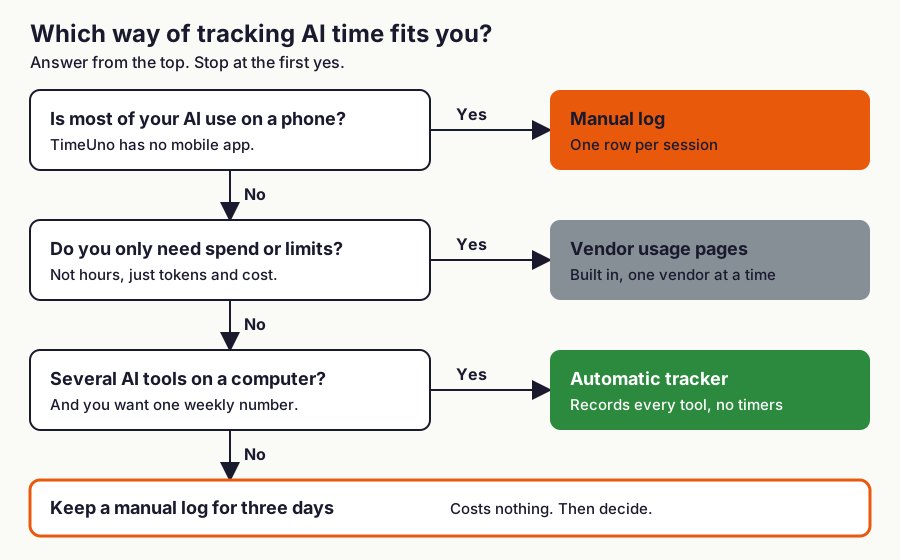
Figure 1: Which method fits, in three questions. TimeUno has no mobile app, which is why phone-only use goes to a manual log.
Why bother measuring AI time at all?
Measure it because "I use AI a lot" is not a number, and memory is a poor instrument. In a 2025 randomized trial by the research group METR, 16 experienced developers expected AI tools to speed them up by 24%. After the study they still believed it had sped them up by 20%, yet they took 19% longer on the tasks where AI was allowed (METR).
METR labels those results out of date for current tools, so the 19% is not a verdict on AI. It does show that people misjudge what AI does to their own time. To turn hours into a return, see how to measure AI ROI.
There are two different numbers hiding in "AI time":
- Your time with the tool: the minutes the app or tab is in front of you, typing, reading, reviewing.
- AI working time: the minutes the tool is running while you do something else, such as an agent in a background terminal.
Most advice mixes them up. The first is your attention; the second is capacity you did not spend.
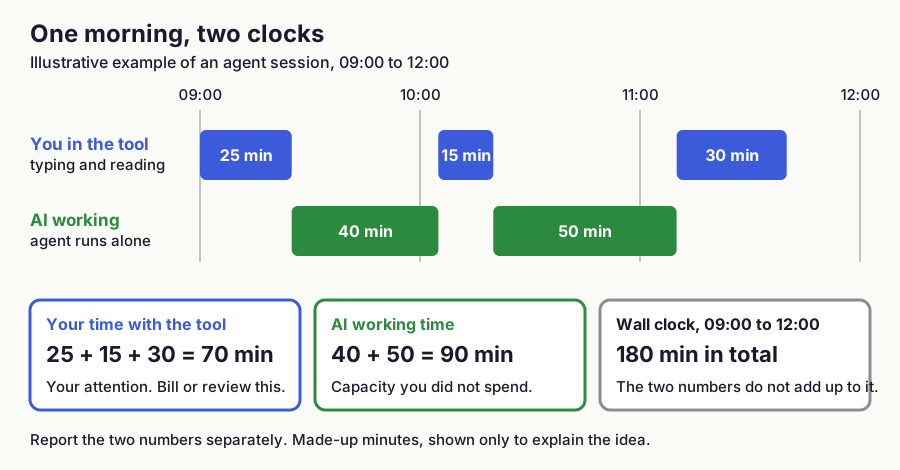
Figure 2: One illustrative morning with made-up minutes. Your time and AI working time are separate numbers and neither equals the wall clock.
Is tracking time on AI tools the same as logging time with AI?
No. Tracking time on AI tools measures how long you and your agents spend in ChatGPT, Claude Code, Cursor and the like. Logging time with AI means telling an assistant to create entries in a time tracker for you, usually through MCP, the Model Context Protocol.
This guide is about the first. For the second, TimeUno has an MCP server at https://app.timeuno.io/mcp, covered in ask Claude about your time with MCP.
Method 1: Can you track AI time manually?
You can, with a spreadsheet or a timer, but it breaks down in about a week. AI use is made of many short bursts: a 90-second question, a 4-minute code fix, a long agent run. Nobody starts a timer for each one, so the log undercounts the small sessions that add up the most.
A manual log has four weak spots: bursts you forget, background agent runs with no natural start or stop, browser tabs that stay open for hours without being in use, and Friday-afternoon memory, which rounds up on good days and down on bad ones.
If you still want to start by hand, keep one row per session with four columns (date, tool, minutes, task) for three days. The number you get is a lower bound, and the gap between it and an automatic count shows how much you forget.
Developers have a free half-way option for one tool. Claude Code stores conversation history with timestamps on disk, and open-source scripts such as cctimesheet group those messages into time blocks (write-up by its author). It covers Claude Code only, on one machine, and only as far back as the tool keeps its history.
Method 2: What do the AI vendors' usage pages show?
Vendor pages show what the vendor bills or limits: tokens, requests, spend and plan limits. They do not show how long you sat in the tool and they cover only that vendor.
Take Claude Code as a documented example. Its /usage command shows token usage for the current session, an estimated cost, and, for subscribers, plan usage bars and a breakdown by skill, subagent and plugin. Anthropic's documentation says the figures are approximate and computed from local session history on that machine, so usage from other devices or claude.ai is not included (Claude Code cost docs).
As of November 2026:
| Source | What it shows | What it leaves out |
|---|---|---|
Claude Code /usage | Session tokens, estimated cost, plan limit bars, 24-hour and 7-day breakdown | Other tools, other devices, claude.ai, your time away from the session |
| claude.ai settings, Usage | Current session usage, weekly reset time and usage credits (Claude help) | Hours of use are not described; other vendors |
| Cursor dashboard | Included usage and additional (on-demand) spend (Cursor help) | Hours in the editor, other tools |
| ChatGPT | A data export of your chat history and account data (OpenAI help); not offered in Business, Enterprise or Healthcare workspaces | The page describes no time-spent report |
Vendor pages answer "what did this cost me or how close am I to my limit". They do not answer "how many hours did I spend in AI across all my tools". For that you need one tracker that sees every tool.
Method 3: How does automatic AI time tracking work?
An automatic tracker watches which app or tab is in front of you and reads session activity from supported AI tools, then adds it up. You do not start or stop anything. The result is one timeline of your attention and one timeline of your AI tools, side by side.
TimeUno is an automatic time tracker for macOS and Windows that records the app in front of you and session metadata from AI tools. It adds a browser extension for the web tools. There is no mobile app and no free plan: every plan starts with a 14-day trial, and paid plans start at $9.99 a month, or $8.33 billed yearly, as of November 2026 (pricing). For the general idea, see automatic time tracking.
Which AI tools does TimeUno track?
| Where | Tools |
|---|---|
| Desktop app | Claude Code, Cursor, Codex CLI, OpenCode, GitHub Copilot, Claude desktop app, Windsurf, Aider, Ollama, Gemini CLI, oh-my-pi, Pi |
| Browser extension | claude.ai, ChatGPT, Gemini, Perplexity, DeepSeek, v0, Grok, Bolt, Lovable, Replit |
| Remote server (headless agent) | Claude Code, Cursor CLI, Codex CLI, Gemini CLI, OpenCode, Aider, Ollama, oh-my-pi, Pi |
Source: TimeUno docs, AI tool tracking.
What does it record from AI tools, and what stays private?
From the desktop tools it sends metadata only: when a session starts and ends, whether the AI is working or waiting for you, the model, token counts and cost, and the project folder. Your prompts, the AI's answers and your code never leave your device. For Aider, Windsurf and Ollama, TimeUno sees only whether they are active, so there is no token count or cost.
To describe sessions on a timesheet, the desktop app also sends the session title, a task type picked from a fixed list, relative paths of edited files and subjects of commits the AI made. Switch that off under Settings, Your data, Share task details; the time is still tracked.
In the browser, the extension reads page text like any other site, which can include chat content. Turn that off under Settings, Read on-screen text; pause and capture settings explains it.
Can it count AI sessions from before you installed it?
Partly. When you start tracking, the app can import earlier sessions from the history your tools keep on disk:
- In full (times, model, tokens, cost, project): Claude Code, oh-my-pi, Pi, OpenCode, Codex CLI.
- Start and end times only: Cursor, Gemini CLI, GitHub Copilot.
- Not imported: Windsurf, Ollama, Aider, Claude desktop app.
It can only find what your tools still have. Claude Code deletes its history after about 30 days by default. Parallel sessions each count, so imported hours can exceed elapsed time.
What does a weekly AI time log look like?
A useful weekly log has one row per tool with sessions, your time, AI working time, and one output you care about. The example below is illustrative: the numbers are made up to show the shape, not measured from a real user or a benchmark.
| Tool | Sessions | Your time (h) | AI working (h) | Output you add by hand |
|---|---|---|---|---|
| Claude Code | 11 | 9.5 | 6.0 | 6 pull requests merged |
| Cursor | 8 | 7.0 | 2.5 | 3 pull requests merged |
| claude.ai | 14 | 3.5 | 1.0 | 4 drafts sent |
| ChatGPT | 9 | 2.0 | 0.5 | 2 drafts sent |
| Perplexity | 6 | 1.0 | 0.2 | 3 research notes |
| Total | 48 | 23.0 | 10.2 |
Three numbers come out of it: your AI share of the week (23.0 of 41.5 tracked hours is about 55%), hours per output (Claude Code: 9.5 hours for 6 pull requests is about 1.6 hours each; Cursor: 7.0 hours for 3 is about 2.3), and the working ratio (10.2 AI hours beside 23.0 of yours, about 0.44). Cost per output is a prompt for questions.
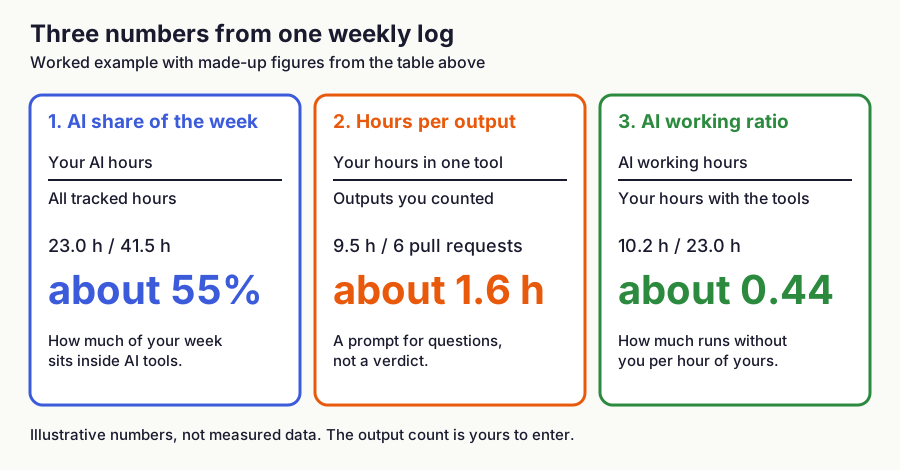
Figure 3: The three numbers from the example log. All figures are illustrative.
TimeUno fills the first four columns. The output column is yours: add it each Friday in two minutes. To see what a tool changes, track a week or two before you adopt it, then compare.
Should you bill clients for the time AI tools spend working?
If you bill by the hour, bill the hours you worked, and treat AI working time as your own capacity. That is a rule of thumb, not a legal rule: your contract and any professional guidance for your field decide what counts as billable.
Your time with the tool is the figure you can stand behind with a client; AI working time explains why a task finished faster than the hours suggest. For pricing models, see the freelance hourly billing guide and time tracking for freelancers.
How do you set it up?
Install the desktop app from the download page, click Start tracking and say yes to "Import your past AI sessions?". Add the browser extension if you use ChatGPT, claude.ai, Gemini or Perplexity in a tab. Work normally for a week without timers, then copy the AI totals from the dashboard into a table like the one above. If a stretch lands in the wrong category, correct it once; corrections become rules.
Who should not use this approach?
Skip an automatic tracker if you only use AI on a phone, since TimeUno has no mobile app, or if you want a free tool: a manual spreadsheet costs nothing. If you only need a spend figure, vendor usage pages are enough. Choose an automatic tracker if you use several AI tools on a computer and want one number across them; compare options in the best automatic time trackers of 2026.
Track your AI hours for a week
Run the trial for one working week, compare the total to your own guess, and fill in the output column. See how TimeUno tracks AI tool time and start the 14-day trial.
## FAQ
### How do I track how much time I spend on ChatGPT and Claude?
Use an automatic tracker, because a manual log undercounts short sessions. TimeUno tracks ChatGPT and claude.ai through its browser extension and Claude Code through the desktop app, and adds them into one weekly total.
Why can't I use vendor usage pages to measure AI hours?
Vendor usage pages show tokens, spend and plan limits, not hours. They also cover only that vendor, so they cannot give you one number across all your AI tools.
Does TimeUno record my prompts and AI answers?
No. TimeUno sends only metadata from desktop AI tools, and your prompts, the AI's answers and your code never leave your device. In the browser, page text can include chat content unless you turn off Read on-screen text.
Can I ask my AI assistant to log my hours instead?
Yes, through an MCP connection, but that records what you tell it and does not measure the time. See the MCP guide.
Sources
- METR, Measuring the Impact of Early-2025 AI on Experienced Open-Source Developer Productivity, July 2025, checked November 2026.
- Anthropic, Manage costs effectively (Claude Code docs), checked November 2026.
- Anthropic, How do usage and length limits work (Claude help center), checked November 2026.
- Anthropic, The .claude directory (Claude Code docs), checked November 2026.
- Cursor, Overages and checking usage, checked November 2026.
- OpenAI, Exporting your ChatGPT history and data, checked November 2026.
- Paul Denya, Claude Code Timesheets, November 2025, and cctimesheet on GitHub.
- TimeUno, AI tool tracking: what TimeUno sends.