

Comparisons 8 best RescueTime alternatives in 2026, compared
Aug 10, 2026 · 12 min read




8 best RescueTime alternatives in 2026, compared
Compare 7 RescueTime alternatives, Timing, Rize, TimeUno, ManicTime, ActivityWatch, WakaTime and Toggl Track, prices and platforms as of October 2026.
The best RescueTime alternatives in 2026 are Timing, Rize, TimeUno, ManicTime, ActivityWatch, WakaTime and Toggl Track, each one replacing a different piece of what RescueTime does. Pick Timing on a Mac for a private, local timeline, Rize for focus tools plus AI, TimeUno for projects and timesheets filed for you across Mac, Windows and Linux including your AI tools' time, or ActivityWatch if you want it free and open source.
RescueTime made automatic tracking popular. Install it, forget it, and get a Productivity Pulse score at the end of the day. People start looking elsewhere for a few reasons. The score tells you how the day went, not where the hours went. The timeline, projects and billable rates now sit in the "+" plans, so you pay for Solo Focus and then again for Solo+. The AI timesheet suggestions can send app and website names to OpenAI, confirmed on RescueTime's sub-processor list, checked October 18, 2026. RescueTime also has no Linux desktop app, per RescueTime's help center, checked October 18, 2026.
Every price and feature claim below links to the vendor's own pricing or help page, dated to when we checked it. Prices are as of October 18, 2026, unless a section says otherwise.
| Tool | Best for | Free plan | Paid from (billed yearly, as of Oct 18 2026) | Platforms | Files projects for you |
|---|---|---|---|---|---|
| Timing | Mac users who want local, private data | No, 30-day trial | $9 a month | Mac only, plus a web app | Rules you build, AI suggestions |
| Rize | Focus tools and AI insights | No, 7-day trial | $9.99 a month | Mac, Windows | AI categorization and rules |
| TimeUno | Projects, timesheets and AI tool time, no timer | No, 14-day trial | $10.49 a month | Mac, Windows (beta), Linux (beta), Firefox | Yes, from your editor project or keywords |
| ManicTime | Detailed local timeline, one-time license | Yes, Windows only | $7 a month, or $87 license | Windows, Mac, Linux, iOS, Android | Auto-tagging rules (paid) |
| ActivityWatch | Free, open source, data on your machine | Free and open source | Free | Windows, Mac, Linux, Android | No, regex categories only |
| WakaTime | Developers who only need coding time | Yes, 1 week of history | $8.25 a month | 100+ editors, desktop app for Mac, Windows, Linux | Yes, for code projects |
| Toggl Track | Billing clients with a timer | Yes, up to 3 users | $9 per user a month | Mac, Windows, web, iOS, Android, browsers | Keyword rules start or suggest entries |
| RescueTime | The original, with focus blocking | Yes, Lite | $7 a month | Mac, Windows, iOS, Android, browsers | Suggestions you review (Solo+) |
What RescueTime still does well
Before you switch, know what you would give up. RescueTime has a free Lite plan, a mobile app for iOS and Android, Focus Sessions that block distracting sites and apps, and it never takes screenshots or logs keystrokes. Solo Focus costs $7 a month billed yearly ($9 monthly), and Solo+ with Timesheets costs $12 a month billed yearly ($15 monthly). Team plans start at $10 per user a month billed yearly. Prices are from RescueTime's own pricing page, as of October 18, 2026.
If your only complaint is the score, try the Solo+ timeline first. If the complaint is the price split, the OpenAI data flow or Linux, read on.
Timing
Timing is a Mac app that records every app, document and website, including the full file path or URL, without a timer. Its pitch is close to RescueTime's, but the data is local, and tracked times stay on your Mac unless you turn on sync.
Who it's for: Mac users who want a private, local timeline instead of a daily score.
Better than RescueTime: you see a detailed timeline, not a score. You build rules by dragging activities onto projects, and AI summaries group your day and suggest time entries. There are no screenshots, idle time can be excluded, and Timing prompts you to record time after video calls. The Connect edition adds a local MCP server so tools like Claude Code can file unassigned activity into projects.
Where RescueTime is better: Mac only, no Windows, Linux or Android app, just a web app and Screen Time import for iPhone. No focus blocking. AI summaries are processed by OpenAI when you opt in, so that concern does not fully go away.
Price: Professional $9 a month billed yearly ($10 monthly), Expert $11 a month yearly ($14 monthly), Connect $16 per user a month. 30-day trial, no free plan. Prices are from Timing's own pricing page, as of October 18, 2026.
Rize
Rize records your active window (app, title, URL) on Mac and Windows and sorts it with AI. It is the closest match if you liked RescueTime's focus side.
Who it's for: people who liked RescueTime's focus tools and want AI to sort their day automatically.
Better than RescueTime: a Focus Time metric, a Distraction Blocker during focus sessions, focus music, smart breaks and AI insights about your day. AI auto-categorization and tagging file your time, and paid plans add AI chat, reports and an MCP server. Rize's newer team plan adds profitability by client, timesheets and invoicing.
Where RescueTime is better: no Linux (listed as coming soon), and no mobile app below Enterprise. The AI runs on credits, and the price climbs fast, with the plans that add agents and the MCP server costing far more than Basic. The security page does not name its AI provider, and data is hosted on Google Cloud in the US.
Price: Basic $9.99 a month billed yearly ($12.99 monthly), Pro $23.99 yearly ($28.99 monthly), Team $29.99 per seat with a 2-seat minimum. 7-day trial, no free plan. Prices are from Rize's own pricing page, which it says it last updated October 12, 2026, as of October 18, 2026.
TimeUno
TimeUno is an automatic time tracker with no timer. It records the app or site in front of you, the window title, idle time and the project you are in, then sorts every stretch into a project and a category and marks it productive or unproductive. It never records what you type.
Who it's for: people who want projects and timesheets filled in for them, including the time their AI tools spend working, on Mac, Windows or Linux.
Better than RescueTime: you get the timeline, projects and timesheets in one plan, not split across Focus and "+" tiers. Projects are detected from the folder open in your editor or from keywords you set for a client. When TimeUno files something wrong, you correct it once and it remembers. Timesheets cover this week, last week or this month, with a client name, and export as CSV. It also tracks AI tools, including agents that run in the background like Claude and Cursor, on their own timeline with tokens and cost, and it reads metadata only, never prompts or code. It runs on Linux (beta, AppImage for Ubuntu, Debian and Fedora). Data is stored in Germany and never sold.
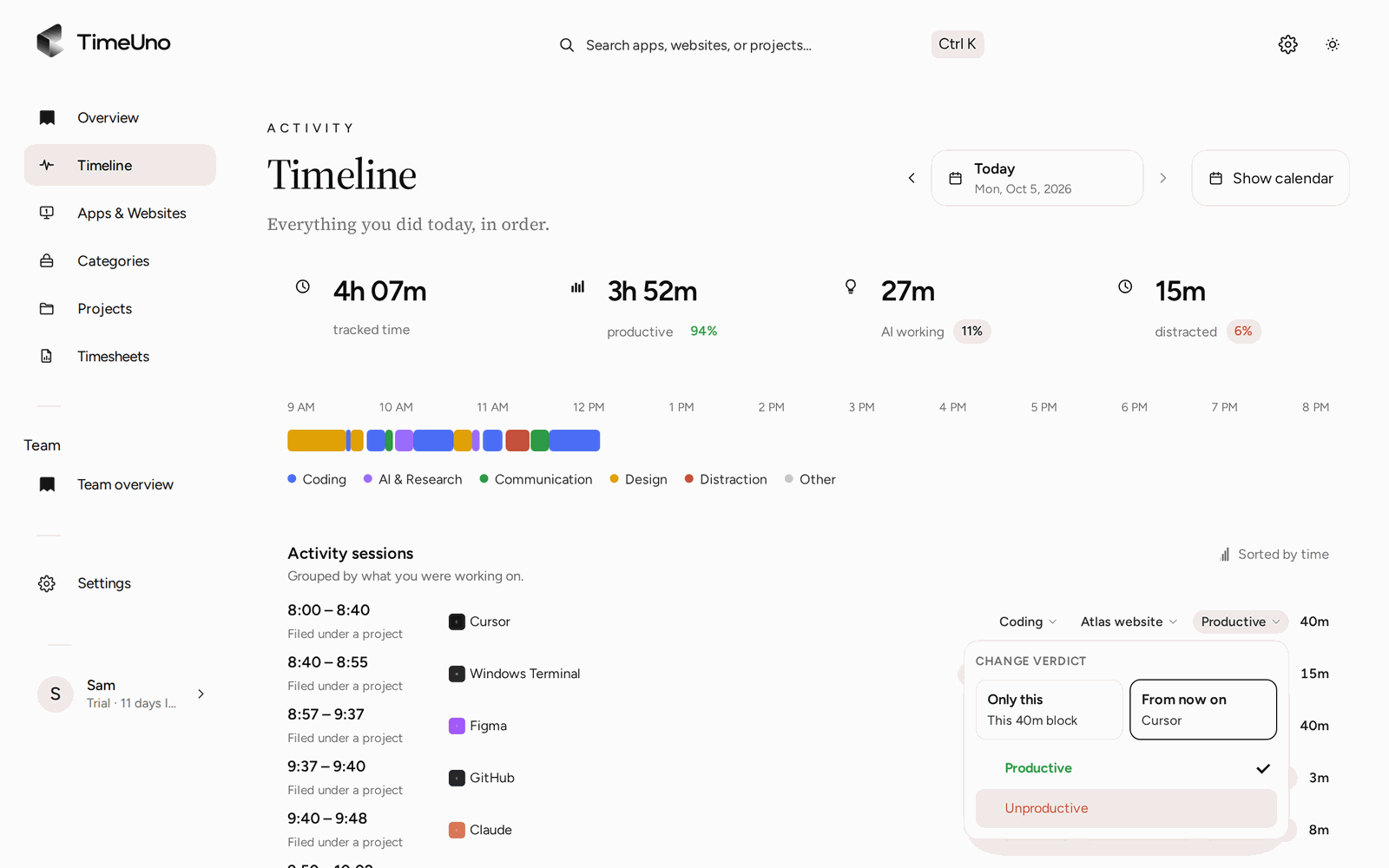
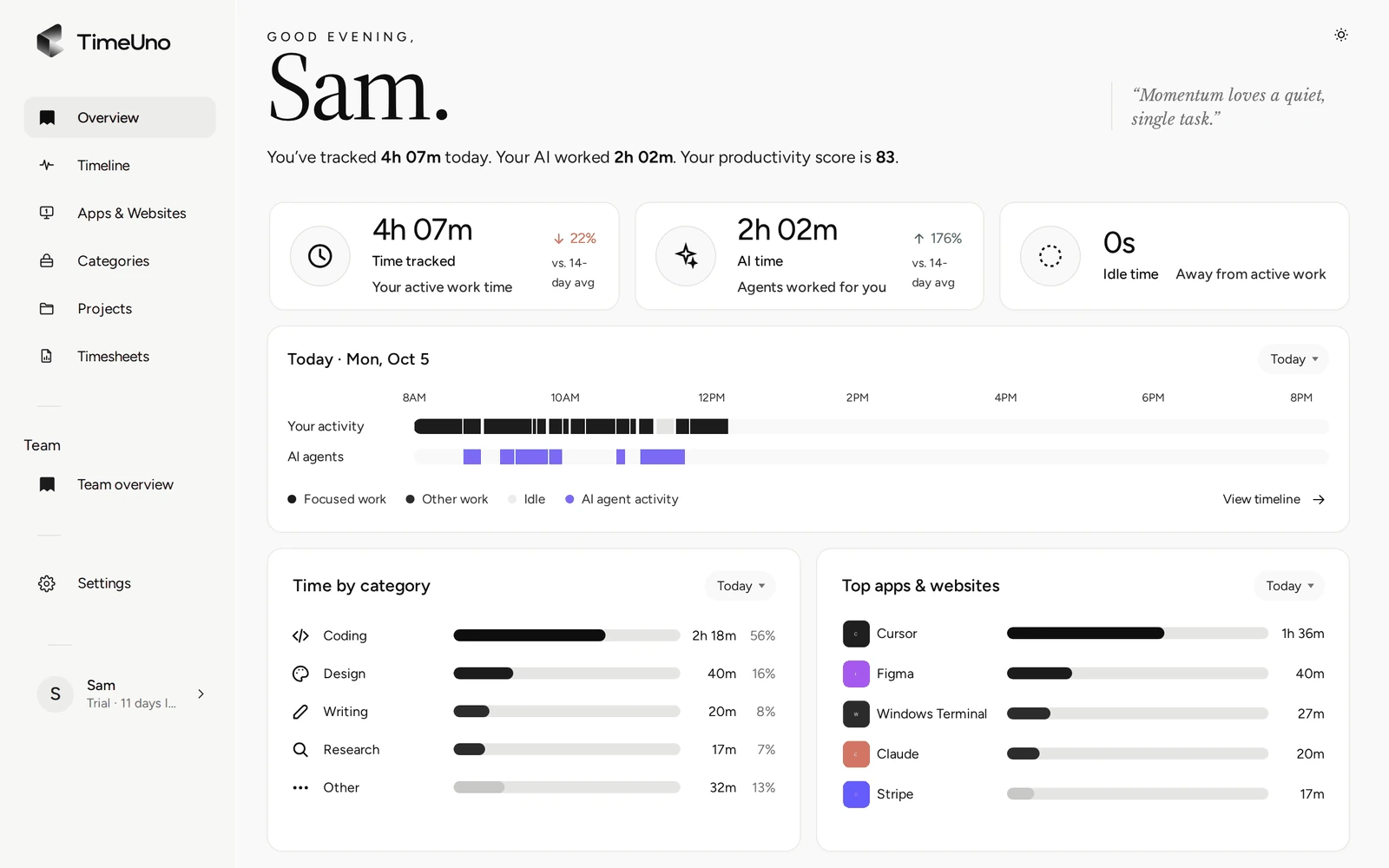
Where RescueTime is better: no free plan and no mobile app. No distraction blocker or focus sessions. No billable rates or invoices, which RescueTime Solo+ has. Screenshots and on-screen text are on by default (you can turn them off per computer), while RescueTime never takes screenshots. Windows and Linux are still in beta. There is no import of your RescueTime history.
Price: Individual $10.49 a month billed yearly ($14.99 monthly), Team $13.99 per seat a month billed yearly ($19.99 monthly). 14-day trial. That is more than Solo Focus and a little less than Solo+.
ManicTime
ManicTime is a long-running desktop tracker that records apps, documents and away time, then lets you tag stretches of the timeline with projects and tasks.
Who it's for: people who want a very detailed local timeline and don't mind tagging it themselves, or who need Linux, iOS or Android support.
Better than RescueTime: a very detailed local timeline, with all data on your computer and no account needed in the free Windows version. It runs on Windows, Mac, Linux, iOS and Android, so it covers the Linux gap. You can buy a license instead of a subscription, and host your own server. It has an MCP server so AI tools can turn your recorded activity into time entries.
Where RescueTime is better: the free version is Windows only, and its documentation lists auto-tagging, timesheets and server sync as licensed features. Optional screenshots and attendance tracking mean it is also sold for watching employees, which may not be what you want. Tagging is still work you set up.
Price: Cloud Standard $7 a month billed yearly ($9 monthly), Ultimate $9 yearly ($11 monthly), team plans from $10 per user a month yearly. Or a one-time license from $87 per user, with a year of upgrades. 30-day trial. Prices are from ManicTime's own pricing page, as of October 18, 2026.
ActivityWatch
ActivityWatch is free and open source (MPL-2.0). It records the active app and window title, the browser tab through an extension, and AFK time, with editor plugins for coding.
Who it's for: people who want it free, fully local and open source, and don't mind writing their own categorization rules.
Better than RescueTime: it costs nothing, the data stays on your machine, and it runs on Windows, Mac, Linux and Android. You can read the code and extend it with your own watchers.
Where RescueTime is better: it is a toolkit more than a product. Categories come from regular expressions you write, there are no projects or timesheets, and sync between devices is still a work in progress. No team features, no focus blocking, no support beyond the community.
Price: free and open source under the MPL-2.0 license, confirmed on ActivityWatch's own site, as of October 18, 2026.
WakaTime
WakaTime tracks coding time through open source plugins for more than 100 editors, IDEs and terminals, plus a desktop app for Mac, Windows and Linux that can track time in any app.
Who it's for: developers who only want to measure coding time inside their editor.
Better than RescueTime: for developers, it knows the project, branch and language without any setup, because it reads them from the editor. It sends file paths, never file contents. It also tracks AI coding tools such as Claude Code, Cursor and Copilot, with per-model tokens and estimated cost on Premium.
Where RescueTime is better: it is built around code. Meetings, email and design work only show up as app time, and there is no productivity score, focus blocking or general timesheet. The free plan keeps one week of dashboard history.
Price: Basic $8.25 a month billed yearly ($9 monthly), Premium $12.83 yearly ($14 monthly), Team $19.25 per developer yearly. Prices are from WakaTime's own pricing page, as of October 18, 2026.
Toggl Track
Toggl Track is a timer, not an automatic tracker. It earns a place here because its desktop Timeline records every app and site you use for more than 10 seconds, privately, and because many RescueTime users really want billable timesheets.
Who it's for: people who bill clients with a timer and want a desktop activity timeline as backup, not full automatic tracking.
Better than RescueTime: mature client billing, billable rates, approvals on Premium, and apps on every platform including mobile. A free plan for up to 3 users.
Where RescueTime is better: the timesheet still comes from timers you start or blocks you convert yourself. No Linux app on Toggl's own Linux page. No focus score or blocking.
Price: Starter $9 per user a month billed yearly ($12 monthly), Premium $16 yearly ($24 monthly). 30-day trial. Prices are from Toggl Track's own pricing page, as of October 18, 2026.
How to choose
Start with the reason you are leaving.
- "The score tells me nothing." You want a timeline and projects. Timing on a Mac, TimeUno on Mac, Windows or Linux, ManicTime if you are happy to tag.
- "I pay twice for timesheets." Compare the plan that includes projects, not the cheapest one. TimeUno includes them at $10.49 a month yearly, Timing at $9, RescueTime Solo+ at $12.
- "I don't want my data at OpenAI." ActivityWatch and ManicTime keep data local. Timing is local unless you opt into AI summaries. TimeUno stores data in Germany and reads only metadata from AI tools.
- "I'm on Linux." TimeUno (beta), ManicTime, ActivityWatch and WakaTime all run there. RescueTime, Timing, Rize and Toggl Track do not offer a Linux app.
- "I want to keep the focus tools." Rize is the closest replacement. Or stay on RescueTime Solo Focus.
- "My AI agents do half the work now." WakaTime counts AI time inside the editor. TimeUno counts it across your day, including agents on a remote server.
Most of these have a trial. Run one next to RescueTime for a week and compare what each says about the same days.
Questions people ask
Is there a free RescueTime alternative?
Yes. ActivityWatch is free and open source on Windows, Mac, Linux and Android. ManicTime has a free Windows version, and WakaTime has a free plan with one week of history for coding time. TimeUno, Timing and Rize have no free plan, only trials.
Which RescueTime alternative works on Linux?
TimeUno (beta, AppImage for Ubuntu 22.04+, Debian 12+ and Fedora), ManicTime, ActivityWatch and WakaTime's desktop app. RescueTime does not support Linux, per RescueTime's help center, checked October 18, 2026.
Which alternative files my time into projects automatically?
TimeUno detects the project from your editor folder or your keywords and remembers corrections. Rize uses AI categorization, Timing uses rules plus AI suggestions, and ManicTime uses auto-tagging rules on a license. WakaTime does it for code only.
Can I move my RescueTime history?
Not into TimeUno, which starts tracking the day you install it. Keep your RescueTime reports for the old data and compare a week of both.
Is RescueTime still free?
There is no longer a standalone free sign-up. Every new RescueTime plan starts with a 14-day trial of a paid tier, and only canceling or letting the trial end drops you to the free Lite plan. See RescueTime's pricing page, checked October 18, 2026.
Does RescueTime work on Linux?
No. RescueTime's help center lists supported systems as Windows, macOS, iOS, Android and a browser extension, with no Linux desktop app. See RescueTime's help center, checked October 18, 2026.