

Comparisons Best Time Trackers for Developers: Code and AI
Nov 14, 2026 · 8 min read
Best Time Trackers for Developers: Code and AI
Compare WakaTime, ActivityWatch, Toggl, Clockify, Timing and TimeUno on what each tracks: editor, AI sessions, git and where your data lives.
What is the best time tracker for developers?
WakaTime is the best pick for per-file, per-language and AI-code metrics from your editor. ActivityWatch is the best free option that keeps data on your machine, and TimeUno fits if you want whole-desktop tracking with AI agent sessions from tools like Claude Code, Cursor and Codex CLI.
Toggl and Clockify suit developers who mainly need client timesheets and invoices. git-hours and similar scripts give a rough estimate from commit history when nothing else was running.
Last reviewed: November 2026. We read each vendor's pricing and documentation pages on 10 November 2026 and link them in the sources. We did not run long-term tests of these tools.
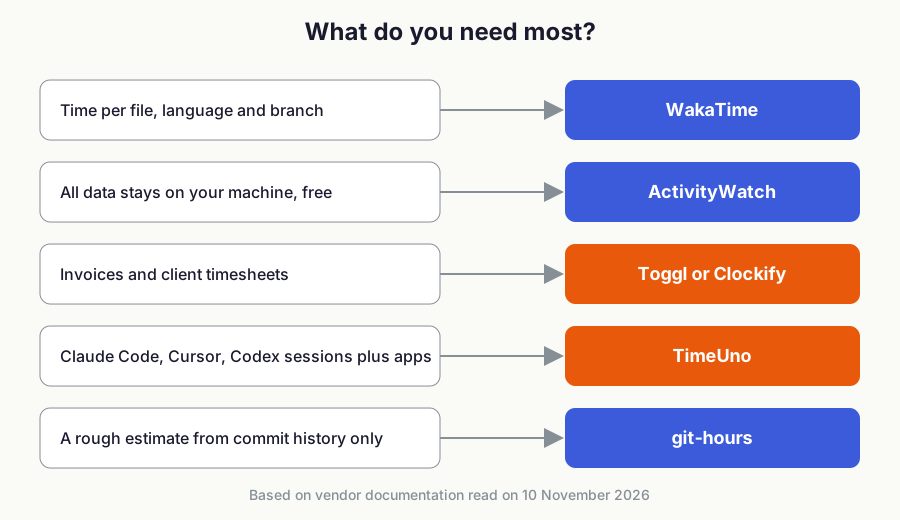
Figure 1: Pick by your main need, then check the details below.
What does developer time tracking have to capture now?
Most of your working time no longer happens in a text buffer. A coding agent can run for twenty minutes while you read docs, review a pull request or sit in a meeting.
A tracker that only listens to keystrokes in an editor counts that stretch as idle, so you need to decide whether you want editor detail, whole-desktop context, or both. The sections below separate four things: editor activity, terminal and AI sessions, git history, and where the data lives.
How do the developer time trackers compare?
| Tool | Captures | Data location | Pricing | Best for |
|---|---|---|---|---|
| WakaTime | Editor plugins, AI tool plugins, optional desktop app | WakaTime servers, or self-hosted wakapi | See WakaTime pricing | Code-level metrics |
| ActivityWatch | Active app, window title, browser tab, editor watchers | Your device only | Free, open source | Local data, no cost |
| Toggl | Manual and real-time timers | Toggl servers | Free up to 3 users; Starter $9 per user/mo billed yearly | Client timesheets |
| Clockify | Timer, desktop and mobile apps, Jira and GitHub buttons | Clockify servers | See Clockify pricing | Teams and billing |
| Timing | Automatic Mac app tracking | Mac, with optional sync | See Timing pricing | Mac-only users |
| TimeUno | Apps, sites, AI sessions, editor project | Cloud | $9.99/mo Individual; $12.99 per seat/mo Team | Desktop plus AI sessions |
| git-hours | Commit timestamps only | Your repository | Free, open source | Rough estimates |
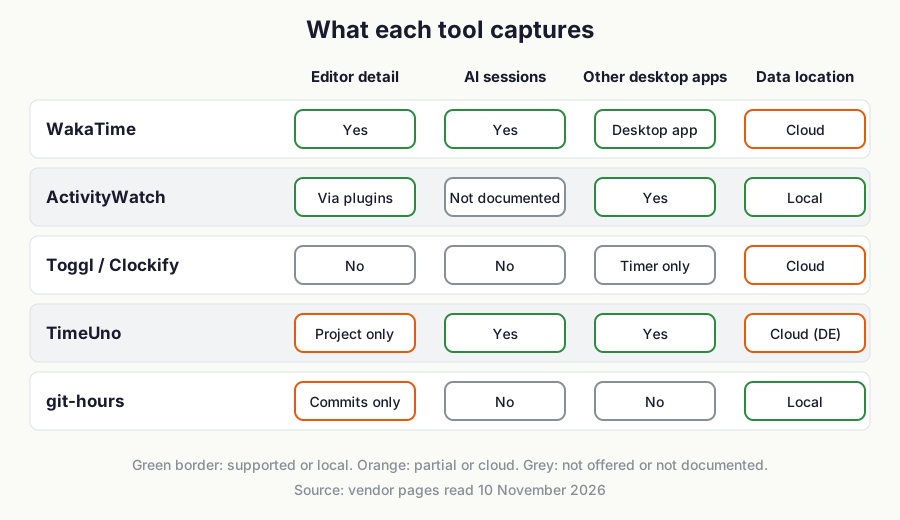
Figure 2: Capture matrix built from vendor documentation read on 10 November 2026.
What does WakaTime track?
WakaTime tracks coding time inside editors and now covers AI tools too. Its plugins page lists open-source plugins for VS Code, JetBrains IDEs, Vim, Neovim, Xcode, Zed, Cursor, Claude Code, Codex CLI, OpenCode and others, plus a Mac and Windows desktop app for custom apps.
Its FAQ says heartbeats carry file paths, project and branch names, languages, line counts, lines added by AI tools and by humans, and AI token counts. File contents are never sent, and you can hide file names or project names in the config file.
Its pricing page lists the current plans and the dashboard history each one includes, and its higher plans add AI model usage, spend and AI-versus-human code insights.
The limits are worth knowing. Data goes to WakaTime's servers, though the community wakapi project offers a self-hosted back end. WakaTime's terminal page also tells you to prefer IDE plugins or the desktop apps over its terminal plugins, so shell-only work is a weaker spot.
What does ActivityWatch track?
ActivityWatch is an open-source tracker for Windows, macOS, Linux and Android. Its site says it records the active application and window title out of the box, adds browser extensions for Chrome and Firefox, and offers editor watchers for coding time.
All data stays on your device. As of November 2026 the software is free under the MPL-2.0 license.
Sync between devices is still marked as in progress on the site. The pages we read do not document AI tool session tracking, so treat that as something you would build or script yourself. Our open-source tracker roundup covers more local-first options.
What does Toggl track?
Toggl, formerly Toggl Track, is built around manual and real-time timers. As of November 2026 its pricing page shows a free plan for up to 3 users, Starter at $9 per user per month billed yearly, and Premium at $16 billed yearly with Jira and Asana integrations and timesheet approvals.
It does not read your editor or your AI sessions, so you start and stop entries yourself. That is a fair trade if your output is a clean client timesheet and you are happy to press a button.
What does Clockify track?
Clockify's developer page describes a timer you start with one click, apps for Mac, Windows, Linux, iOS and Android, and timer buttons inside Jira, Trello and GitHub. Reports export as PDF, CSV or Excel, and there is an open API.
Its pricing page lists the current plans and what each one adds, such as invoicing and rounding. If you are comparing it with automatic trackers, our Clockify alternatives list goes through the options.
What does Timing track?
Timing is a Mac-only automatic tracker. Its pricing page shows three editions, and as of November 2026 MCP integration, two-way Linear and ClickUp sync and scripting appear only in the Connect edition.
If you work on a Mac and want those integrations, Timing is a strong choice, and our TimeUno vs Timing comparison lays out the differences. It has no Windows or Linux version.
Can Timewarrior or git-hours track developer time?
Timewarrior is an MIT-licensed command-line tool with stopwatch features, calendar-based backfill and reporting. You start and stop it yourself, which suits terminal-first workflows and costs nothing.
git-hours estimates time from commit timestamps by grouping commits into sessions, with a default gap of 120 minutes. Its README warns that the numbers may not be accurate enough for billing, so use it for rough scoping only.
What does TimeUno track for developers?
TimeUno is a macOS and Windows desktop app that tracks apps, websites and AI tool sessions automatically. It recognises Claude Code, Cursor, Codex CLI, OpenCode, GitHub Copilot, Windsurf, Aider, Gemini CLI and others, and records session times, working and waiting states, model, tokens, cost and project folder.
It records the front app, window title, idle time and the editor project taken from files like package.json, Cargo.toml or go.mod, with no screenshots and no record of what you type. It also reads on-screen text by default, up to 4,000 characters per activity record, and an owner or admin can turn that off. Data is stored on TimeUno's servers.
Pricing is $9.99 a month for Individual ($8.33 billed yearly) and $12.99 per seat for Team ($10.83 billed yearly), with a 14-day trial and no free tier. An MCP server lets you ask Claude or ChatGPT about your own tracked time.
TimeUno is the wrong choice in several cases. It has no Linux desktop app, no mobile app, no invoicing, no accounting integrations and no Jira sync, and exports are CSV and PDF only. For per-file and per-language stats pick WakaTime, for free local data pick ActivityWatch, and for Jira-linked billing pick Toggl or Clockify. For ticket-level logging see our Jira time tracking guide.
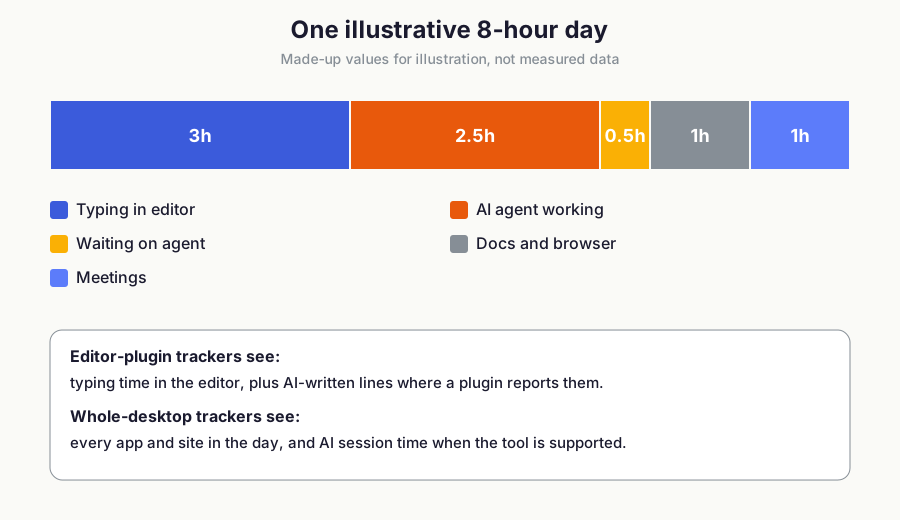
Figure 3: Illustrative values only. The split shows which parts of a day editor-only tracking misses.
How do you choose a time tracker as a developer?
Start with the question of whether your time includes agent work. If you run Claude Code or Codex CLI for long stretches, either use WakaTime's AI plugins for code metrics or a desktop tracker that records sessions. Our guide to tracking time spent on AI tools explains what is recorded.
Next decide where data may live. Choose ActivityWatch or Timewarrior for fully local data, WakaTime with wakapi for self-hosted editor stats, or a cloud tool if you accept hosted storage.
Last, decide what you must hand to someone else. Clients who expect invoices point to Toggl or Clockify, and managers asking about AI spend point to a WakaTime plan with AI insights or an automatic tracker. To weigh that spend against output, read how to measure AI ROI.
If you want to query your data from an assistant, compare the options in our MCP time tracker roundup or read how to ask Claude about your time.
Where can you try TimeUno?
TimeUno is available for macOS and Windows with a 14-day trial at timeuno.io. The MCP setup is described at timeuno.io/mcp.
FAQ
What is the best time tracker for developers?
WakaTime is the best fit for code-level metrics from editors. ActivityWatch suits free, local tracking, and TimeUno suits whole-desktop and AI session tracking on macOS and Windows.
Can I track time in Claude Code and Cursor?
Yes. WakaTime publishes plugins for both, and TimeUno detects both automatically as desktop tools. They record different things: WakaTime reports editor activity and AI token usage, while TimeUno records session times and cost per project.
Does WakaTime send my code to its servers?
According to its FAQ, WakaTime sends file paths, project names and metrics, but never file contents. You can obfuscate file and project names in the config.
Which developer time tracker keeps data local?
ActivityWatch stores data only on your device. Timewarrior and git-hours also run on your machine, and wakapi lets you self-host a WakaTime-compatible back end.
What is the best time tracker for Linux developers?
TimeUno has no Linux desktop app, so ActivityWatch, WakaTime and Clockify are the desktop options on Linux. TimeUno does offer a headless Linux agent for servers. See time tracking on Ubuntu and Linux servers with Claude Code.