

Comparisons Time Trackers With an MCP Server, Compared (2026)
Nov 13, 2026 · 9 min read
Time Trackers With an MCP Server, Compared (2026)
Compare seven time trackers with an MCP server for Claude and ChatGPT: TimeUno, RescueTime, Rize, Timing, Toggl, Harvest and Clockify, as of November 2026.
Which time trackers have an MCP server?
Seven time trackers document an MCP server for Claude or ChatGPT: TimeUno, RescueTime, Rize, Timing, Toggl, Harvest and Clockify, though Clockify's page is marked "coming soon". TimeUno, an automatic time tracker for Mac and Windows, has a hosted server at app.timeuno.io/mcp. Pick an automatic tracker to ask about recorded time, and a manual one to log hours by chat.
Based on each vendor's public documentation and pricing as of November 2026; we did not run a long-term test of any server. MCP (Model Context Protocol) is an open standard that lets an AI app call named tools in another product. For TimeUno's own setup steps, see the TimeUno MCP page and our MCP guide.
Last reviewed: November 2026. We read each vendor's MCP and pricing pages on 10 November 2026, and plans and menus change.
How do the MCP servers compare?
The table lists what each vendor's own pages say as of November 2026. Read and write means the assistant can change data, usually after a confirmation.
| Tracker | Server runs | Sign-in | Recording | Assistant can | Pricing |
|---|---|---|---|---|---|
| TimeUno | Vendor-hosted, app.timeuno.io/mcp | OAuth | Automatic | Read; pause, note, rules | 14-day trial, no free tier |
| RescueTime | Vendor-hosted, rescuetime.com/mcp | OAuth or read-only API key | Automatic | Read; focus and categories with extra permission | See RescueTime pricing |
| Rize | Vendor-hosted, mcp.rize.io/mcp | OAuth | Automatic | Read and write entries | See Rize pricing |
| Timing | Local on your Mac (beta) and web | Allow dialog or OAuth | Automatic on Mac | Read and write | See Timing pricing |
| Toggl | Local, npx | OAuth in browser | Manual timers | Read and write | See Toggl pricing |
| Harvest | Vendor-hosted, api.harvestapp.com/mcp | OAuth | Manual timers | Read and write, invoices as drafts | See Harvest pricing |
| Clockify | Vendor-hosted | Personal API key | Manual timers | Read and write | Page marked coming soon |
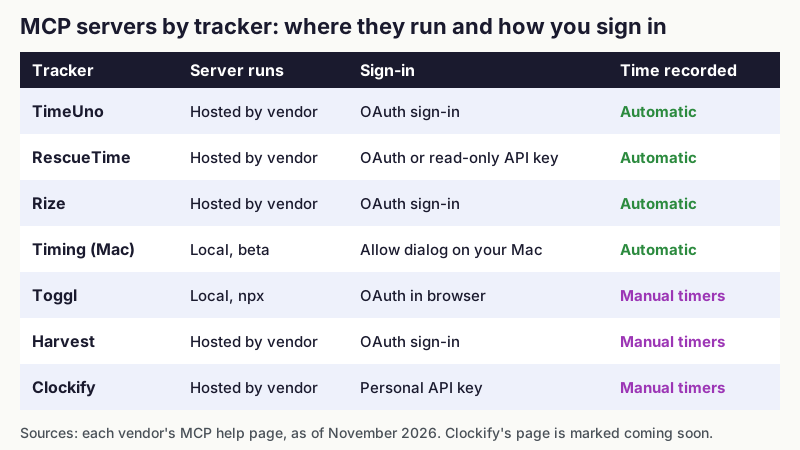
Figure 1: Where each MCP server runs and how you sign in. Sources: the vendor pages listed below, as of November 2026.
What is the difference between automatic and manual trackers?
An automatic tracker records your apps and sites in the background, so the assistant answers from a record you did not have to write. A manual tracker only knows what you tell it, so its MCP server is mostly a faster way to start timers and fix entries.
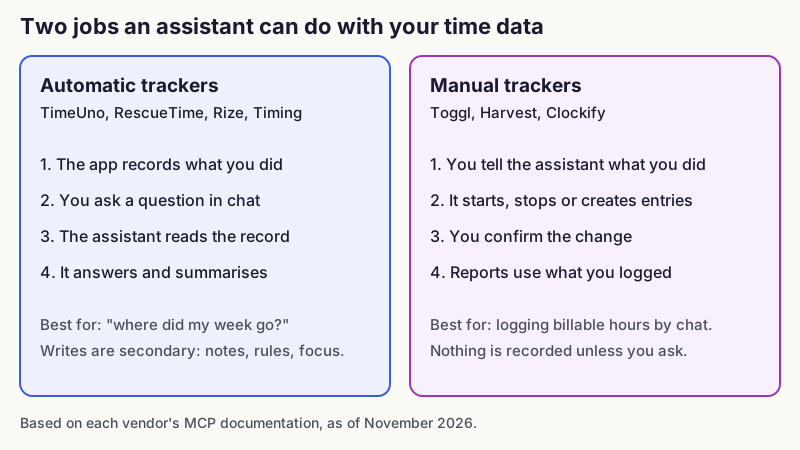
Figure 2: The two jobs an assistant does with time data. Sources: vendor MCP documentation, as of November 2026.
Toggl states that its server does not track time automatically and creates entries only when you ask. The same distinction applies to Harvest and Clockify, whose tools start and stop timers and log or edit entries.
What does each tracker's MCP server do?
TimeUno
TimeUno is an automatic tracker for macOS and Windows that records apps, websites and AI tool sessions such as Claude Code, Cursor and Codex CLI. Its remote server at https://app.timeuno.io/mcp signs you in with OAuth. Read tools cover summary, timeline, current activity and projects, plus a team summary for owners and admins. If you allow it, the assistant can also pause or resume tracking, add a note and set a productivity rule.
It cannot log or edit time entries from a chat. It has no mobile app, no Linux desktop app (only a headless agent for servers), no invoicing, no accounting integrations and no Jira sync, and no free tier beyond the 14-day trial. Individual costs $9.99 per month, or $8.33 per month billed yearly, as of November 2026 per the pricing page.
RescueTime
RescueTime hosts a server at https://www.rescuetime.com/mcp. Its guide says it mostly reads your activity, category totals and timesheet data, and can start or stop a focus session or timer only when you ask and grant extra permission. It cannot edit settings or project records.
You can sign in with OAuth or use an MCP API key, and the keys are read-only. The guide does not say which plans include MCP, so check the RescueTime pricing page before you subscribe. For alternatives, see best RescueTime alternatives.
Rize
Rize runs a hosted server at https://mcp.rize.io/mcp with OAuth. Its docs list tools to create, update and delete time entries, and to approve or reject AI suggestions, plus read tools for activity, clients, projects and reports.
MCP access is tied to a paid plan, so check Rize pricing for which one. Rize states that accounts on an older plan keep MCP. Compare it with TimeUno in TimeUno versus Rize.
Timing
Timing has two servers. The Mac app server is in beta, runs on 127.0.0.1 and works with Claude Code, Codex and the Claude desktop app, which needs Node.js and a bridge. The web server at https://web.timingapp.com/mcp is the one for ChatGPT and Claude on the web.
Both need a plan that includes MCP, so check Timing pricing. If your licence lapses, the Mac server turns read-only. It is Mac only; see TimeUno versus Timing for a full comparison.
Toggl
Toggl's official server is the npm package @togglhq/mcp, which runs on your computer and needs Node.js. You sign in through a browser, and Toggl says it works in Claude Desktop, Claude Code, Cursor, VS Code and Codex. Its docs say it covers Toggl 2.0 workspaces, while its marketing page says Toggl Track remains supported, so confirm which one your workspace is.
Tools cover projects, tasks, time entries, reports and timesheets. Every create, update or delete is a two-step summary and confirmation. Toggl says MCP is available on all plans. See Toggl pricing for plan limits.
Harvest
Harvest hosts a server at https://api.harvestapp.com/mcp with OAuth, and it acts with your role's permissions. Its help article covers timers, entries, reports, budgets, projects, clients, expenses and invoices. Invoices can be read and only created as drafts.
It documents setup for Claude, Claude Code, Cursor and ChatGPT developer mode. The article does not say which plans include MCP, so check with Harvest.
Clockify
Clockify's help page for its server, modified 2 October 2026, carries a "coming soon" label. It describes a remote server that takes a personal API key in a header, with tools for timers, entries, projects, tags and reports. The documented setup covers Claude CLI, Codex CLI and Gemini CLI only, so treat it as unfinished.
Where does the server run, and does it matter?
It matters for which apps can connect. A local server, such as Toggl's or Timing's Mac one, works with desktop and editor apps on your machine. Claude's web custom connectors connect from Anthropic's cloud, so they need a vendor-hosted URL like the ones from TimeUno, RescueTime, Rize, Harvest and Timing's web server.
Whichever you pick, whatever a tool returns enters the assistant's conversation and falls under that AI provider's terms. A tool call answers from time it already tracked. TimeUno says it never sends your data to the AI app's model provider beyond the tool result the app chooses to show you, but that result still passes through your AI app.
Which MCP time tracker should you pick?
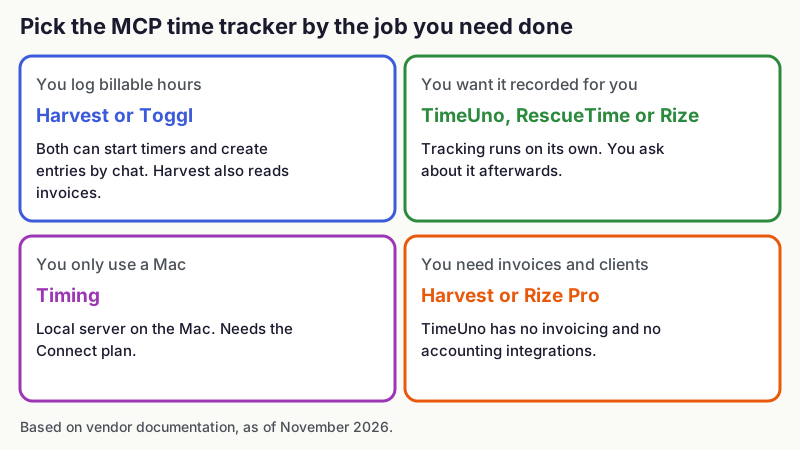
Figure 3: Pick by the job you need done. Sources: vendor documentation, as of November 2026.
- Pick Harvest or Toggl if you log billable hours and want to start timers or fix entries from a chat.
- Pick TimeUno, RescueTime or Rize if you want time recorded on its own and plan to ask about it afterwards. TimeUno suits you if you work on macOS or Windows and use AI coding tools, since it records those sessions next to your own app time.
- Pick Timing if you only use a Mac and want a local server.
- Pick Harvest or Rize if you need invoices in the same tool. TimeUno cannot do that, and it does not connect to accounting software or Jira.
- Pick RescueTime if you need a phone app, because TimeUno has none. Check the RescueTime site for its current apps.
For a wider comparison of recorders, see best automatic time trackers. To see what the AI side of your day costs in hours, read how to track time spent on AI tools.
Where can you try TimeUno's MCP server?
TimeUno is a desktop app for macOS and Windows with a 14-day trial. Download TimeUno or read the MCP page.
FAQ
Which time tracker has the best MCP server?
It depends on the job. Harvest and Toggl have the broadest write tools for logging billable time, and TimeUno, RescueTime and Rize are better when you want to query time that was recorded automatically.
Does Toggl have an MCP server?
Yes. Toggl publishes @togglhq/mcp, which runs locally and signs in through your browser. Its docs describe Toggl 2.0 workspaces, so confirm that your workspace is supported.
Does RescueTime have an official MCP server?
Yes, as of November 2026. RescueTime documents a server at https://www.rescuetime.com/mcp, which signs in with OAuth or a read-only API key.
Can ChatGPT connect to a time tracker?
Yes, if the tracker offers a vendor-hosted server. Harvest, Rize and RescueTime document ChatGPT setup, and Timing's web server is listed for ChatGPT. Local servers such as Toggl's run on your computer instead.
Does the TimeUno MCP server work with Claude Code?
Yes. Run claude mcp add --transport http timeuno https://app.timeuno.io/mcp, then sign in from /mcp. The server can read your time, pause tracking, add notes and set productivity rules, but it cannot edit entries. A TimeUno account with an active trial or plan is required.
Sources and checks
- TimeUno MCP page: https://timeuno.io/mcp/
- Toggl MCP: https://toggl.com/ai/mcp
- Toggl MCP docs: https://docs.toggl.com/toggl-mcp-and-cl
- Harvest MCP help: https://support.getharvest.com/hc/en-us/articles/46293697226381-Harvest-MCP
- Clockify MCP help: https://clockify.me/help/integrations-and-add-ons/use-clockify-mcp-server-to-connect-to-ai-agent
- Rize MCP docs: https://docs.rize.io/mcp
- Rize MCP tools: https://docs.rize.io/mcp/tools
- Rize pricing: https://rize.io/pricing
- Timing MCP help: https://timingapp.com/help/mcp
- Timing pricing: https://timingapp.com/pricing
- RescueTime MCP guide: https://www.rescuetime.com/mcp-guide
- RescueTime pricing: https://www.rescuetime.com/pricing