

Comparisons Rize Review: Features, Plans and Limits (2026)
Nov 14, 2026 · 7 min read

Rize Review: Features, Plans and Limits (2026)
Rize review for 2026: how its AI tracking works, focus tools, privacy, plan limits and who should pick something else. Based on public docs, November 2026.
Is Rize a good time tracker?
Yes, if you want focus tools and client invoicing. Rize is an AI time tracker for Mac and Windows that logs your active app and website and suggests time entries. Clients, projects and invoicing start on its Pro plan, as of November 2026. This review uses the vendor's public documentation, not a long-term test. TimeUno, an automatic time tracker for Mac and Windows, is the comparison point.
Last reviewed: November 2026.
What does Rize do?
Rize runs on macOS and Windows and records the active window's app name, window title, URL and timestamps. It groups that into time entries with AI suggestions, then adds focus sessions, break prompts, a distraction blocker, calendar sync and an AI assistant. Since its 27 August 2026 relaunch it also targets agencies and teams, with profitability, resourcing and invoicing.
What do Rize's plans include?
Rize publishes its prices, trial terms and credit allowances on its own page, which changes over time. See Rize pricing for current numbers. The plan features below are from that page, as of November 2026.
| Plan | Adds |
|---|---|
| Basic | Automatic tracking, AI tagging, AI chat, focus tools, personal reports, data export |
| Pro | Clients, projects, invoicing, client reports, MCP server, API, webhooks, Zapier |
| Max | Priority support |
| Team | Team dashboards, budgeting, profitability, onboarding |
Enterprise is sold through contact sales, and Rize lists SOC 2 Type II as in progress, with SSO and SCIM on the roadmap.
Check two billing details on its pricing page before you subscribe: how AI credits work and what its cancellation and refund terms say.
How does Rize track time automatically?
According to Rize's tracking documentation, only the active window is tracked. A live entry appears on your calendar as you work. When you switch context, Rize finalizes it as a suggestion with a description and tag suggestions.
You choose a suggestion mode in settings: AI, AI plus keywords, or keywords only. The docs recommend reviewing suggestions daily during the first week so the tagging learns your projects. Plan for that review time.
Rize reads app name, window title, URL and timestamps by default, according to its homepage. It states that it does not log keystrokes, record the screen or store screenshots. An optional Screen Text (Vision) feature is off by default and, per the security page, its data is deleted 30 days after capture.
What are Rize's focus sessions and distraction blocker?
The October 2026 update replaced the timer with a Focus page. You start Focus, Break or Meeting sessions by hand or let Rize detect them, and the docs suggest 25 to 45 minutes as a typical focus length. The sidebar shows focus time, session count, break time, top distractions and a weekly histogram.
The productivity page lists a Focus Quality Score, break suggestions, a focus music library and a configurable distraction blocker. A silent mode pauses sessions, blocker and reminders while tracking continues. If you want these tools, this is where Rize is stronger than TimeUno, which does not offer focus sessions.
Which integrations does Rize have?
Per Rize's integrations page, Google Calendar and Outlook sync, native Linear, ClickUp, Asana, Notion and Slack connections, and Zoom, Fathom, Granola and Fireflies transcripts are available. Jira, QuickBooks, Xero and FreshBooks go through Zapier. Rize also has a GraphQL API, webhooks and an MCP server at mcp.rize.io for Claude, ChatGPT and Codex.
The MCP server and API sit on Pro and above, as of November 2026. They act as the person who connected them, with read and write access. TimeUno also has an MCP server, at app.timeuno.io/mcp.
Who sees your data in Rize?
On Rize's security page, team admins see approved entries only: title, description, times, client, project and rates. App names, URLs, window titles and calendar events stay visible only to the person who tracked them. Entries are auto-approved 8 hours after the tracking day ends unless auto-approve is off.
Rize hosts data on Google Cloud in US regions and encrypts it at rest and in transit. You can set Do Not Track rules per app or site, keep only the domain of a URL, drop window titles and redact tracked data.
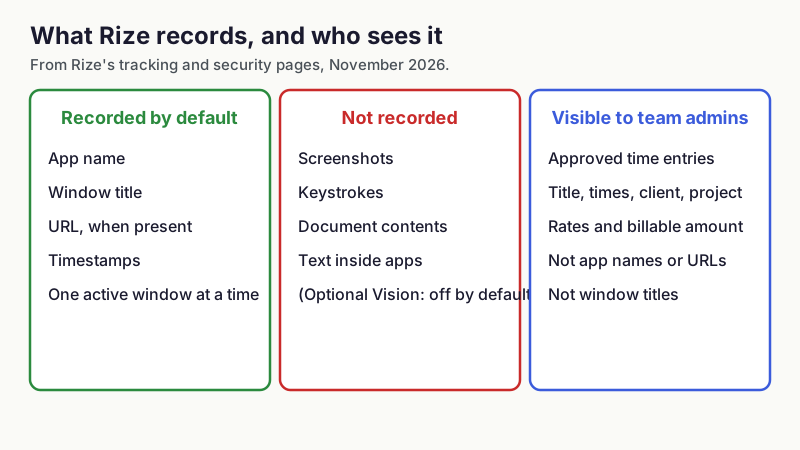
What Rize records and who sees it, from Rize's tracking and security pages, November 2026.
What are the limits of Rize?
- No iOS or Android app, according to its homepage. Time away from the computer enters through calendar events, manual entries or the API.
- The useful client features sit behind its Pro plan, as of November 2026.
- AI features run on a monthly credit allowance, so heavy use can mean buying packs.
- Entries go through an AI suggestion step that you need to review.
- Data is hosted in the US on Google Cloud, with SOC 2 Type II in progress.
- Rize does not describe tracking of AI coding agents such as Claude Code or Cursor as a feature.
What are the limits of TimeUno?
- TimeUno has no mobile app, no Linux desktop app, no invoicing, no accounting integrations and no Jira sync.
- Exports are CSV and PDF only.
- There is no free tier, only a 14-day trial.
- It does not offer focus sessions, a distraction blocker or a break coach.
- Pricing is Individual at $9.99 a month ($8.33 billed yearly) and Team at $12.99 per seat ($10.83 billed yearly).
How does Rize compare with TimeUno?
| Rize | TimeUno | |
|---|---|---|
| Desktop platforms | macOS, Windows | macOS, Windows |
| Entry price, annual billing | See Rize pricing | $8.33 per month (Individual) |
| Team price per seat, annual billing | See Rize pricing | $10.83 |
| Trial | See Rize pricing | 14 days |
| Invoicing | Pro and above | None |
| Focus tools | Yes | No |
| AI coding tool sessions | Not described | Tracked automatically |
| MCP server | Pro and above | Yes |
| Hosting | US, Google Cloud | Cloud |
Rize facts are as of November 2026 from its pricing and security pages. For a longer comparison, read TimeUno vs Rize.
Who is Rize for?
Rize fits you if you run client work and want tracking, invoicing and profitability in one tool, or if you want focus sessions and break prompts built into your tracker. Agencies and small teams that need resourcing and budgeting are the audience of the August 2026 relaunch, so look at Rize Pro or Team first.
Pick something else if you mainly need to see how long AI coding tools worked for you, or want the lowest price for one person. In those cases TimeUno is the closer fit. If you want other options first, see best automatic time trackers in 2026 and best RescueTime alternatives. Mac users can also compare best time tracking apps for Mac.
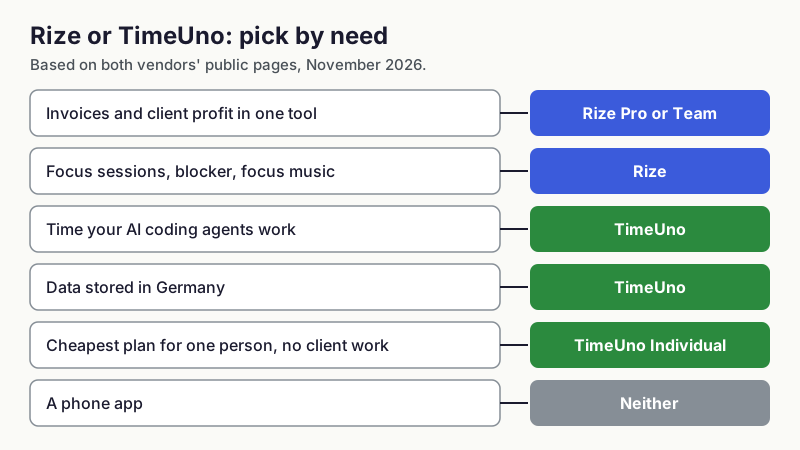
Pick by need, based on both vendors' public pages, November 2026.
FAQ
Is Rize free?
Check Rize's own pricing page for its current trial and free options. TimeUno has no free tier, only a 14-day trial.
Does Rize take screenshots?
Rize states that it does not record the screen, log keystrokes or store screenshots. An optional Screen Text (Vision) feature is off by default and its data is deleted after 30 days, per its security page.
Does Rize work on a phone?
No. Rize lists macOS and Windows and has no iOS or Android app, as of November 2026.
Can Rize track AI coding tools?
Rize tracks the active app and window, so a terminal or editor appears as time in that app. It does not describe a dedicated tracker for AI coding agent sessions. TimeUno tracks Claude Code, Cursor and Codex CLI sessions; see how to track time spent on AI tools.
Does Rize have an MCP server?
Yes, at mcp.rize.io for Claude, ChatGPT and Codex, on Pro and above as of November 2026. TimeUno's is described in ask Claude about your time.
Where can you try TimeUno?
TimeUno is a macOS and Windows time tracker with a 14-day trial. Details are at timeuno.io, and the MCP server is described at timeuno.io/mcp.