

Comparisons RescueTime review: plans, features and limits (2026)
Nov 14, 2026 · 8 min read

RescueTime review: plans, features and limits (2026)
RescueTime review for 2026: plans, automatic tracking, Productivity Pulse, Focus Sessions, privacy and where it falls short, as of November 2026.
Is RescueTime a good time tracker?
Yes, for personal productivity, less so for client billing. RescueTime is an automatic time tracker for Windows and macOS that scores how productive your day was. RescueTime sells several plans, and project timesheets sit on its higher ones, as of November 2026. TimeUno, an automatic tracker for Mac and Windows, is the comparison here.
Based on the vendor's public documentation and pricing as of November 2026; we did not run a long-term test. We also make TimeUno, a competing tracker, so the sections below say where each one is the better pick.
Last reviewed: November 2026. Every RescueTime fact here comes from its pricing page or help center, linked in the sources. For prices, see RescueTime pricing.
What does RescueTime do?
RescueTime runs in the background and records which apps and websites you use, then sorts that time into categories and productivity levels. You do not start timers. The vendor says it collects the window titles of the apps and sites you use.
It has two product lines. Focus covers tracking, reports, goals and distraction blocking. Timesheets adds projects, clients, billable rates and exports, and is sold as a bundle with Focus.
What do RescueTime's plans include?
RescueTime has Lite, Solo, Solo+, Team and Team+ plans. The Timesheets bundle costs more than Focus alone, so check the RescueTime pricing page for current prices.
| Plan | What it adds |
|---|---|
| Lite | Automatic tracking, limited history and goals |
| Solo (Focus) | Focus Sessions, alerts, unlimited history, offline time, iOS app |
| Solo+ (Timesheets + Focus) | Projects, clients, billable rates, timesheet export |
| Team (Focus) | Team reports, role-based access, SSO |
| Team+ (Timesheets + Focus) | Shared clients, projects and tasks, billable rates |
Read its pricing page for trial, tax, refund and invoice billing terms. If a payment fails, the account can drop back to Lite.
How does RescueTime track time automatically?
You install a desktop app, sign in and activate it, and it logs app and website time from then on. The install guide covers Windows and macOS, and macOS asks for accessibility permissions. Browser tracking supports Chrome, Edge, Safari, Arc and Brave, and Firefox on macOS needs a plugin.
Solo and above add detailed tracking: file names and document titles as well as the app name. You can switch off window and document titles, ignore adult sites, whitelist only certain websites or set a logging schedule. The vendor also lets you install it on any number of computers, and all time is combined in reports instead of split by device.
What is the Productivity Pulse?
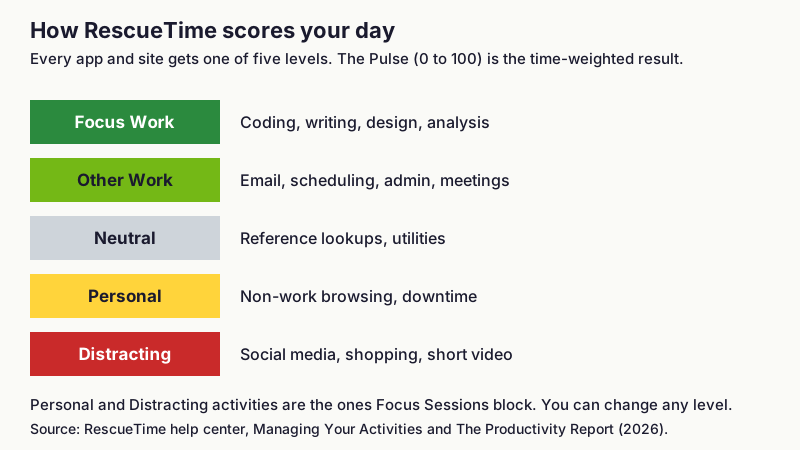
The Productivity Pulse is a score from 0 to 100, the time-weighted average of your activities across five levels. The levels are Focus Work, Other Work, Neutral, Personal and Distracting.
RescueTime sets defaults based on how most users classify each app, and you can change any of them. A developer who watches coding tutorials on YouTube can move it to Other Work. The help center calls getting these levels right the most important step for accurate data.
One limit: categories cannot be renamed or removed. You can only add sub-categories and change default levels.
!Five stacked labels showing the RescueTime productivity levels from Focus Work to Distracting with example activities
Figure 2: The five productivity levels behind the Pulse. Source: RescueTime help center, 2026.
What are Focus Sessions, goals and alerts?
FocusTime, as older articles call it, is now named Focus Sessions. A session blocks the apps and sites you rated Personal or Distracting, silences notifications and can play Spotify or YouTube focus music. It is a Solo or higher feature, so Lite users do not get it.
Goals set a daily target, such as more than 3 hours of Focus Work or less than 30 minutes on social networks. Automations act when a threshold is crossed: they can start a Focus Session, open a web page or send a notification. Lite has a lower goal limit and no automations.
The Android and iOS apps extend blocking to your phone during a session. The Android app needs the accessibility permission for this, and the vendor says it does not read your screen content.
What about project timesheets and invoicing?
Project timesheets exist, but only on Solo+ and Team+, and they work through review rather than pure automation. Timesheets builds suggested project blocks from your activity, and you accept, adjust or delete each one. Reports only count time you have logged to a project.
You can set billable rates, with rate precedence of task, then project, then client, then user. Clients group projects so time rolls up in reports and invoices, and reports export as Excel or CSV. The help center overview does not walk through creating an invoice document, so check the vendor's current Timesheets guide if you need one produced inside the tool.
Free and Solo accounts have none of this. If client hours are your main need, you are paying for Solo+, and tools built around billing may fit better. See RescueTime alternatives and Mac time trackers.
How does RescueTime handle privacy?
RescueTime says it never records keystrokes, text entered into fields or website content, and it looks only at window titles. It states that it has never sold or shared user data, honors deletion requests and lets you export your data. Its privacy controls live under Data and Privacy in account settings.
Two cautions from its own help pages. Email detail tracking can expose subject lines, and ignored or deleted data cannot be recovered. If you work in a team, read how reports reach your admin before you install it. For where the line sits, see how automatic time tracking works.
Which platforms does RescueTime support?
RescueTime runs on Windows and macOS desktops, with iOS and Android apps. The mobile apps track phone time and start Focus Sessions or timers. The iOS app is listed as a Solo feature, not part of Lite.
Linux is not covered by the install guide, which documents only Windows and macOS.
What are RescueTime's pros and cons?
- A Lite plan that tracks automatically with limited history.
- A 0 to 100 productivity score with levels you can adjust.
- Distraction blocking, goals and automations on desktop and phone.
- Project timesheets with billable rates on Solo+.
- Phone tracking on iOS and Android.
Limits: the Lite plan caps history and goals, categories cannot be renamed, Timesheets reports include only time you reviewed and logged, and project time needs the higher-priced bundle. It also gives no record of what AI coding tools did while you were elsewhere, which matters if you run agents.
How does RescueTime compare with TimeUno?
RescueTime is better if you want a phone app, distraction blocking, or a productivity score for self-improvement. TimeUno is better if you use AI coding tools and want a second timeline of agent sessions.
TimeUno records the app and site in front of you plus sessions from Claude Code, Cursor, Codex CLI and others. It has an MCP server at app.timeuno.io/mcp, so you can ask Claude or ChatGPT about your own time. Individual is $9.99 a month ($8.33 billed yearly) and Team is $12.99 per seat ($10.83 yearly).
TimeUno is the wrong choice if you need a mobile app, a Linux desktop app, invoice creation, accounting integrations or Jira sync. It has a 14-day trial, exports CSV and PDF only, and has Chrome, Firefox and Edge extensions but no Android or iOS app.
For other trackers in this space, see TimeUno vs Rize and automatic time trackers compared.
Who should pick RescueTime?
Pick RescueTime if you want to see where your attention goes, set focus goals and block distractions on both computer and phone. Its Lite plan is a way to try it, and Solo covers most personal use.
Pick something else if you bill clients by the hour and want timesheets on every plan, or if AI agent work is part of your day. Solo+ covers billing, and its suggestions need review.
Which tracker should you try next?
If AI tools are part of your work, TimeUno offers a 14-day trial for macOS and Windows at timeuno.io, and the MCP setup is at timeuno.io/mcp. See the RescueTime alternatives page for more options.
FAQ
Is RescueTime free?
RescueTime has a Lite plan, and its pricing page lists the current terms. Focus Sessions, alerts, unlimited history and timesheets need a paid plan.
Does RescueTime take screenshots?
No. The vendor says it does not capture screenshots, message content or what you type. It reads window titles of the apps and sites you use.
Can RescueTime do project timesheets and invoicing?
Timesheets with projects, clients and billable rates is included in Solo+ and Team+. Reports export to Excel or CSV, and you review suggested time before it counts.
Does RescueTime work on Linux?
The install guide documents Windows and macOS only, so Linux is not a documented platform.
Is there a RescueTime alternative that tracks AI tools?
TimeUno records sessions from tools such as Claude Code, Cursor and Codex CLI on macOS and Windows.
Sources and checks
Facts read from the vendor's public pages in November 2026. Plans change, so confirm before you buy.
- RescueTime: pricing and Solo Focus features
- RescueTime help: comparing plans
- RescueTime help: categories and productivity levels and the Productivity Report
- RescueTime help: goals and automations
- RescueTime help: Timesheets overview
- RescueTime help: controlling collected data and GDPR approach
- RescueTime help: install on Windows and macOS and Android app