

Comparisons Clockify review 2026: plans, limits and verdict
Nov 14, 2026 · 6 min read

Clockify review 2026: plans, limits and verdict
Clockify review from public docs: what each plan adds, auto tracker, monitoring, who it fits and who should pick another tool. Checked as of November 2026.
Is Clockify good?
Yes, as a timer and timesheet for a small group. Clockify lists a free plan and adds billing, shift and monitoring tools on paid plans, as of November 2026. It is a weaker fit if you want tracking that runs without a timer. This review uses the vendor's public documentation, not a long-term test.
Last reviewed: November 2026. We make TimeUno, an automatic time tracker, so this page also says where TimeUno is the wrong pick.
What does each Clockify plan include?
Clockify has a free plan and four paid plans, billed per seat: Basic, Standard, Pro and Enterprise. For current prices and limits, see Clockify pricing.
The free plan lists tracking, a timer, timesheets, a calendar, the auto tracker, mobile and desktop apps, and reports. The pricing page also states the user, report range and API limits of the free plan, so read it before you rely on that plan.
Check the pricing page FAQ for how Clockify counts seats, including owners and admins.
| Plan | What it adds (per the pricing page) |
|---|---|
| Free | Timer, timesheet, calendar, auto tracker, reports |
| Basic | Kiosk, breaks, required fields, project templates, add time for others |
| Standard | Invoicing, approval, time off, rounding, QuickBooks integration |
| Pro | Activity monitoring, GPS tracking, scheduling, expenses, labor cost, data region |
| Enterprise | SSO, custom subdomain, SCIM, audit log |
What does the Clockify free plan include?
The free plan covers the core job of recording hours. You can run a timer, enter a timesheet, see a calendar and get reports.
The limits show up when you need to manage people. Kiosk clock-in, breaks, required fields and bulk edits start on Basic. Invoicing, approval, time off and timesheet locking start on Standard, so a freelancer who wants to invoice from tracked time pays for that tier.
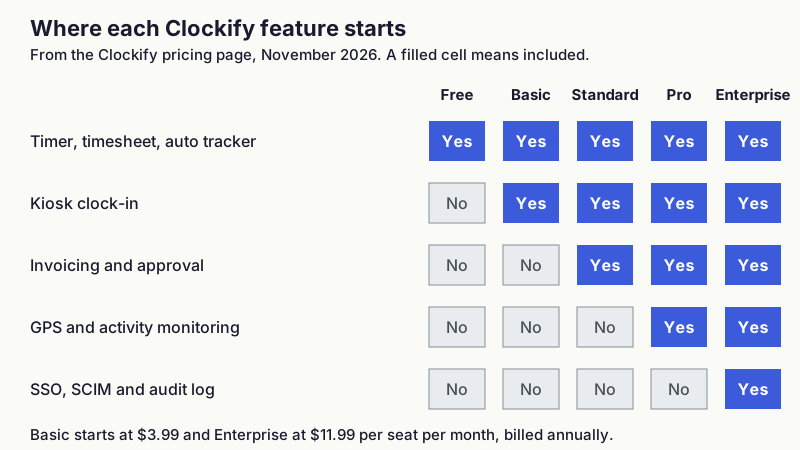
!Matrix showing the Clockify plan where each feature group starts: timer and auto tracker on all plans, kiosk from Basic, invoicing and approval from Standard, GPS and activity monitoring from Pro, SSO and audit log on Enterprise
Figure 2: The plan where each feature group starts, from the Clockify pricing page as of November 2026.
What features does Clockify have?
The main tool is a manual timer with timesheet and calendar views. Clockify also lists a Pomodoro timer, idle detection and reminders, and integrations listed on the pricing page.
The auto tracker records the apps and websites you use and turns them into timesheet entries. Clockify's auto tracker page says the recorded activity is saved locally and only you can see it, and that desktop apps exist for Mac, Windows and Linux (auto tracker). It is a helper next to the timer, and it is included on every plan, free one too.
For client work, Standard adds invoices and recurring invoices, and approval for timesheets. For teams with shifts, Basic and above add a kiosk, and Pro adds optional GPS tracking of visited client sites while on the clock. Pro also adds scheduling, expenses and labor cost and profit reports.
Does Clockify monitor employees?
Clockify's activity monitoring is part of the Pro plan. Its feature page describes an Agent app installed on company devices that records visited websites and apps, keyboard and mouse activity, and optional screenshots, with the admin setting the screenshot interval and an option to blur them (activity monitoring).
The page calls it employee monitoring software and says it works silently in the background. If you track your own time, none of that applies, because you decide what to install. If you are a team member joining someone else's workspace, ask your admin whether it is switched on.
What are Clockify's pros and cons?
Pros, from the vendor's own documentation:
- A free plan listed on the pricing page.
- Invoicing, approval and time off on the Standard plan, the first tier that covers billing.
- Mobile and desktop apps, a kiosk and GPS for field or shift work.
- A data region choice on Pro, with EU (Germany), UK, USA or Australia.
Cons, from the same pages:
- The free plan has report range and API limits, listed on the pricing page.
- The auto tracker feeds a timesheet you still have to review, and the timer is the main flow.
- Every active user, including admins, takes a paid seat.
- Monitoring and screenshots exist in the product, which matters if you want a tool that never records staff.
Should you pick Clockify or TimeUno?
TimeUno is the better pick if you want tracking that runs on its own on macOS or Windows and records apps, websites and AI tool sessions such as Claude Code, Cursor and Codex CLI. It takes no screenshots, and its MCP server at app.timeuno.io/mcp lets you ask Claude or ChatGPT about your own time. Read TimeUno vs Clockify for the full comparison.
TimeUno is the wrong pick in several cases. It has no free tier, only a 14-day trial, then $9.99 per month for Individual ($8.33 billed yearly) or $12.99 per seat for Team ($10.83 billed yearly). It has no invoicing, no accounting integrations, no Jira sync, no mobile app and no Linux desktop app, and exports only CSV and PDF. For any of those needs, Clockify or another tool from best Clockify alternatives fits better.
On teams, TimeUno admins see worked time, productivity score and AI usage. They see per-person apps, websites and timeline only after a notice and a 7-day delay.
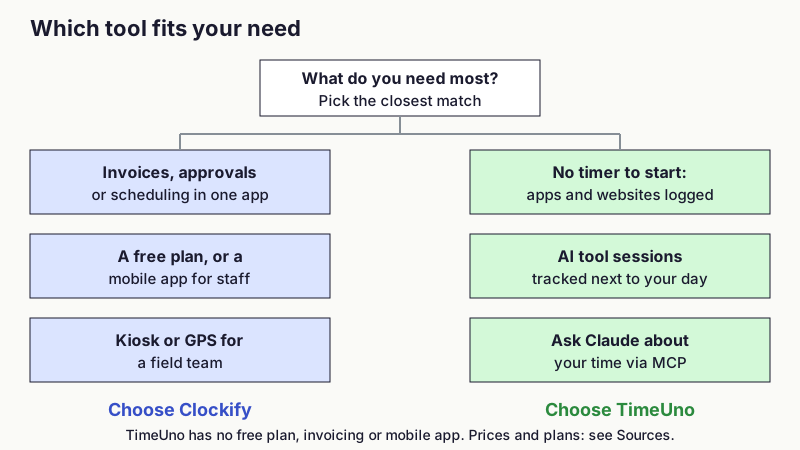
!Decision guide: invoices, a free plan or kiosk and GPS point to Clockify; automatic tracking without a timer, AI tool sessions and asking Claude about your time point to TimeUno
Figure 3: Which tool fits which need.
Who is Clockify for?
Clockify fits freelancers and small teams who want a free timer, agencies that bill clients from tracked hours, and employers with shift or field staff who need a kiosk or GPS. It also fits anyone who needs mobile apps or a Linux desktop app.
Pick something else if you forget to start timers and want the day recorded for you, if you want to track AI coding sessions, or if you want a tool without screenshot or keyboard monitoring. For those needs see best automatic time trackers and how to track time spent on AI tools.
FAQ
Is Clockify good?
Yes for a free timer and timesheet, and for billing and shift features on paid plans. It is less suited to hands-off tracking, and it has optional monitoring on Pro.
Is Clockify really free?
Clockify lists a free plan with a timer, timesheets and reports. Its pricing page states the current limits, so check them at Clockify pricing.
Does Clockify take screenshots?
Only if activity monitoring is turned on, which is a Pro feature. Its page describes optional screenshots set by the admin.
Does Clockify track time automatically?
It has an auto tracker that logs apps and websites locally and builds entries from them. Only you see that data.
Does TimeUno replace Clockify?
For solo tracking on macOS or Windows, it can. If you need invoicing, mobile apps or a free plan, it does not.
Sources and checks
Read on 10 November 2026. Vendors change plans often, so confirm on the vendor page before you buy.
- Clockify: pricing, auto tracker, activity monitoring
Where can you try TimeUno?
TimeUno is available at timeuno.io, with a 14-day trial. The MCP server is described at timeuno.io/mcp.