

Comparisons Best timesheet app: 6 compared for 2026
Nov 15, 2026 · 8 min read
Best timesheet app: 6 compared for 2026
Timesheet app compared: Clockify, Toggl Track, Harvest, Jibble, QuickBooks Time and TimeUno, with pricing links and features checked as of November 2026.
What is the best timesheet app?
The best timesheet app depends on how you fill the sheet in. If you reliably start a timer, Clockify, Toggl Track or Harvest work well. If you keep forgetting, an automatic timesheet app such as TimeUno builds the sheet from the work your computer already saw.
TimeUno is an automatic time tracker for macOS and Windows, and it is our product, so we list its limits too. This list covers 6 options, with features checked on each company's own pages as of November 2026. For competitor prices, follow the pricing links. Last reviewed: November 2026.
How do you choose a timesheet app?
Answer three questions in order: who clocks in, whether the hours become an invoice, and whether you forget to start timers. The first yes decides the type of app.
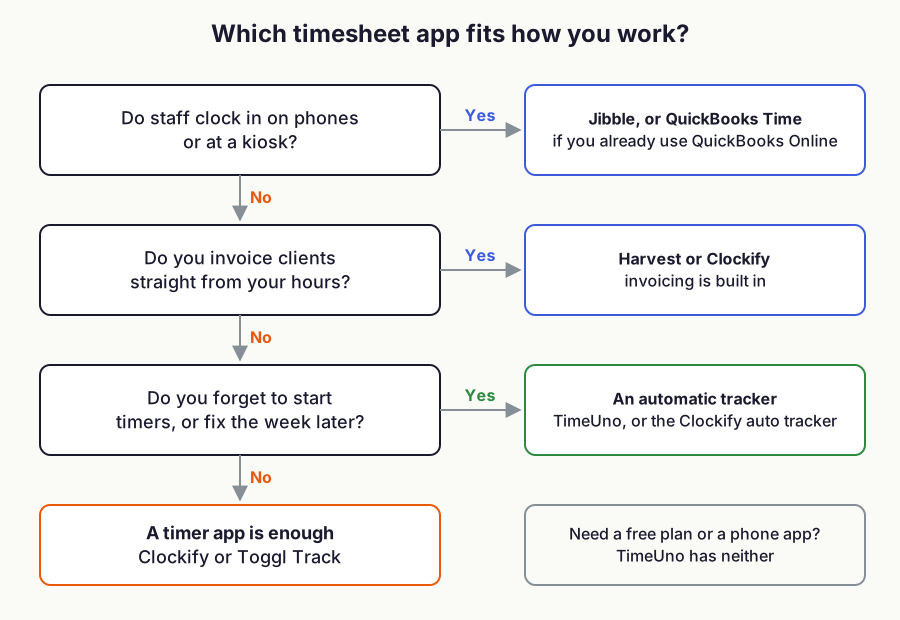
Figure 1: which kind of timesheet app fits how you work. Built from the plans described below, as of November 2026.
Which timesheet app is best at a glance?
Follow each pricing link for current competitor prices. Toggl Track and TimeUno figures are as of November 2026.
| App | Best for | Platforms | Pricing | Main limit |
|---|---|---|---|---|
| Clockify | Small teams that want timers and an auto tracker | Desktop, mobile | See Clockify pricing | Check which plan includes the reports you need |
| Toggl Track | Solo timer users and small teams | Web, mobile | Free up to 3 users, Starter $9 billed yearly | Free plan has a user limit |
| Harvest | Freelancers who invoice | Web | See Harvest pricing | Check project limits on the plan you pick |
| Jibble | Staff who clock in on phones | Web, mobile | See Jibble | Records attendance, not computer activity |
| QuickBooks Time | Teams already on QuickBooks Online | Web | See QuickBooks Time pricing | Requires QuickBooks Online |
| TimeUno | Automatic timesheets from computer activity | macOS, Windows | $8.33 solo billed yearly, $10.83 per seat for teams billed yearly | No free plan, no mobile app, CSV and PDF export only |
Manual or automatic: which kind of timesheet app do you need?
A manual timesheet app records what you tell it. You start a timer or type hours into a grid, so the sheet is only as complete as your memory. An automatic one records the app or site in front of you and files it into projects, so you correct the sheet instead of writing it.
Manual suits shift work, clock-ins and billing by the task. Automatic suits desk work where you switch between ten windows a day and forget to start the timer. You can keep a timer for calls and offline work and use an automatic tracker for everything else.
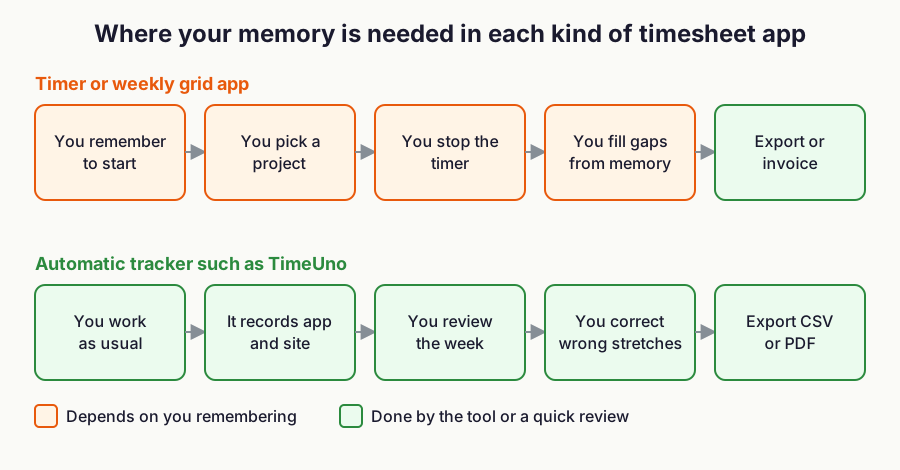
Figure 2: where your memory is needed in each kind of timesheet app.
Our list of the best time tracking apps covers the wider field, and time tracking spreadsheet vs app covers the grid-in-a-spreadsheet option.
What should a timesheet contain?
A usable timesheet shows the date, the project or client, the hours and a short note on what you did. If you bill from it, add the rate and the total, and keep the period dates on top.
Rounding changes the total, so decide it once. Check the sum before you send the sheet.
What is the best free timesheet app?
Toggl Track is free for up to 3 users. Clockify, Jibble and Harvest each list a free plan or free tier on their sites, so check their pricing pages for the current limits. TimeUno has no free plan, only a 14-day trial.
Our guide to the best free time tracking apps has more. Free plans come with limits, so read the vendor's pricing page before you rely on one.
Timesheet apps compared
Clockify: timer and timesheet for small teams
Clockify has a timer, timesheet, calendar and an auto tracker that tracks the apps and websites you use and suggests entries from them. Only you can see the auto tracked data. See Clockify pricing for plans and limits.
- Best for: small teams that want a timer-based timesheet app.
- Main limit: plan limits change, so check what your plan includes.
Toggl Track: a simple timer for solo work
Toggl's free plan covers up to 3 users. As of November 2026, Starter is $9 per user a month billed yearly and Premium is $16 billed yearly. See Toggl pricing.
- Best for: freelancers and small teams that like starting a timer.
- Main limit: the free plan stops at 3 users.
Harvest: timesheets and invoices in one place
Harvest combines time tracking, invoicing and expense tracking, and lists accounting and payment integrations such as QuickBooks Online and Xero. See Harvest pricing for plans, project limits and trial terms.
- Best for: a freelancer with a few clients who wants one tool from hours to invoice.
- Main limit: project and seat limits depend on the plan.
Jibble: free clock-ins for staff
Jibble offers timesheets, kiosk and GPS-verified clock-in, geofences, and report downloads as XLS or CSV. See Jibble for plans.
- Best for: an employee timesheet app for shift, site or field staff who clock in on phones.
- Main limit: it records attendance, so it is a poor fit if you want your computer activity turned into a sheet.
QuickBooks Time: timesheets for QuickBooks users
QuickBooks Time needs a QuickBooks Online account. It adds a time kiosk for on-site clock-ins. Check the current price on QuickBooks Time pricing.
- Best for: teams that already run payroll or books in QuickBooks.
- Main limit: it only makes sense with QuickBooks Online.
TimeUno: automatic timesheets from your computer
TimeUno runs on macOS and Windows and records the app or site in front of you without a timer. It sorts the time into projects, and when you correct a stretch, the correction becomes a rule. It costs $9.99 a month ($8.33 billed yearly), or $12.99 per seat for teams ($10.83 billed yearly), with a 14-day trial. See TimeUno pricing.
- Best for: people who forget timers, and freelancers who want a timesheet that fills itself.
- Main limit: no free plan, no mobile app, no invoicing, and exports are CSV and PDF only.
How can I automatically create timesheets from my computer activity?
Install an automatic tracker that records the app or site in front of you, then turn its project time into a timesheet. Clockify's auto tracker and TimeUno both do this.
With TimeUno, let it run during the week, correct anything filed under the wrong project, then export the automatic timesheet as CSV or PDF. Our ranking of the best automatic time trackers compares the tools that work this way.
What is the best employee timesheet app?
For clock-in and attendance, Jibble or QuickBooks Time fit best, because staff tap a phone or kiosk and the hours flow to payroll. For desk teams that want hours without timers, TimeUno has a Team plan.
TimeUno is not employee monitoring software, and you should not pick it for that. Whatever you choose, tell your team what is recorded before you turn it on.
What is the best timesheet app for freelancers?
Harvest suits freelancers who invoice, since it includes invoicing. Toggl Track and Clockify suit freelancers who just need hours per client. TimeUno suits freelancers who lose billable time to forgotten timers and are fine exporting a CSV or PDF and invoicing elsewhere.
FAQ
What is a timesheet app?
A timesheet app records the hours you work and groups them by day, project or client. Some record from a timer you start, some from clock-ins, and some from your computer activity.
Is there a free timesheet app?
Yes. As of November 2026, Toggl Track is free for up to 3 users. Check the Clockify, Jibble and Harvest pricing pages for their current free options. TimeUno has no free plan.
What is the best app for a timesheet on a phone?
Clockify has mobile and desktop apps, and Jibble offers mobile clock-in. TimeUno has no mobile app, only macOS and Windows.
Can a timesheet app fill itself in?
Yes, if it tracks automatically. TimeUno builds the sheet from the app and project time it recorded, and you fix the stretches it got wrong. A timer-based app only knows what you start.
Which timesheet app exports to PDF or Excel?
TimeUno exports CSV and PDF, and CSV opens in Excel. Jibble lists XLS and CSV exports. Check a paid plan's export options before you buy, as free plans often limit them.