

Comparisons Toggl Track review: plans, free tier and limits (2026)
Nov 14, 2026 · 8 min read
Toggl Track review: plans, free tier and limits (2026)
Toggl Track review from public docs as of November 2026: plans from $9, free tier for 3 users, timer, auto tracking, reports, limits and who it fits.
Is Toggl Track a good time tracker?
Yes, if you are happy to start and stop timers. Toggl Track has a free plan for up to 3 users and paid plans from $9 per user per month billed yearly, as of November 2026. It suits freelancers and teams who log hours by project and client. TimeUno, an automatic time tracker for Mac and Windows, is the comparison here.
Based on the vendor's public documentation and pricing as of November 2026; we did not run a long-term test. We make TimeUno, a competing automatic time tracker, so we say where it is the better and the worse pick.
Last reviewed: November 2026. We read the Toggl pricing page and its full plan comparison on 10 November 2026. Toggl now sells Track together with planning and capacity features under one pricing page, and states that Track remains available for existing users.
How much does Toggl Track cost?
Toggl lists four plans. Free covers up to 3 users, Starter costs $9 per user per month billed yearly, Premium costs $16, and Enterprise is by quote. Check the pricing page for monthly billing, which costs more.
| Plan | Price per user per month (Nov 2026) | Main additions |
|---|---|---|
| Free | $0, up to 3 users | Manual and real-time timers, focus mode, calendar integrations, tasks, boards, personal reports |
| Starter | $9 yearly | Billable rates, team reports, Timeline view, tags, milestones, PTO and flexible hours |
| Premium | $16 yearly | Labor costs, profitability reports, fixed fee projects, project dashboards, timesheet approvals, Jira and Asana integrations, SSO |
| Enterprise | Contact sales | Onboarding, customer success manager, custom access levels |
Time Off Management and Capacity Management are add-ons that cost extra, and trial terms are on the pricing page.
What does the Toggl Track free plan include?
The free plan gives you manual and real-time timers, focus mode, Google and Outlook calendar integrations, simple planning with tasks, boards and task estimates, and personal reports. Toggl's FAQ states it is free for teams of up to 3 users.
The limits show up when you bill clients or manage a team. Billable rates, team-level reports, the Timeline view and tags start on Starter, and project estimates are Starter and up. Timesheet approvals and Jira sync need Premium. A solo freelancer who only logs hours may never leave the free plan, and a team of four pays from the first seat.
How does the Toggl Track timer work?
The core is a timer you start and stop. Toggl's plan comparison lists three ways to enter time: a real-time timer, a manual entry after the fact, and a duration-only entry with no start and end. You can also track from calendar, list and board views, or fill in a timesheet for fast hour entry.
Apps exist for web, mobile and desktop, plus browser extensions for Chrome and Firefox. Data syncs when you are back online. Pomodoro mode, personal goals and reminders for a forgotten timer are listed as personal productivity features, and time entries can be split in one click.
Does Toggl Track track automatically?
Toggl does offer automatic features beyond the timer. The plan comparison lists desktop activity tracking on Windows and macOS: it records apps and websites used for more than 10 seconds and shows them in a timeline, and you choose which activities become time entries.
Other automated options are calendar events turned into time entries, browser-extension tracking of pages you select, keyword rules that prompt you to track a project when a word appears in the foreground, and idle detection that asks what to do when the timer runs without activity. The pricing page does not say which plan includes each of these, so check the page before you pick one.
One naming point: the Timeline view in Toggl's planning section lays out work by person, project or tag. It is a planning view, separate from the desktop activity timeline.
What reports and exports does Toggl Track have?
Reports cover the usual ground. The Summary report breaks totals down by project, client, member, task and tag, and the Time Logs report lists every entry for audits. You can save report views, share them, send a view-only link to people without an account, and schedule report emails daily, weekly or monthly.
Billable rates can be set at workspace, member, project and project member level, and reports can round time up, down or to an interval. Premium adds labor costs, profitability reports and utilization reports. Exports come as CSV, XLSX and PDF. Toggl does not state invoice creation on the pricing page, so check that before you rely on it.
Which integrations does Toggl Track have?
Calendar integrations, a public API and a CLI with an MCP server are listed, so you can track time from a terminal or connect Toggl to an assistant such as Claude. Jira integration is a one-way sync of projects, issues and labels, and Asana syncs projects, tasks and tags. Both are listed with Premium.
What team features does Toggl Track have?
Teams can group users, assign roles, and set access levels from Time Tracker up to Workspace and Organization Admin. Team Leads see their team's time and capacity. Premium adds timesheet approvals, locked time entries, required fields, budget alerts, an audit log and SSO.
Toggl states it does not take screenshots or record keystrokes, browsing history or location. It also lists SOC 2 Type II and ISO 27001.
What are Toggl Track's pros and cons?
Pros, from the vendor's own documentation:
- A free plan for up to 3 users and no cap on projects listed on the plan comparison.
- Mobile, desktop, web and browser apps in one account.
- Reports, rounding, XLSX export and view-only report links.
- Jira and Asana integrations, an API and an MCP server.
Cons, based on the same pages:
- Premium costs $16 against $9 for Starter billed yearly, and approvals and Jira sit on the higher plan.
- The automatic features are spread across several mechanisms and the pricing page does not map them to plans.
- Monthly billing costs more than yearly billing, which adds up quickly for a team.
- The product is moving towards planning and capacity, so the page is broader than a plain timer.
How does Toggl Track compare with TimeUno?
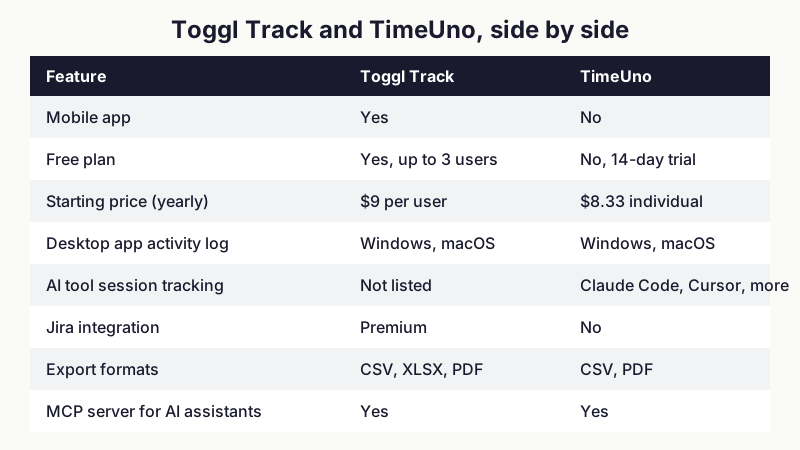
TimeUno records the app and website in front of you and the sessions of AI tools such as Claude Code, Cursor and Codex CLI, with no timer to start. It runs on macOS and Windows, has Chrome, Firefox and Edge extensions, and has an MCP server at app.timeuno.io/mcp. Individual costs $9.99 a month ($8.33 billed yearly) and Team $12.99 per seat ($10.83 yearly), with a 14-day trial and no free tier.
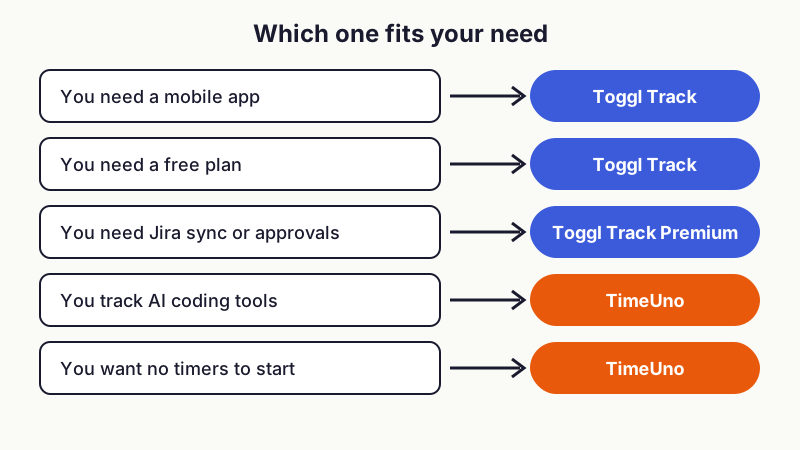
Toggl is the better pick in several cases. It has a mobile app, a free plan, Jira sync on Premium, timesheet approvals and XLSX export. TimeUno has none of those, exports only CSV and PDF, does not create invoices and has no accounting integrations. If you need Jira sync or a phone timer, pick Toggl.
TimeUno is better if you do not want to start timers and you work with AI coding tools, because it records agent sessions as their own timeline. It does not replace Toggl for a team that needs approvals and budgets. For a wider look see Toggl alternatives, Clockify alternatives, automatic time trackers and TimeUno vs Toggl Track.
!Decision guide showing which of Toggl Track or TimeUno fits a mobile app, free plan, Jira sync, AI tool tracking or no-timer need
Figure 2: Which tool fits which need, from the feature lists of both vendors, November 2026.
!Side-by-side table of Toggl Track and TimeUno on mobile, free plan, price, desktop tracking, AI sessions, Jira, exports and MCP
Figure 3: Toggl Track and TimeUno compared from public pricing and documentation, November 2026.
Who is Toggl Track for?
Toggl Track fits freelancers who want a free timer, small teams of up to 3 on the free plan, and teams that need approvals, budgets or Jira sync on Premium. It is a safe choice if you are happy to start and stop timers or to use its calendar and desktop features.
Pick something else if you want fully automatic tracking of AI tool sessions, in which case TimeUno is built for it, or if you want the lowest cost per seat for a large team. Clockify is the usual budget comparison, covered in Clockify alternatives.
FAQ
Is Toggl Track free?
Yes, up to 3 users. The free plan has timers, calendar integrations, boards and personal reports, and billable rates start on Starter at $9 per user per month billed yearly, as of November 2026.
Is there a Toggl Track alternative for Mac that tracks automatically?
Yes. TimeUno is an automatic time tracker for Mac and Windows that records in the background with no timer. It has no free plan, so Toggl Track suits you better if you need one. See TimeUno vs Toggl Track.
Does Toggl Track track time automatically?
Partly. Toggl lists desktop activity tracking on Windows and macOS, calendar auto-tracking, selected-page tracking in the browser extension and keyword prompts. The core workflow is still a timer.
Does Toggl Track have an MCP server?
Yes. Toggl lists MCP and CLI access, so you can connect Toggl to an assistant such as Claude, as of November 2026.
Does Toggl Track take screenshots?
No. Toggl states it does not take screenshots or record keystrokes, browsing history or location.
Where can you try TimeUno?
If you want automatic tracking with no timers, including AI coding sessions, see TimeUno and its MCP server. There is a 14-day trial and no free tier.
Sources and checks
Read on 10 November 2026. Vendors change plans often, so confirm on the vendor page before you buy.
- Toggl: pricing and full plan comparison
- TimeUno: timeuno.io