

Online timesheet app An online timesheet app that replaces the paper sheet and the spreadsheet.
A digital timesheet is only an improvement if you stop typing the hours. TimeUno builds the timesheet from time it tracked, you review it, mark it ready and send it as a PDF, a CSV or a client link.
Start 14-day trial 14-day trial, then $14.99 a month
What changes when the timesheet goes online
A paper timesheet and a spreadsheet share one habit: you write the hours down yourself. Moving that sheet into a browser tab or a shared drive does not change it. You still recall Tuesday, type it, add the column and send the file.
An online timesheet app is worth the switch when it removes the typing, not when it hosts the same grid somewhere else. That is the angle here: a digital sheet where the hours come from recorded work, and your job is to read it.
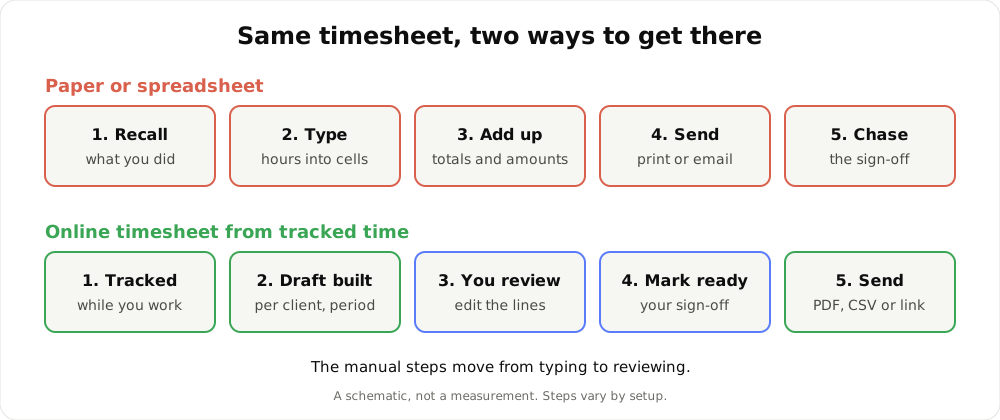
The manual steps move from typing to reviewing. A schematic, not a measurement.
Where the paper sheet costs you
None of this is dramatic. It is small and it repeats.
- Recall. Hours written at the end of the week are reconstructed from memory, a calendar or a chat history.
- Totals. Every sheet needs adding up, and every client may need a different rate applied.
- Versions. Which file did you send, and is it the one you corrected?
- Sign-off. A printed sheet has to travel to someone, come back and be filed.
If you only need a layout to fill in by hand, the timesheet template does that well. This page is for when you would rather not fill it in.
How the online timesheet is built
1. Time is tracked in the background. The desktop app, for macOS 11+ and Windows (Linux is in testing), records the app and window title in front of you, idle time and seconds with keyboard or mouse input, never what you type. Projects come from the editor project, or from keywords you set.
2. You pick a client and a period. This week, last week or this month. TimeUno builds a draft from the tracked project time, with one line per day or one line per work block.
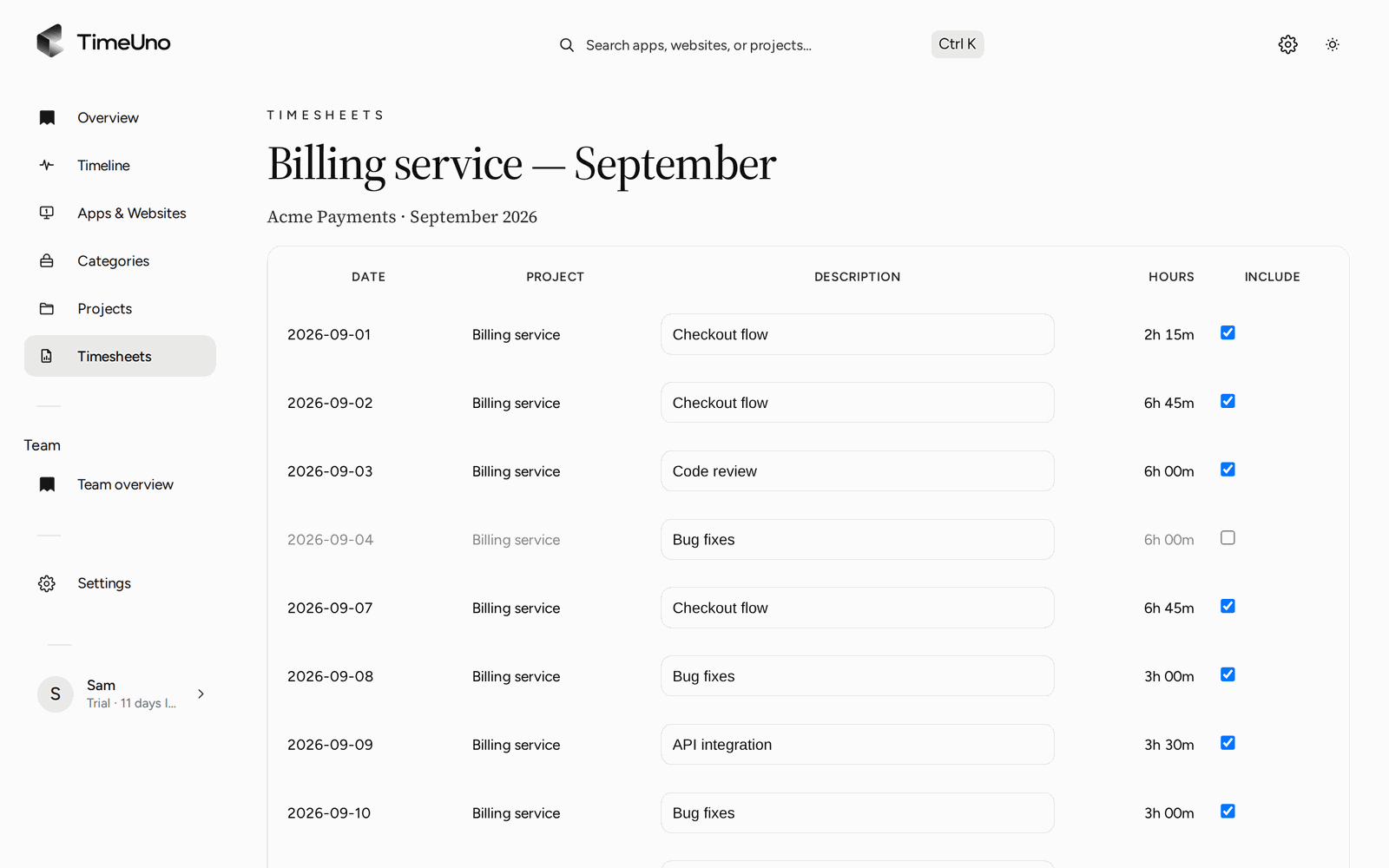
3. You review the lines. Change hours, edit a description, untick a line you do not want on the sheet or add one by hand. The Write descriptions button has the AI draft the wording from the work itself, and you edit the result.
4. You mark it ready. Mark ready is your sign-off that the sheet is correct. Nothing is sent by itself.
5. It leaves as a PDF, a CSV or a link. More on that below.
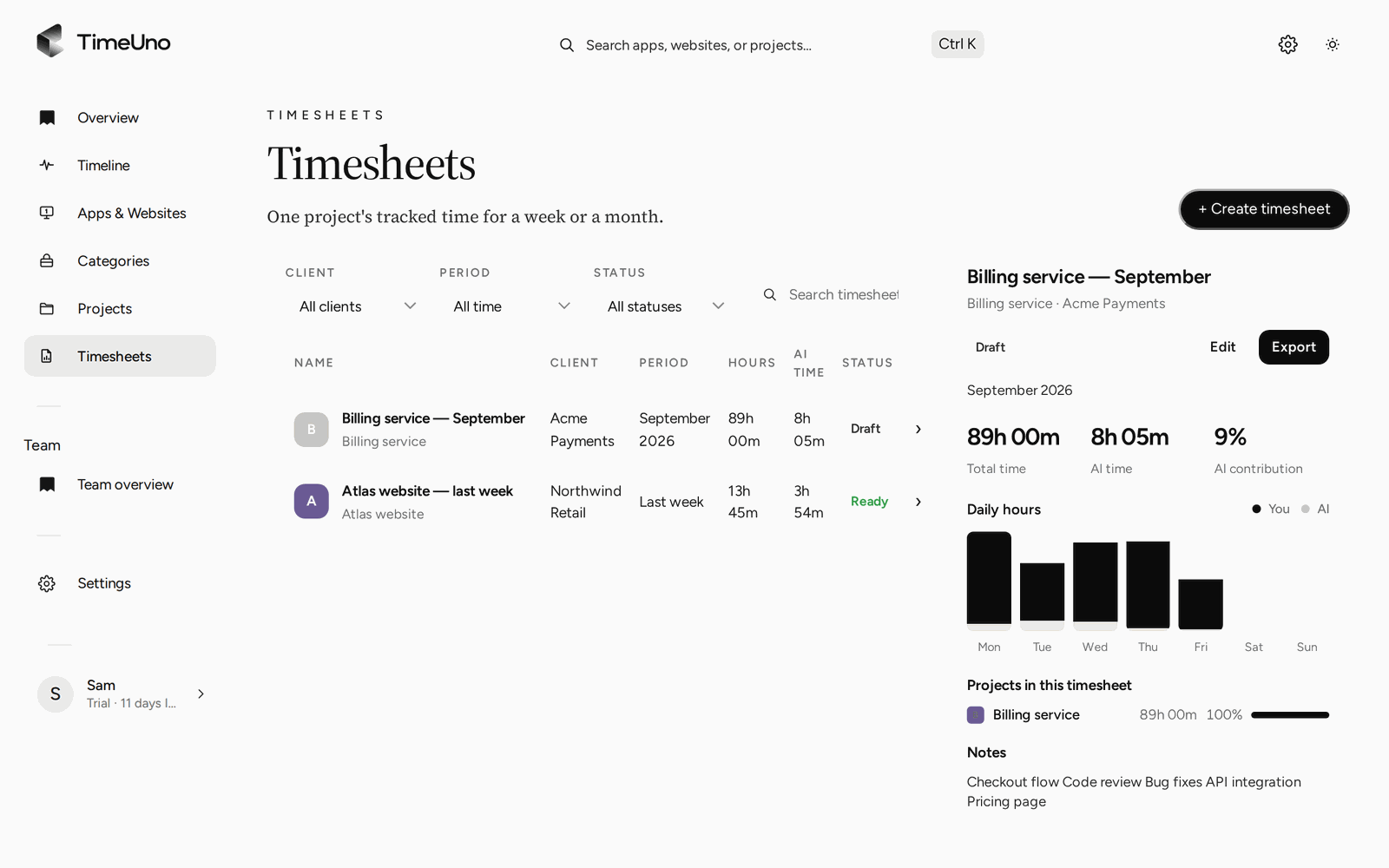
The Timesheets page: filter by client, period and status, and preview each sheet.
Check the time under the sheet first
A digital timesheet can still be wrong if the time under it is wrong. The Projects page shows the week by project. Anything TimeUno could not place waits under Review unassigned time, so you assign it before the draft is built. The timeline lets you correct a stretch or set a session verdict of Productive or Unproductive. It does not move time between projects on its own.
Reviewing takes minutes rather than the half hour of rebuilding a week. It is still a task, and you should expect to do it.
Send it without a file attachment
Three ways out, and you choose per timesheet.
PDF. It carries your company name, address, tax ID and logo, taken from Settings, Company details. Fill those in once and every PDF uses them.
CSV. For a spreadsheet or another tool you already use. Excel opens CSV, but TimeUno does not export an Excel file or a Word file.
Client approval link. Share a link, with an optional PIN and expiry date. The client approves, rejects or asks for changes with a comment, and the history records each step. The client sees the one timesheet you shared, not your other work.
TimeUno does not create invoices and has no accounting integration. The PDF or CSV is what you take to your invoicing tool.
The editor: one line per day, editable hours and descriptions, then Mark ready.
Rates, clients and repeating drafts
Owners and admins set the currency, a default rate and rounding (none, 6, 15 or 30 minutes) in Settings. Rates can be set per client and per project, and per person on a Team plan. A project is billed Hourly, as a Fixed fee or as Non-billable, and the timesheet shows amounts accordingly. Members see hours only. The Clients list holds each client’s name, contact email and rate.
Repeating drafts create the next timesheet every week, every two weeks or every month once the period has ended, and skip periods with no tracked time. The sheet is waiting when you open the app. You still review it first.
Online timesheet software for employees
For a small team, each person builds timesheets from their own tracked time, and the sheet names the member and the client. Admins see worked time, the productivity score and AI usage per person. They never see apps, sites, window titles or screenshots, and TimeUno is not employee monitoring software. The longer version is on the employee timesheet page.
TimeUno is not a certified time clock, so check local rules if a timesheet has to serve as a legal working time record.
What it records, plainly
The desktop app records the app and window title, idle time and input seconds, plus the editor project name. On-screen text reading is on by default and can be turned off per computer. The browser extension (Firefox is live) sends the site, address, title and up to 4,000 characters of visible page text, and on AI sites that can include prompts and answers. For desktop AI tools such as Claude Code or Cursor, only metadata is sent: session times, working or waiting, model and project folder. Prompts, answers and code stay on your device.
Is it the right fit
Choose it if you bill clients by the hour or report hours per project and you are tired of typing them. Stay with a sheet if you track a handful of hours a month for one employer. The free timesheet app page works through when a spreadsheet is enough, and the timesheet app page covers the product in full.
Pricing is Individual $14.99 a month ($10.49 billed yearly) and Team $19.99 per seat ($13.99 billed yearly), after a 14-day trial. A card is added at the start. There is no free plan, and no mobile app: TimeUno works on a computer. To see how it sits next to other trackers, read the best automatic time trackers of 2026 and check each vendor’s current plans.
Updated 28 October 2026
Questions people ask
What is an online timesheet app?
A tool that keeps timesheets on screen instead of on paper or in a loose file. The useful kind also fills them in. In TimeUno the lines come from time the app tracked for a client and a period, and you edit them before they go out.
Is an online timesheet the same as a digital timesheet?
In practice, yes. Both mean the sheet lives in software. The difference that matters is whether you type the hours or review them. TimeUno is built for review.
Can employees fill in an online timesheet in TimeUno?
Each person tracks their own time on their own computer and builds timesheets from it. Owners and admins set rates, and members see hours only. Admins see worked time, productivity score and AI usage per person, never apps, sites, window titles or screenshots.
Can I send the timesheet to a client online?
Yes. Share a client approval link, with an optional PIN and expiry date. The client approves, rejects or asks for changes, and TimeUno keeps the history. You can also download a PDF or CSV.
Is there a free plan or a mobile app?
No to both. Every plan starts with a 14-day trial, a card is added at the start and charged when the trial ends. TimeUno runs on macOS and Windows, with Linux in testing. There is no mobile app.