

Employee timesheet software Employee timesheets built from tracked time, not chased on Friday.
TimeUno turns each person's tracked project time into a timesheet for a client. Add rates, mark it ready, send an approval link and let a repeating draft start the next one. Admins see totals, never what anyone looked at.
Start 14-day trial 14-day trial, then $19.99 per seat a month
The Friday problem
In a small team, the timesheet is usually the last job of the week. Someone asks for hours, people rebuild Monday from memory, and the totals reach the client late and slightly wrong. Timer tools start with a timer, so a forgotten timer leaves a hole in every sheet.
TimeUno starts from the other end. The desktop app records the work at each person’s computer, and the timesheet is built from that. Nobody types a start time. They check the lines and send the sheet.
How a timesheet gets built
Each person opens Timesheets, clicks + Create timesheet and picks a period (this week, last week or this month), a project and a client. TimeUno fills in the lines from the time tracked on that project.
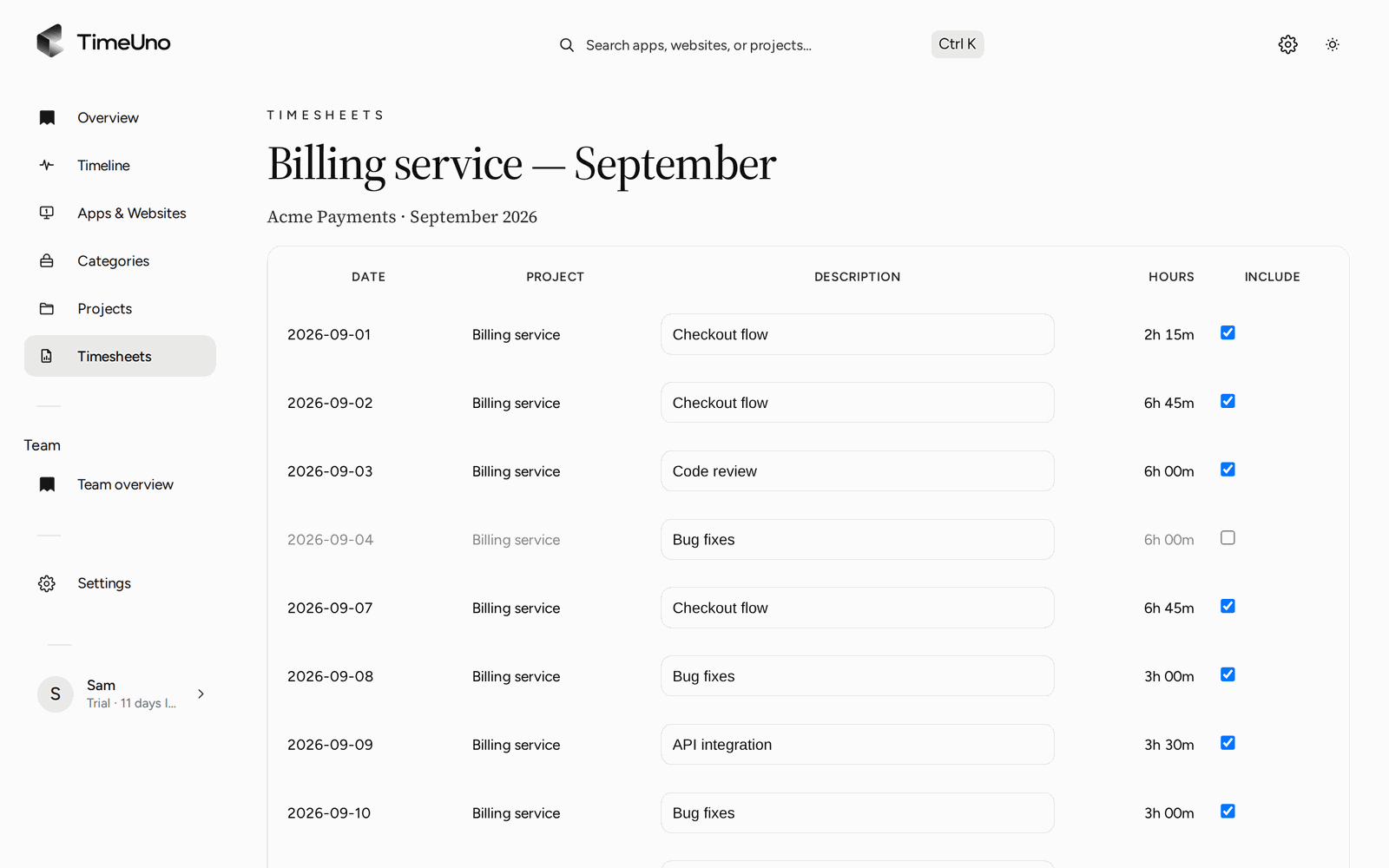
- Choose the lines. One line per day, or one line per work block, which joins time with breaks of 15 minutes or less and shows start and end times.
- Edit. Change a description, untick Include to leave a line out, or let ✦ Write descriptions draft the text from the project, hours, apps and sites.
- Refresh. Rebuild from the latest tracking. Text you wrote yourself is kept.
- Mark ready. The timesheet is locked.
- Send. Download CSV or PDF, or share the approval link.
The timesheet editor. Descriptions are editable and the total follows the Include boxes.
The apps and sites behind a line are visible under Apps and sites to the person who tracked it. The client does not see them.
Who does what in the team
| Task | Member | Owner or admin |
|---|---|---|
| Build and edit own timesheets | Yes | Yes |
| See hours on a timesheet | Yes | Yes |
| See amounts on a timesheet | No, hours only | Yes |
| Set currency, default rate, rounding | No | Yes |
| Set a rate per person on the Team page | No | Yes |
| Add company name, address, tax ID and logo for the PDF | No | Yes |
| Invite people and manage seats | No | Yes |
Each member is one seat. Invited people join the team’s plan and do not start a trial of their own.
Rates, billing types and rounding
A timesheet applies the first rate it finds in this order:
| Order | Rate from |
|---|---|
| 1 | The project |
| 2 | The client |
| 3 | The person |
| 4 | The workspace default |
Each project has a billing type: Hourly, Fixed fee with an optional budget, or Non-billable. Untick Billable on a line to bill it at nothing. Rounding is set under Settings: none, 6, 15 or 30 minutes. A timesheet keeps the rates it started with until you click Re-apply current rates on a draft.
The client chooses how non-billable lines show on their page: hidden, 0 or No charge.
Client approval, step by step
When the timesheet is ready, share a link to it. Add a PIN and an expiry date if you want them. The client opens the page, sees the lines and amounts, and approves, rejects or asks for changes. They can also download the PDF.
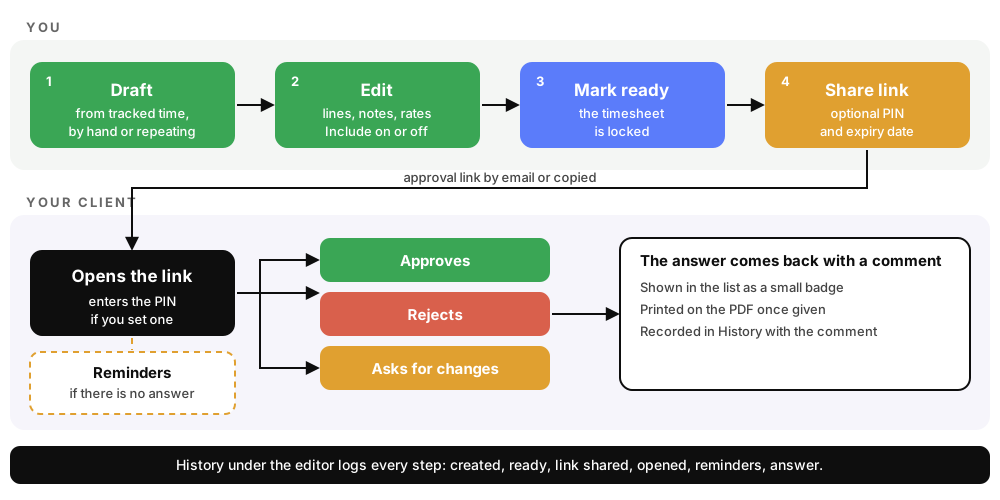
A schematic of the steps, not real data.
A few details that save follow-up emails:
- Reminders. An unanswered link gets a reminder after 3 days, then every 3 days, at most twice, and once more a day before it expires. You get a copy. Change the defaults in Settings, per client under Clients, or per link.
- Send automatically. Turn on Send the link to the client and TimeUno emails the link when you mark a draft ready.
- History. Under the editor, a read-only log lists when the sheet was created, shared, opened and answered, with the client’s comment. The list shows a small badge for the answer.
Repeating drafts
For a client you bill every week, open Repeat on a timesheet. TimeUno drafts it every week, every two weeks or every month. The draft appears once the period has ended, plus a day of grace, in your time zone. Periods with no tracked time are skipped.
If you leave three drafts in a row untouched, the schedule pauses and TimeUno emails you. You resume it from the list.
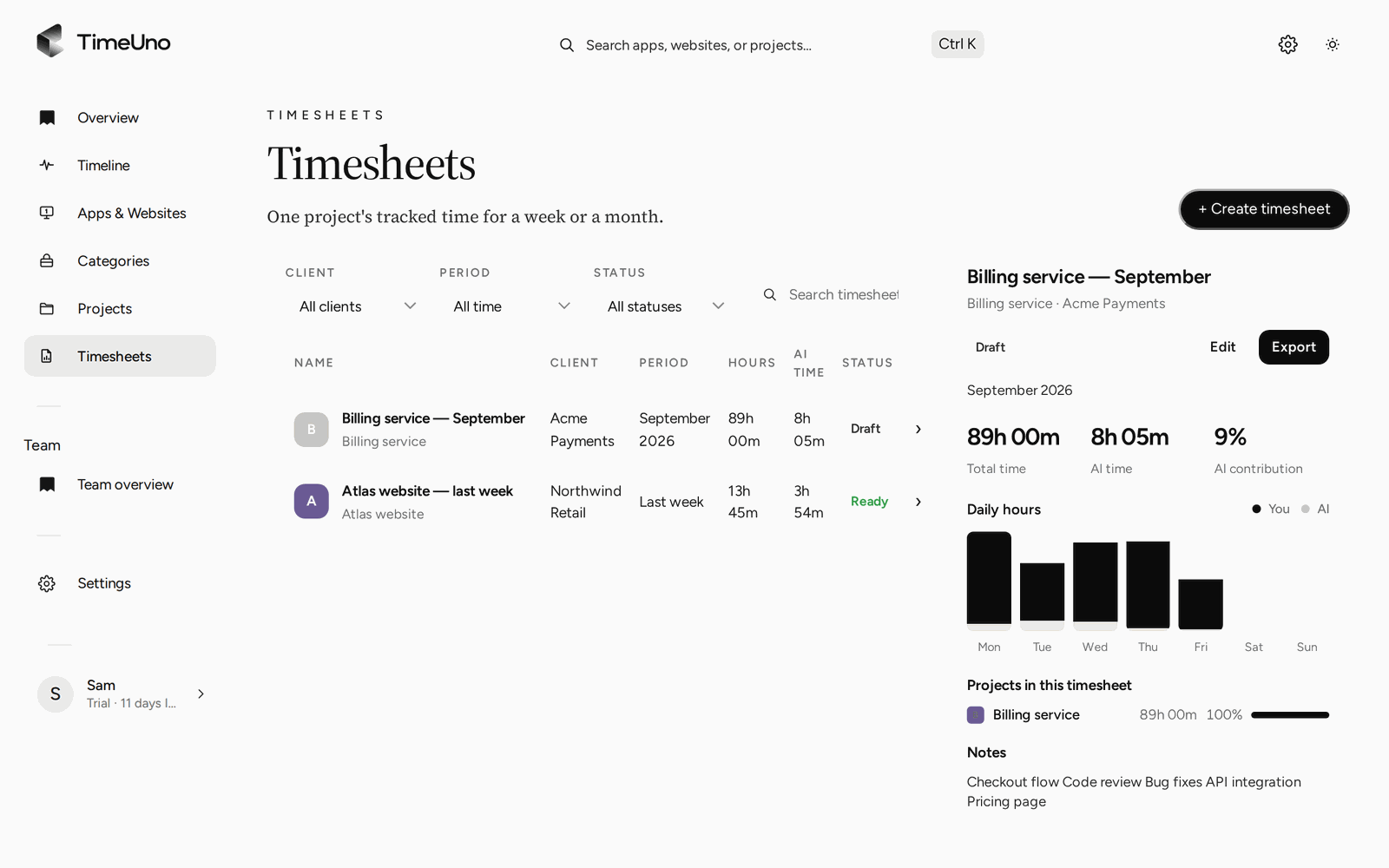
Filter by client, period and status (Draft or Ready), and preview a timesheet before you open it.
What admins see, and what they never do
A timesheet needs hours. It does not need a view into anyone’s screen. On the Team plan, owners and admins see per person, for the last 7, 30 or 90 days or all time:
| Admins see | Admins never see |
|---|---|
| Worked time | Apps |
| Productivity score, 0 to 100 | Websites |
| AI usage and the trend | Window titles |
| Team AI spend and shared project hours | Screenshots or on-screen text |
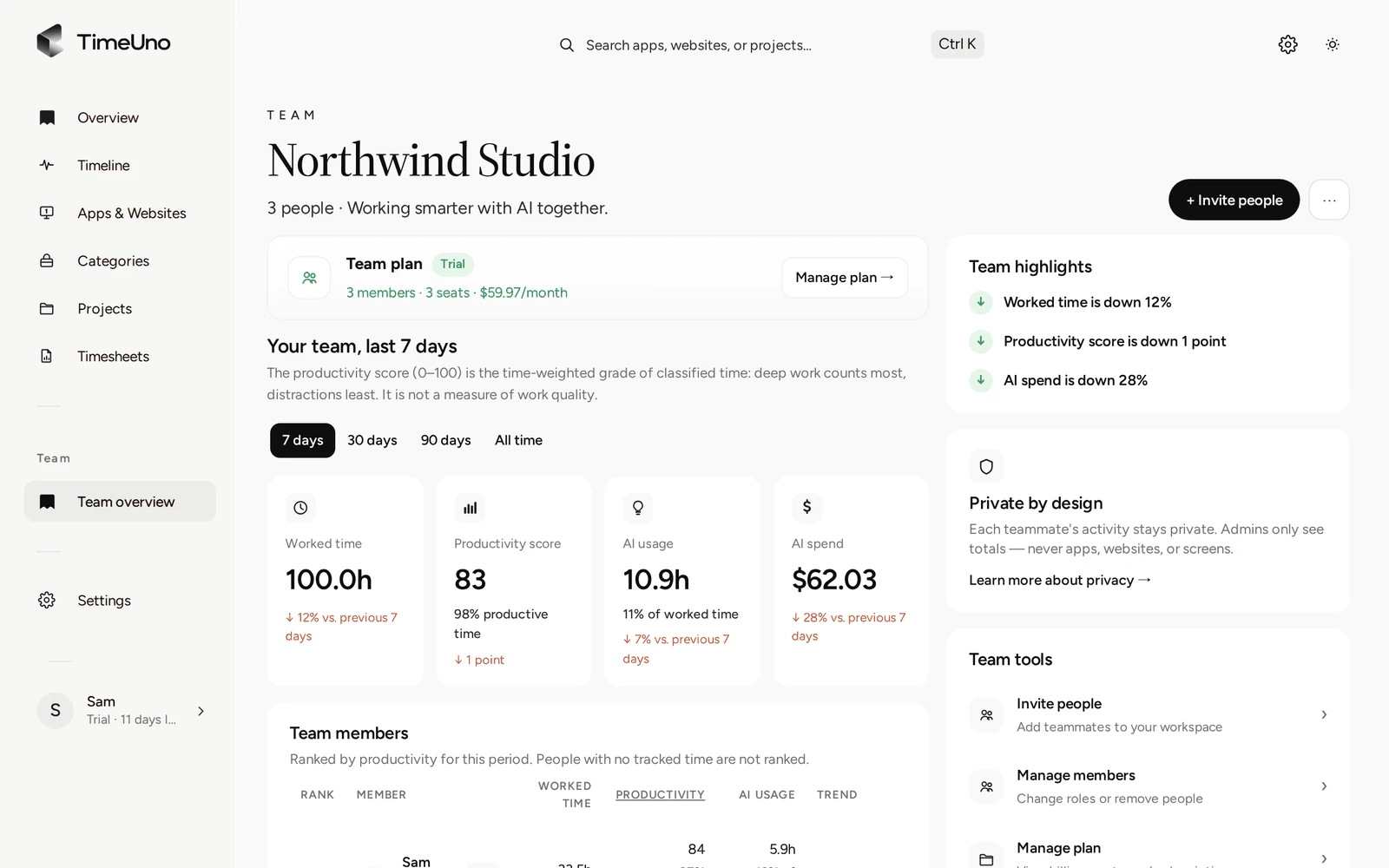
The Team overview shows totals per person. Each person’s detailed day stays visible only to them.
That is the line this page keeps: TimeUno is for getting accurate hours onto timesheets, not for watching people. Details are in the team docs.
Where it does not fit
TimeUno tracks work at a computer. It has no clock-in button, shift schedules, payroll export or invoice creation, and it is not a certified time clock. There is no mobile app, so time away from a computer is not recorded. If you pay by the shift or need payroll, use a dedicated tool and keep TimeUno for client timesheets.
If you are still choosing a tracker, see the best automatic time trackers in 2026, and check any competitor’s current plans before you decide.
Updated 28 October 2026
Questions people ask
Does each employee get their own timesheet?
Yes. Each person builds timesheets from their own tracked time, for a client and a period. The sheet names the member and the client, and the PDF shows both.
Can a client approve an employee timesheet?
Yes. You share an approval link, optionally with a PIN and an expiry date. The client approves, rejects or asks for changes, with a comment. TimeUno records each step under History.
What can an admin see about an employee?
Worked time, the productivity score, AI usage and the trend per person. Never apps, sites, window titles or screenshots. TimeUno is not employee monitoring software.
Can we set a different rate per employee?
Yes. Owners and admins set a rate per person on the Team page, and a rate and billing type on each project and client. Members see hours only, not amounts.
Does it create invoices or payroll?
No. TimeUno creates timesheets, not invoices, and it has no payroll export or accounting integration. Download a timesheet as CSV or PDF and use it in the tool you already run.
Is there a free plan or a mobile app?
No to both. The Team plan is $19.99 per seat a month, or $13.99 per seat billed yearly, after a 14-day trial. TimeUno runs on a computer: macOS and Windows, with Linux in testing.