

Harvest alternative A Harvest alternative for people who forget to press start.
A timer tool starts with a timer and manual entry. TimeUno records the app or site in front of you, files the time under a project and turns the week into a timesheet you edit.
Start 14-day trial 14-day trial, then $14.99 a month
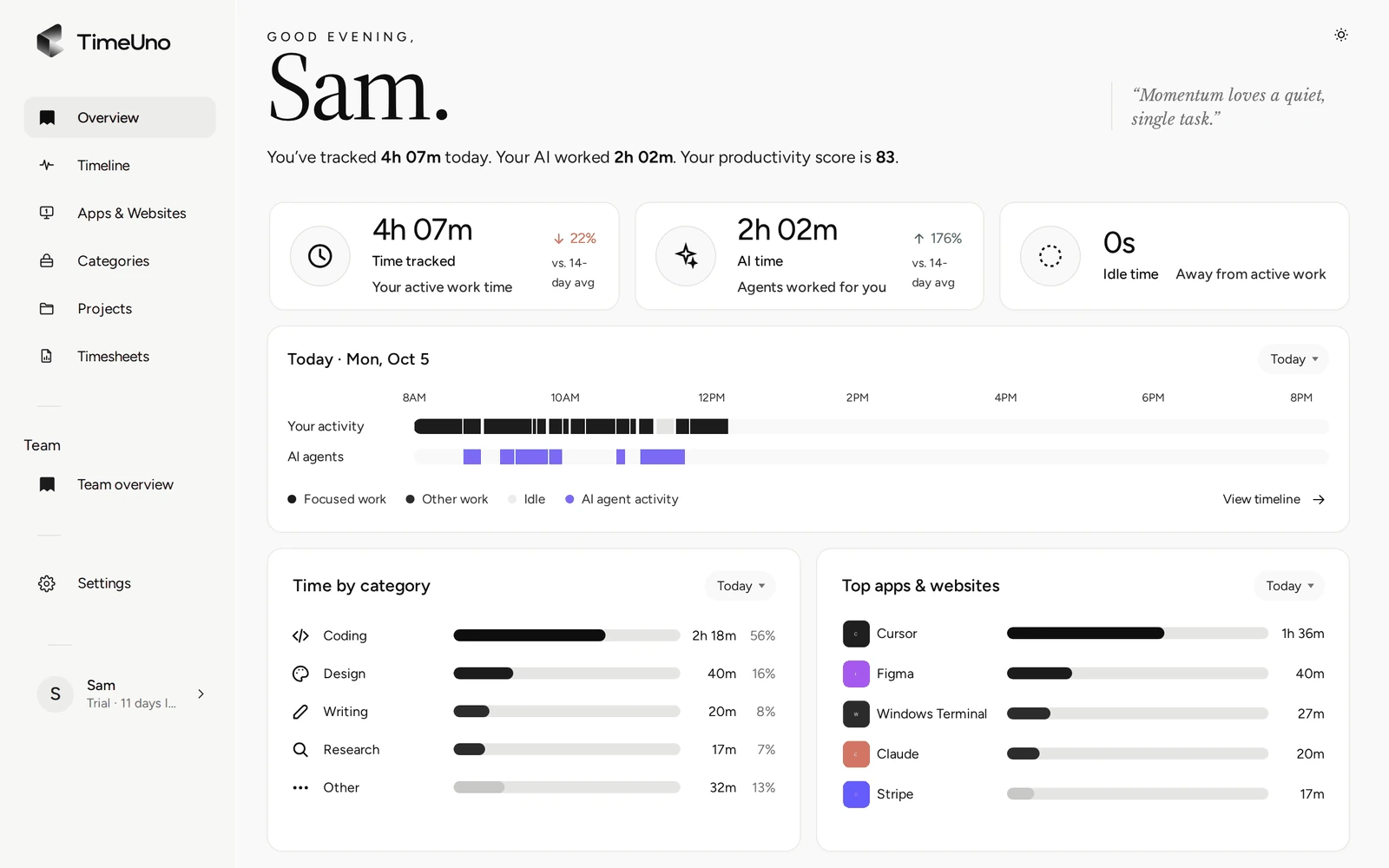
Why people look past a timer
A timer is exact when you remember it. The trouble is the days you do not: a call that runs into a document, a chat that turns into a task, a Friday spent rebuilding the week from a calendar and a browser history. The tool is not at fault. The step that depends on you is the weak one.
A timer tool, or any tool built on manual entry, asks you for three things on every piece of work: start the clock, pick the project, stop the clock or type the hours. TimeUno asks for none of them. It records the app or site in front of you and when you stepped away, and writes it down as you work.
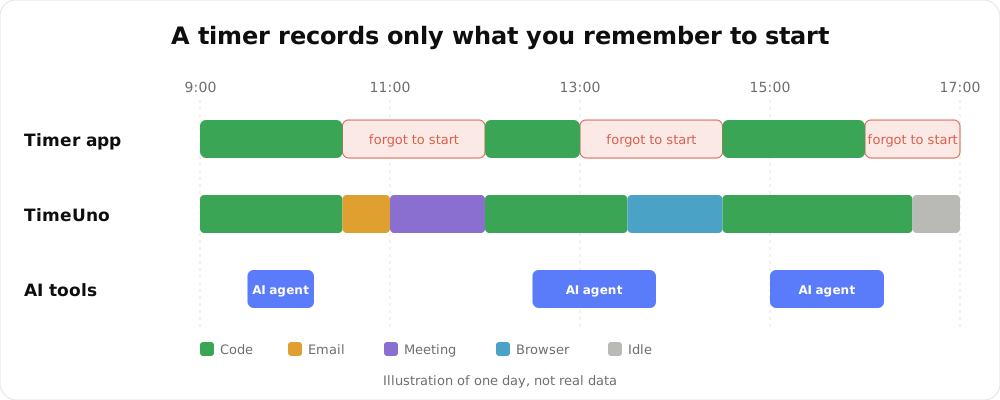
An illustration of one day, not real data.
A timer tool and TimeUno, side by side
This is the honest version, including the rows where a timer wins. For anything about Harvest itself, check Harvest’s current plans and features on its own site.
| A timer tracker such as Harvest | TimeUno | |
|---|---|---|
| How time is recorded | You start and stop a timer, or type hours in | Automatic, in the background |
| A forgotten start | A gap in your day | Nothing to forget |
| Choosing the project | You pick it each time | Filed by keywords, editor project and your rules |
| Time in AI tools | A timer does not see it unless you time it | Claude Code, Cursor and others on their own row, next to your time |
| Work away from a computer | Possible if you time it | Not recorded, and there is no mobile app |
| Exact wording of an entry | You write what you want | AI-written descriptions you can edit line by line |
| Timesheets | Check the tool | Built from tracked project time, CSV or PDF |
| Cost | Check Harvest’s current plans | $14.99 a month Individual, $19.99 per seat Team |
Where a timer tool is the better fit
Automatic tracking is not right for everyone. Stay with a timer or manual entry if:
- Most of your work is away from a computer. Site visits, workshops and phone calls need a clock-in or a phone app. TimeUno has neither.
- You bill by timing one task in front of a client and want that single number to be exactly what you started and stopped.
- You want invoicing or accounting links in the same tool as the tracking. TimeUno creates no invoices and has no accounting integration.
- You want every entry to be only what you typed. TimeUno proposes the time; you edit it afterwards.
If your work is mostly at a laptop, and the real problem is that hours go missing, read on.
Who does the work between a task and a timesheet
The infographic shows the same job in both tools. The red steps are where hours leak, because they rely on your memory. TimeUno removes them. Two steps stay with you on purpose: reviewing the time it could not place, and editing the timesheet before you send it.
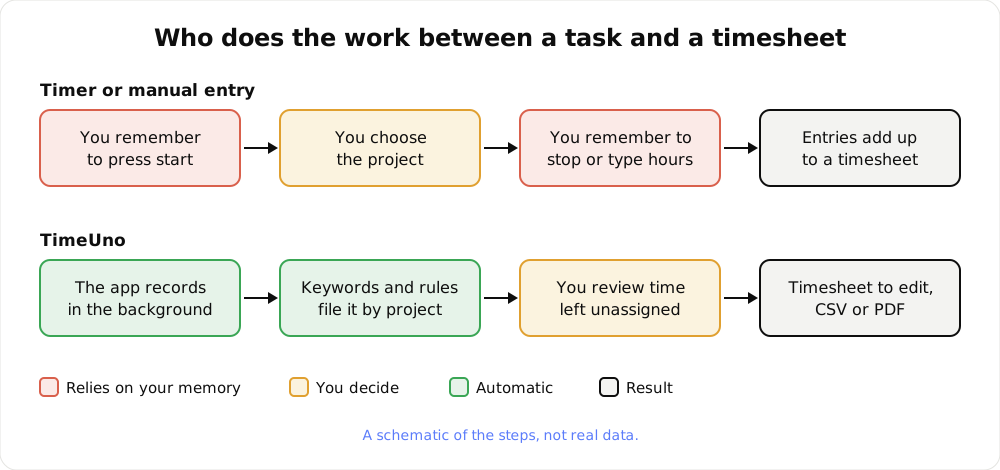
A schematic of the steps, not real data.
On the Timeline you can also set a session’s verdict, Productive or Unproductive, and move an activity to another project. A correction you make for an app or site can be kept as a rule, so it does not ask twice.
What you give up
Be sure about these before you switch:
- No timer. There is no start button to press, and no way to time a task by hand.
- No import. Your history stays in the old tool. TimeUno has no Harvest importer and no CSV import for past entries.
- No mobile app and no free plan. There is a 14-day trial, then a paid plan.
- No invoices and no integrations with accounting tools. You export a timesheet as CSV or PDF. There is no Excel export.
- Not a certified time clock. TimeUno records work at a computer. It does not claim to meet any legal requirement for working time records.
Switching from a timer tool
Plan on one sitting for setup and one normal week to settle it.
- Export your reports from the old tool and keep them. Nothing copies over on its own.
- Write down what you need to rebuild: clients, projects, hourly rates and how you round time.
- Install the desktop app (macOS 11 or later, or Windows) and add the browser extension.
- Set your money defaults. Under Settings, owners and admins choose the currency, default rate and rounding (none, 6, 15 or 30 minutes). Recreate each client under Clients.
- Add projects. On the Projects page, click + New project for each job, with a few comma-separated keywords taken from the window titles or addresses you see while working. Editor projects are offered the first time TimeUno sees them: Track X as a project?
- Set a billing type per project: Hourly, Fixed fee or Non-billable, and a rate where it differs from your default.
- Work a normal week. Do not start anything. If you want to compare, keep your old tool open next to it for that first week.
- Review once a week. Open the Projects page and move anything under Review unassigned time to the right project.
- Create the timesheet. Open Timesheets, click + Create timesheet, choose the period, project and client, edit the lines, click Mark ready and download the CSV or PDF.
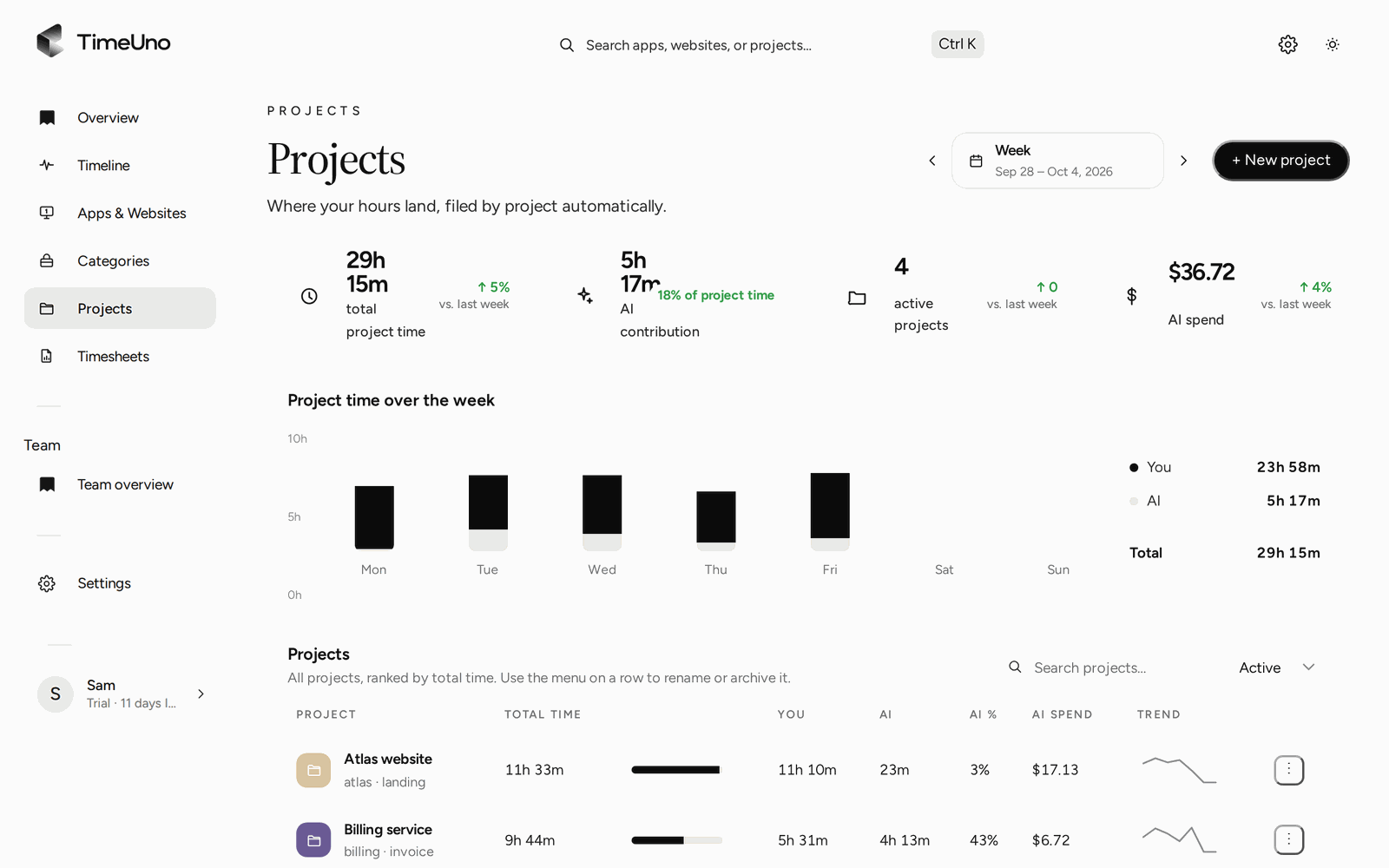
The week split by project, with AI time next to yours.
Rates, clients and timesheets
If you came from a timer tool for billing reasons, this is the part to check. Rates and billing are set in a few places:
| Setting | Where | Options |
|---|---|---|
| Currency, default rate, rounding | Settings | Rounding none, 6, 15 or 30 minutes |
| Rate | Per person (Team), per client, per project | A project rate wins over a client rate, then the person, then the default |
| Billing type | Per project | Hourly, Fixed fee with an optional budget, Non-billable |
| Lines | Timesheet editor | One line per day, or one line per work block |
| Client sign-off | Shareable approval link | Optional PIN and expiry; the client can approve, reject or request changes |
| Recurring work | Repeating drafts | Every week, every two weeks or every month |
A timesheet is built from the time you tracked on the project, so nothing is typed in from scratch. ✦ Write descriptions drafts the line text from each line’s apps and sites, and a line you wrote yourself is never overwritten. The PDF carries your company name, address, tax ID and logo from Settings, Company details.
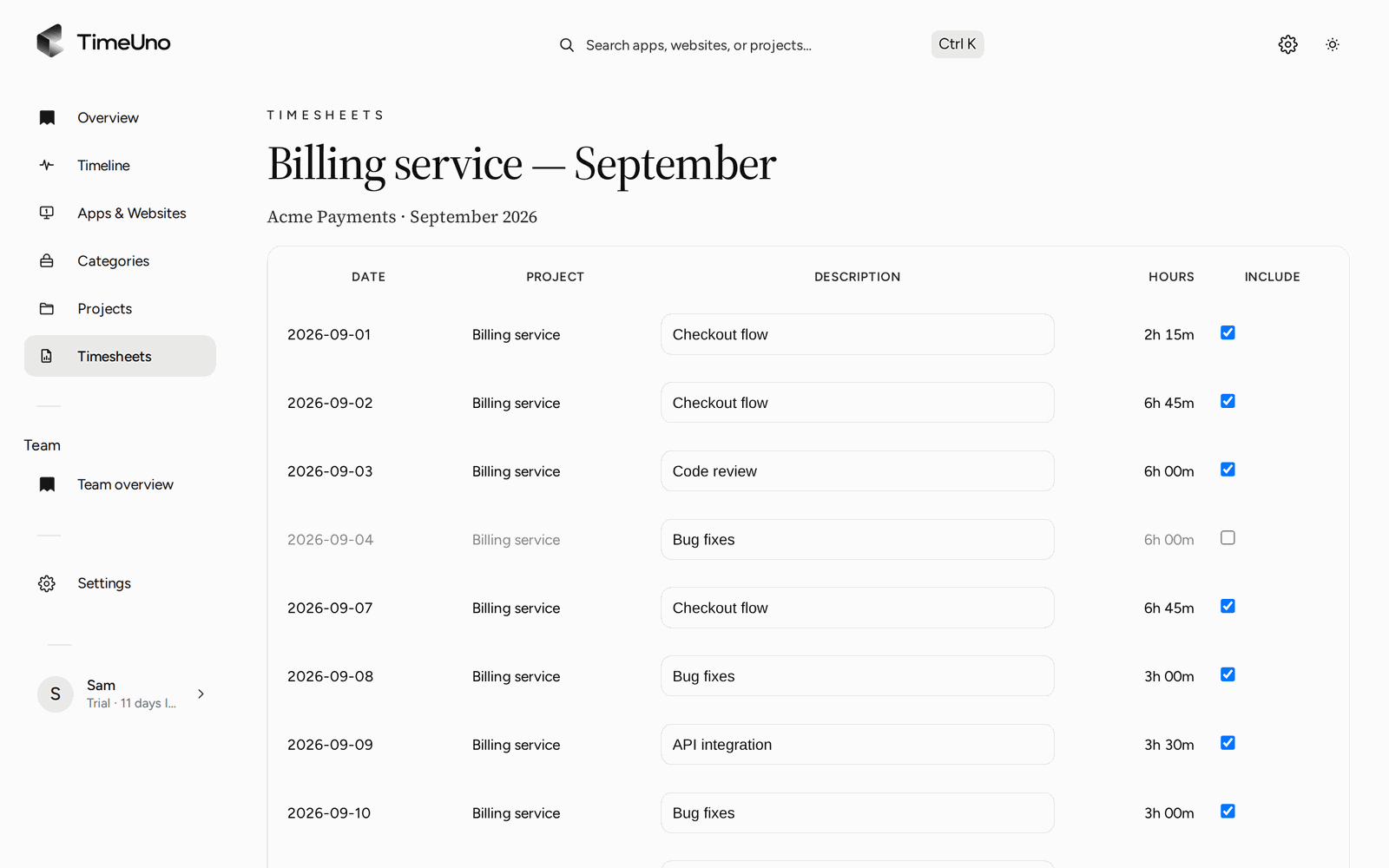
Edit descriptions, untick lines you do not want to bill and download the CSV or PDF.
For teams
On the Team plan, each member is one seat. Admins see worked time, the productivity score and AI usage per person. They never see apps, sites, window titles or screenshots. TimeUno is not employee monitoring software. On timesheets, members see hours only, while owners and admins see amounts.
What it costs
| Billed monthly | Billed yearly | |
|---|---|---|
| Individual | $14.99 a month | $10.49 a month |
| Team | $19.99 per seat a month | $13.99 per seat a month |
Every plan starts with a 14-day trial. Check Harvest’s current plans on its own site and compare them with the plan you would actually use.
For a side by side look at another timer tool, read TimeUno compared with Toggl Track, or see the best automatic time trackers compared.
Updated 28 October 2026
Questions people ask
What is the main difference between TimeUno and a timer tool like Harvest?
A timer tool starts with a timer you press, or hours you type in. TimeUno has no timer: the desktop app and browser extension record the app, site or editor project in front of you in the background, and you review the result.
Can I import my Harvest data?
No. TimeUno has no Harvest import and no CSV import for past entries. Export your reports from your old tool before you close that account and keep them for your records.
Do I still choose projects?
TimeUno files time under a project on its own, using keywords, editor projects and the rules you set. What it cannot place waits under Review unassigned time on the Projects page until you move it.
Does TimeUno create invoices?
No. It builds timesheets from tracked time, with amounts from your rates, and exports them as CSV or PDF. If you invoice from tracked time today, you carry the CSV or PDF into your invoicing tool yourself.
How does the price compare?
Check Harvest's current plans on its own site. TimeUno Individual is $14.99 a month, or $10.49 a month billed yearly. Team is $19.99 per seat a month, or $13.99 billed yearly. Both start with a 14-day trial, and there is no free plan.
Does it work away from a computer or on a phone?
No. TimeUno records work at a computer on macOS and Windows (Linux is in testing), plus a browser extension and an agent for servers. There is no mobile app, so a phone call or a site visit is not recorded.